

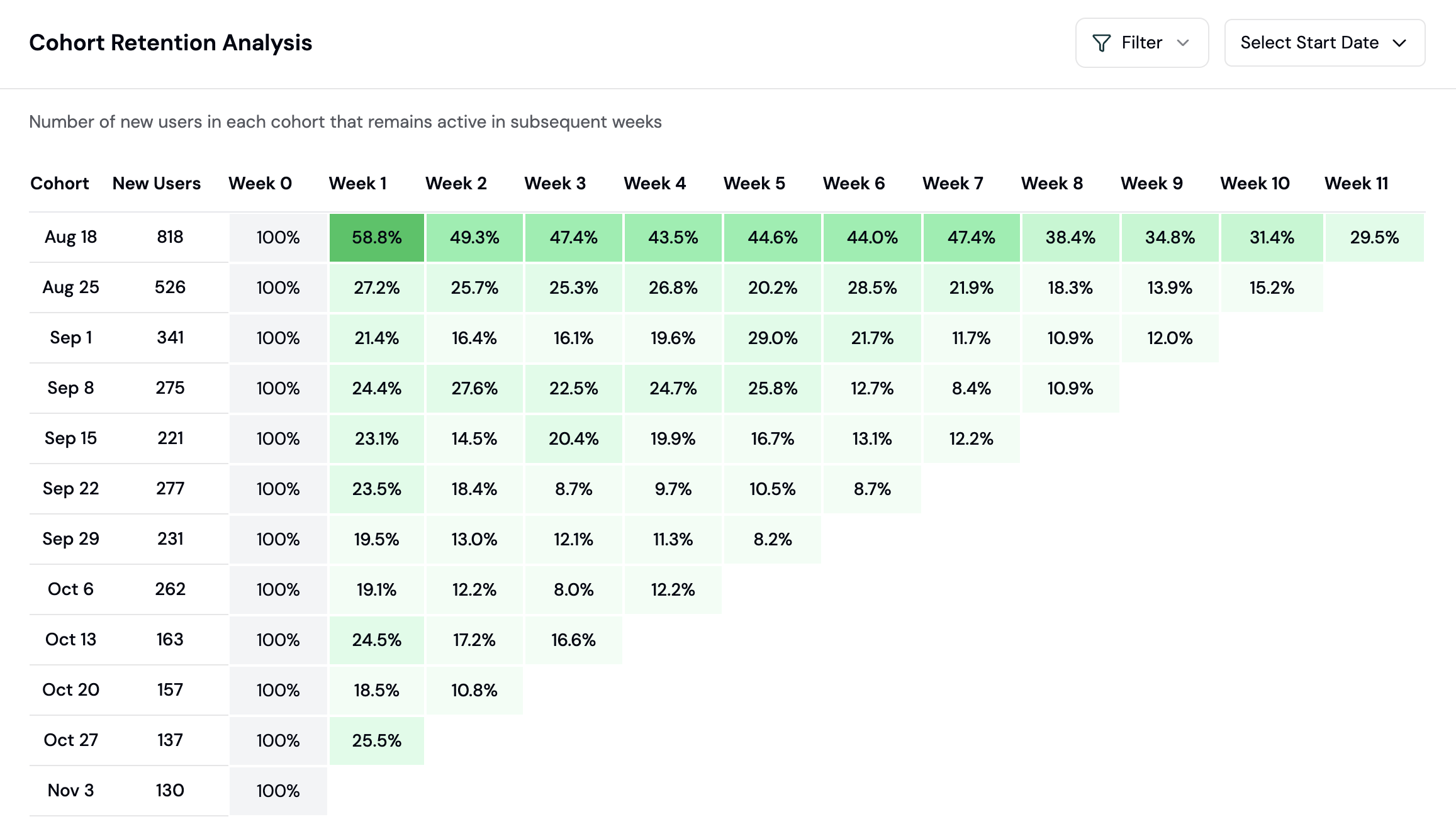
Measure the stickiness of your product with different cohorts of users.
- Transaction completions
- Feature usage
- Wallet connections
- Custom events specific to your app
How to analyze user retention
Retention analysis shows how many users come back to your app over time. This guide walks you through reading retention charts and improving user stickiness.What is a cohort retention chart?
A cohort is a group of users who started using your app in the same time period (e.g., users who first connected in Week 1). Retention tracks what percentage of each cohort returns in subsequent weeks.
This example shows: of users who started in Week 0, 40% returned in Week 1, 25% in Week 2, etc.
Step 1: Create a Retention chart
Retention is a chart type you add to a dashboard (board), not a separate nav page.- Go to the Formo Dashboard
- Select your project
- Open Dashboards in the left navigation, then open or create a board
- Click Add Chart and choose the Retention chart type
Step 2: Choose the entry and retention events
Configure how cohorts are formed and what counts as “coming back”:
You can also narrow the cohort with the Segment filter: device, browser, OS, country, volume, revenue, points, referrer, referrer URL, referral, builder codes, or UTM parameters. Separately, a cohort label filter restricts the cohort to wallets that carried a given label as of their entry week. Alternatively, switch Retention by to User label to retain on a wallet label value (e.g.
open_interest > 10000) instead of an event.
Step 3: Read the retention matrix
The retention chart displays:- Rows: Cohorts, grouped by start week, plus a pinned “Mean retention” row (the unweighted average across all visible cohorts)
- Columns: Weeks after the cohort’s start (Week 0 through however many weeks have fully elapsed)
- Cells: Percentage of the cohort still active in that week
Cohort retention shows which user groups stick around.
Step 4: Identify patterns
Healthy retention curve:- Sharp drop in Week 1 (normal)
- Gradual stabilization by Week 3-4
- Flat line after stabilization (loyal users)
- Continuous decline without stabilization
- Large drop-offs in later weeks
- Significant variance between cohorts
Step 5: Compare cohorts
Look for cohorts with better or worse retention: Questions to ask:- Did a product change improve retention for newer cohorts?
- Do users from certain campaigns retain better?
- Is there seasonal variation in retention?
Improving retention
Based on your retention analysis: If Week 1 drop-off is too high:- Improve onboarding experience
- Send follow-up notifications
- Add incentives for early engagement
- Add new features or content
- Implement re-engagement campaigns
- Analyze churned users for common patterns
- Identify what made them different
- Replicate successful acquisition channels
- Apply learnings to current users