

Overview
The Formo MCP Server enables AI tools like Cursor, Claude Desktop, Claude Code, and others to query your analytics data directly. Ask questions about your users, events, and metrics in natural language. The Model Context Protocol (MCP) is an open standard that allows AI assistants to connect to external data sources and tools. With Formo’s MCP server, you can ask:- “How many daily active users did we have last week?”
- “What are the top acquisition sources this month?”
- “Show me user retention by cohort”
- “Which pages have the highest bounce rate?”
Getting started
Supported clients: Claude Desktop, Cursor, Claude Code, Windsurf, VS Code, Codex, and any client that supports HTTP or stdio MCP transports.Prerequisites
Before setting up the MCP server, you need:- A Workspace API Key with MCP scope
- An MCP-compatible AI client
- Go to your Formo workspace settings
- Navigate to Settings → API Keys
- Click Create API Key
- Enable the MCP scope
- Copy the generated key
Setup
Select your client below to configure the MCP server.- Claude Desktop
- Cursor
- Claude Code
- Windsurf
- VS Code
- Codex
- mcp-remote / CLI
- Other Clients
- On Claude Desktop, go to Settings > Developer > Edit Config
- This will open the Claude Desktop config file:
- macOS:
~/Library/Application Support/Claude/claude_desktop_config.json - Windows:
%APPDATA%\Claude\claude_desktop_config.json
- macOS:
- Add the following configuration:
- Restart Claude Desktop for the changes to take effect
- Upon successful restart, lick to the + icon on a new chat screen to enable Formo.
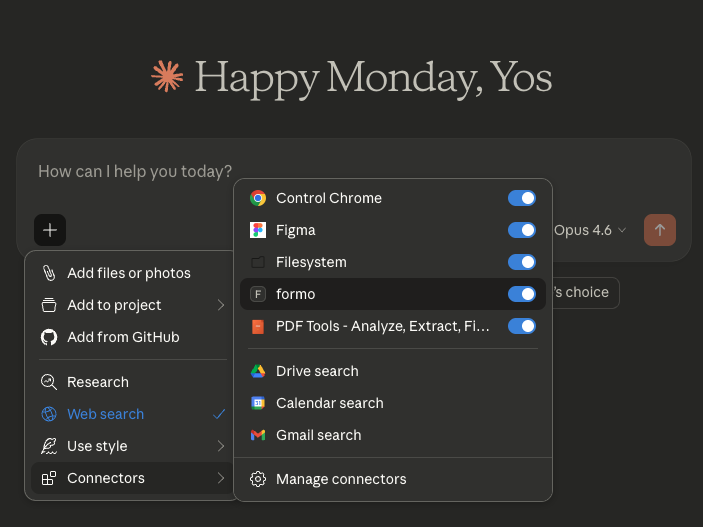
- You can go to to the Connectors settings to configure the Formo connector permissions to Always Allow.
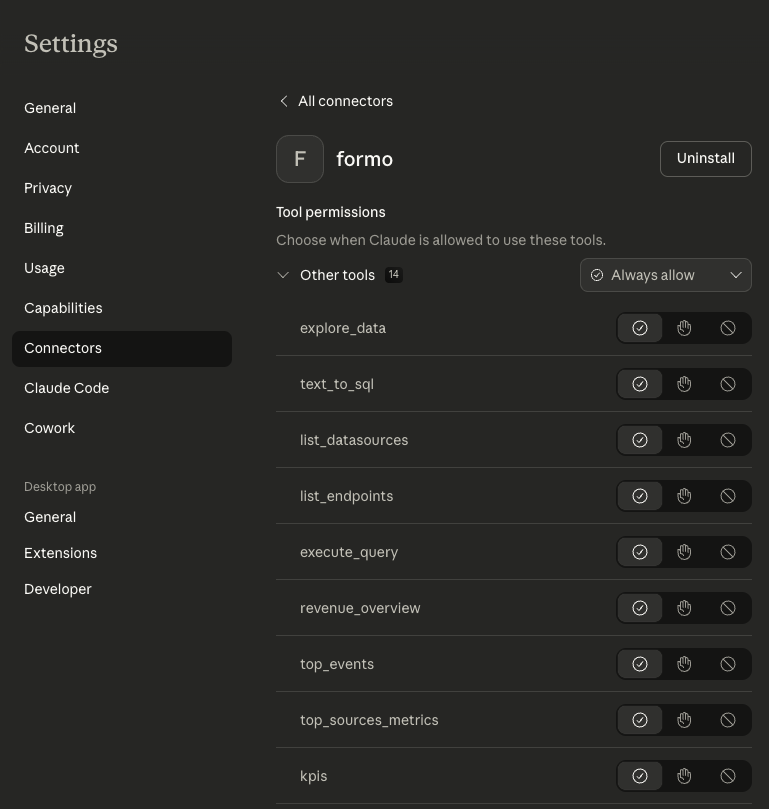

Example queries
Once connected, try these prompts with your AI assistant: Traffic & Events- “What are my KPIs for the last 7 days?”
- “What are my top traffic sources?”
- “Which pages have the highest engagement?”
- “Show me traffic by country”
- “What are the most common events?”
- “How many users signed up this week?”
- “Show me daily active users for the past month”
- “What’s the conversion rate from page view to wallet connection?”
- “Show me wallet profiles with their net worth”
- “What tokens do my users hold?”
Available tools
The Formo MCP server exposes these analytics tools:| Tool | Description |
|---|---|
explore_data | Natural language data exploration with Formo-specific context |
execute_query | Run SQL queries against your analytics data |
text_to_sql | Convert natural language to SQL |
list_endpoints | List available API endpoints |
list_datasources | List available data sources |
kpis | Get key performance indicators |
distinct_values | Get unique values for filtering |
top_events | View most common events |
top_custom_events | View custom tracked events |
top_pages | Analyze page performance |
top_sources_metrics | Attribution and traffic sources |
top_locations | Geographic distribution |
revenue_overview | Revenue analytics |
wallet_profiles | Web3 wallet data and enrichment |
text_to_sql + execute_query to query the users datasource directly.
FAQ
Which AI tools support the Formo MCP Server?
Which AI tools support the Formo MCP Server?
The Formo MCP Server works with Claude Desktop, Cursor, Claude Code, Windsurf, VS Code, Codex, and any AI client that supports HTTP or stdio MCP transports. See the setup tabs above for configuration instructions for each client.
What analytics data can I query through the MCP Server?
What analytics data can I query through the MCP Server?
You can query KPIs, traffic sources, top pages, top events, custom events, geographic distribution, revenue data, and wallet profiles. For advanced queries like retention and cohort analysis, use the
text_to_sql and execute_query tools to run SQL directly against your data.Is my analytics data secure when using the MCP Server?
Is my analytics data secure when using the MCP Server?
Yes. The MCP Server provides read-only access scoped to your project. Each API key is project-specific and no data is stored by the MCP server itself. You can revoke API keys at any time from your workspace settings.
Troubleshooting
Tools not appearing: Verify your API key has the MCP scope enabled. Check that the URL ends with a trailing slash:https://api.formo.so/v0/mcp/. Restart your AI assistant after configuration changes.
Authentication errors: Ensure the API key is correctly formatted: Bearer YOUR_API_KEY. Check that the API key hasn’t been revoked.
Claude Desktop not connecting: Ensure Node.js is installed and accessible from the command line. Check Claude Desktop logs: ~/Library/Logs/Claude/ (macOS).