

Part 1: Build a Retention Cohort Chart
Create a retention cohort chart on a dashboard. This shows how each cohort of users (grouped by signup week) retains over time:1
Click Dashboards → Add Chart → select Retention chart type.
2
Configure the chart:
- Retention Type: Rolling (default; counts toward week N if active in week N or any later week, giving a smooth curve) or Recurring (counts only if active in exactly week N, so the curve can dip and recover)
- Signal: Base retention on a specific event, or on a user label
- Cohorts are grouped weekly
3
Click Save to Dashboard. This cohort chart is now live.
- Declining diagonal: Older cohorts have worse retention. (Possible: product degraded, new cohorts are higher quality)
- Level diagonal: Consistent retention across all cohorts. (Healthy.)
- Rising diagonal: Newer cohorts retain better. (Possible: product improvements are working)
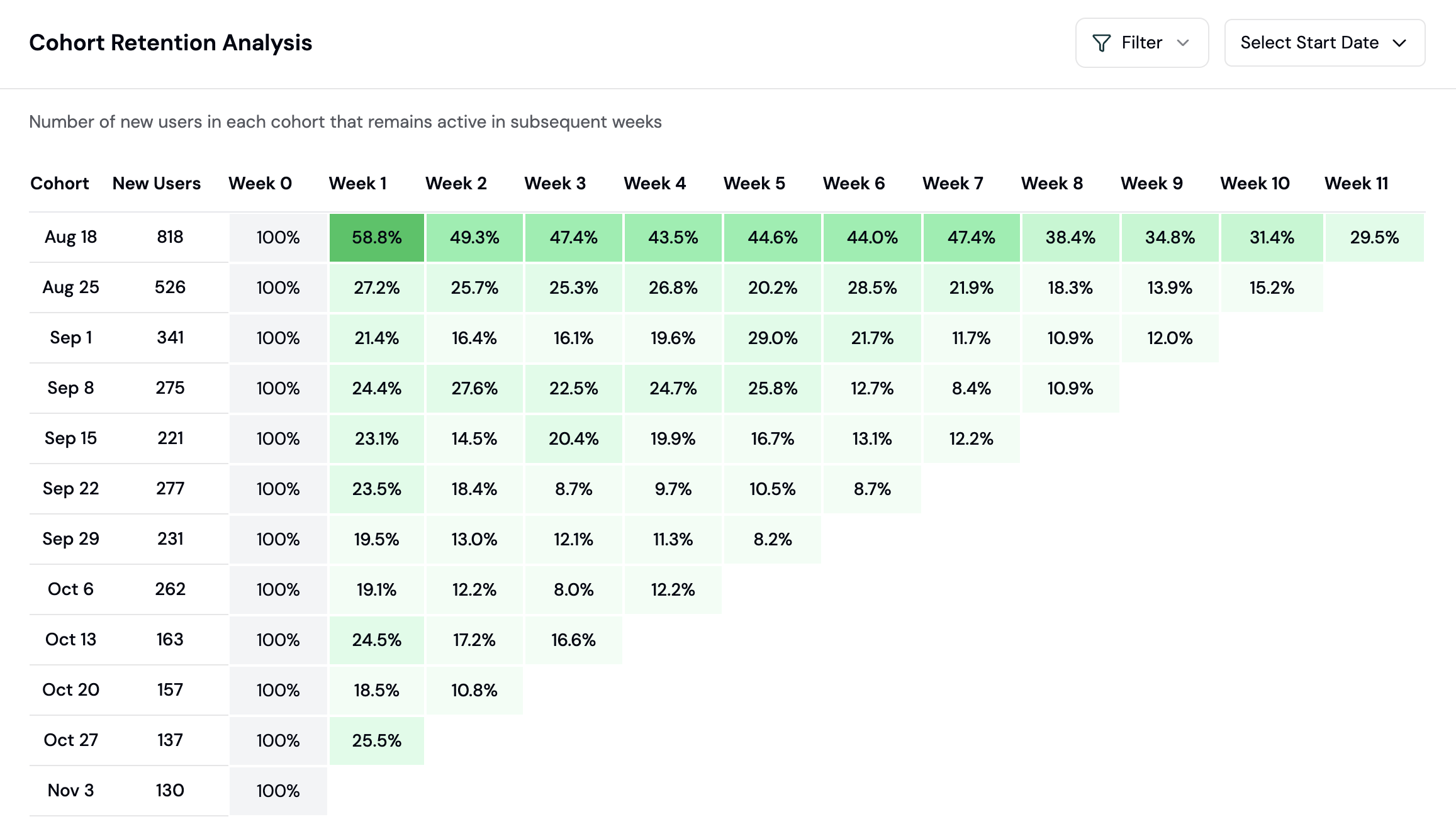
Retention cohort table showing Week 1, 4, 12
Part 2: Identify Churn Patterns
The Insights page uses AI to spot churn signals and refreshes the first time you open it each day. Check it regularly:1
Click Insights in the sidebar.
2
Look for the Issues section. Formo flags patterns like:
- “Users from country=US are churning 25% faster than average”
- “Mobile users have 40% lower Week 1 retention”
- “Cohort from Week 3 of March dropped 15% in Week 1”
3
Click on an insight to drill into the data. Ask: Is this a real problem or noise?
- A sudden drop in Week 1 retention (5%+ week-over-week) usually means a bug or product issue
- A specific geography or device churning faster suggests a UX or localization problem
- A cohort that performs poorly across all retention windows suggests they were bad-fit users to begin with
Part 3: Segment Churned and At Risk Users
To re-engage users, you must first identify them. Use the Users page to create segments:1
Click Users in the sidebar to see all users.
2
Apply filters to find at-risk users:
- Lifecycle = “Churned”: Users inactive for 30+ days
- Lifecycle = “Resurrected”: Users who returned after being inactive
- Last Activity < 7 days ago: Users who haven’t returned this week
3
Click Save Segment. Name it “Churned Users Q1 2026”.
4
Once saved, you can export this segment as CSV for re-engagement campaigns or use it to build exclusion lists.
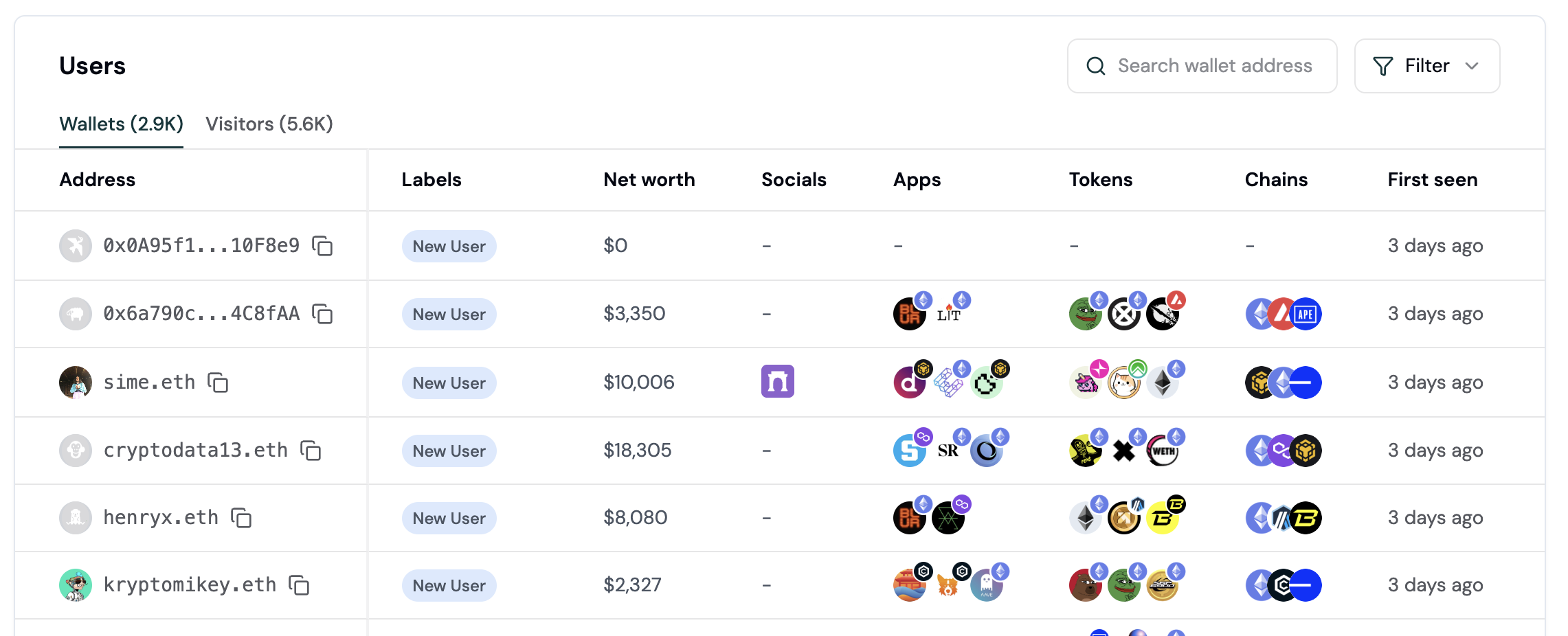
User lifecycle stages in the Users page
User Lifecycle Stages: New, Returning, Power user, At Risk, Churned, and Resurrected, assigned from each wallet’s activity recency and frequency. See User Lifecycle for the exact rules and thresholds.Use these stages to build segments for targeted campaigns.
Part 4: Export Your Segment for Re-Engagement
1
In your saved segment, click Export as CSV.
2
Download the file. It contains wallet addresses, ENS names, and event counts.
3
Use this list to:
- Send a Farcaster DM campaign: “We missed you. Here’s what’s new.”
- Create a rewards campaign: “Return this week, get 100 points.”
- Build a lookalike audience: “Find more users like these high-retainers.”
Part 5: Set Up Alerts for Key User Events
Monitor important user activity with alerts. Get notified when high-value wallets connect or key events happen:1
Go to Project Settings → Alerts.
2
Click Create Alert.
3
Configure your alert trigger (e.g., whale wallet connects, transaction from a high-value user). Choose notification method (Slack webhook).
4
Save. You’ll be alerted in real time when the event fires.
Part 6: Use Ask AI to Understand Churn
Open Ask AI (the AI assistant) and ask natural language questions:- “Why is Week 1 retention down 10% this week?”
- “Which countries have the worst retention?”
- “Do mobile users churn faster than web?”
- “What do my highest-retaining users have in common?”
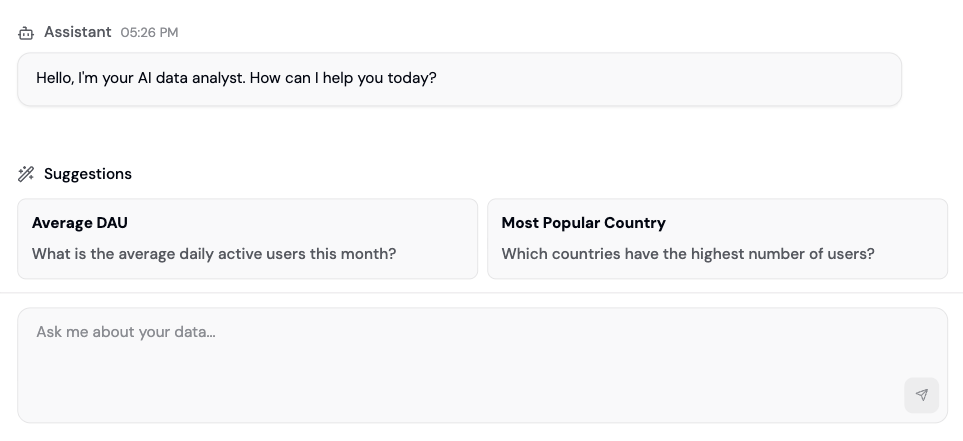
Ask AI interface for analytical questions
Real-World Example: Diagnosing a Retention Drop
1
Identify: A retention cohort chart shows mobile users churn 15 points faster than web.
2
Diagnose: Ask AI “Why are mobile users churning faster?” surfaces a timeout issue causing 3x more failed transactions on mobile.
3
Test a fix: Increase the timeout from 30s to 60s, roll it out to 10% of mobile users, and compare that segment’s Week 1 retention against older cohorts.
4
Roll out: If the test segment’s retention improves, deploy the fix to all mobile users and keep monitoring Week 1 retention.
Best Practices
- Weekly review: Check Insights every Monday and act on red flags immediately.
- Cohort comparisons: Compare consecutive weekly cohorts to see if retention is trending up or down, and investigate why.
- Segment tests: Compare retention between segments (e.g., high fee payers vs. low fee payers) to find what predicts retention.
- Pair with conversion: High conversion doesn’t mean high retention. A user who swaps once and never returns is not a retained user. Optimize for both.
- Monitor by source: Segment by referrer to see which traffic sources produce the best-retaining users.
- Check wallet labels: If you use Wallet Intelligence, segment by wallet label (e.g., “Verified Coinbase User”). Some labels correlate with higher retention.
Churn Prevention Playbook
Churn is a measurable, predictable pattern, not just “users who left.” Use this playbook to define, detect, and prevent churn in your app. Churn Definition by App Type
Monthly Churn Rate Query
Use this SQL to calculate month-over-month churn:
Create these three segments in the Users page and save them for weekly monitoring:
-
At Risk Power Users (High priority)
- Filter:
Sessions > 20ANDLast Activity 7-14 days ago - Why: These users have proven value. Re-engage before they churn.
- Filter:
-
New Users Not Returning (Medium priority)
- Filter:
Sessions < 5ANDLast Activity 3-7 days ago - Why: Early-stage friction. A small push converts them to returning users.
- Filter:
-
Declining Activity (Watch list)
- Filter:
Sessions > 10ANDLast Activity 7-30 days ago - Why: Gradual drop-off. These need incentives before hitting 30+ days.
- Filter:
- Whale Going Inactive: User with
Lifetime Value > $10kANDLast Activity > 7 days - Power User Declining: User with
Sessions > 15ANDDay-over-day activity drop > 50% - Failed Transaction Spike: Cohort-level alert if
Failed Transactionsincrease 3x week-over-week
Analyze Churned User Behavior with Flows
Use Flow charts to understand what churned users did in their last session:
- Go to Dashboards > Add Chart > select Flow
- Filter by users whose lifecycle is Churned
- Look for patterns: failed transactions, abandoned flows, or limited exploration
- Churned cohort: Active 60+ days ago, has not returned in 30+ days
- Retained cohort: Active 60+ days ago, has returned in the last 30 days
FAQ
How is retention calculated?
How is retention calculated?
Week 1 retention = (Users active in Week 1 / Users in the Week 0 cohort) * 100A user is considered active in a week if they have at least one session (page view or transaction) during that week.Example: 1000 users enter the cohort in Week 0. 250 of them return and are active in Week 1. Week 1 retention = 25%.
What's the difference between Week 1, 4, and 12 retention?
What's the difference between Week 1, 4, and 12 retention?
- Week 1: Users active in the week after their cohort’s start. Measures short-term activation.
- Week 4: Users active a month in. Measures habit formation.
- Week 12: Users active a quarter in. Measures long-term value.
What user lifecycle stage should I re-engage first?
What user lifecycle stage should I re-engage first?
Priority order:
- Resurrected: Users who just came back. Momentum is on your side.
- At Risk / Returning: Users with only 2-3 sessions. Easy to convert to Power users.
- Churned, inactive 30-60 days: Still remember your product.
- Churned, inactive 6+ months: Hard to re-activate.
Can I compare retention across different UTM sources?
Can I compare retention across different UTM sources?
Yes. Create two retention charts (or use breakdowns). Filter the first by UTM Source = “twitter” and the second by UTM Source = “discord”. Compare Week 1 retention across both. You’ll likely see significant differences.If one source has 2x better retention, invest more in that channel.
Can I set a custom cohort entry event?
Can I set a custom cohort entry event?
Yes. By default, cohorts are grouped by wallet connect. You can set any event (e.g., “first_transaction”) as the entry event instead, so cohorts are grouped by when users first performed that event.