

Part 1: Start on the Users Page
Open Formo’s dashboard and click Users in the sidebar. You’ll see a table of all users with their wallet addresses, lifecycle stages, net worth, labels, and last activity timestamp.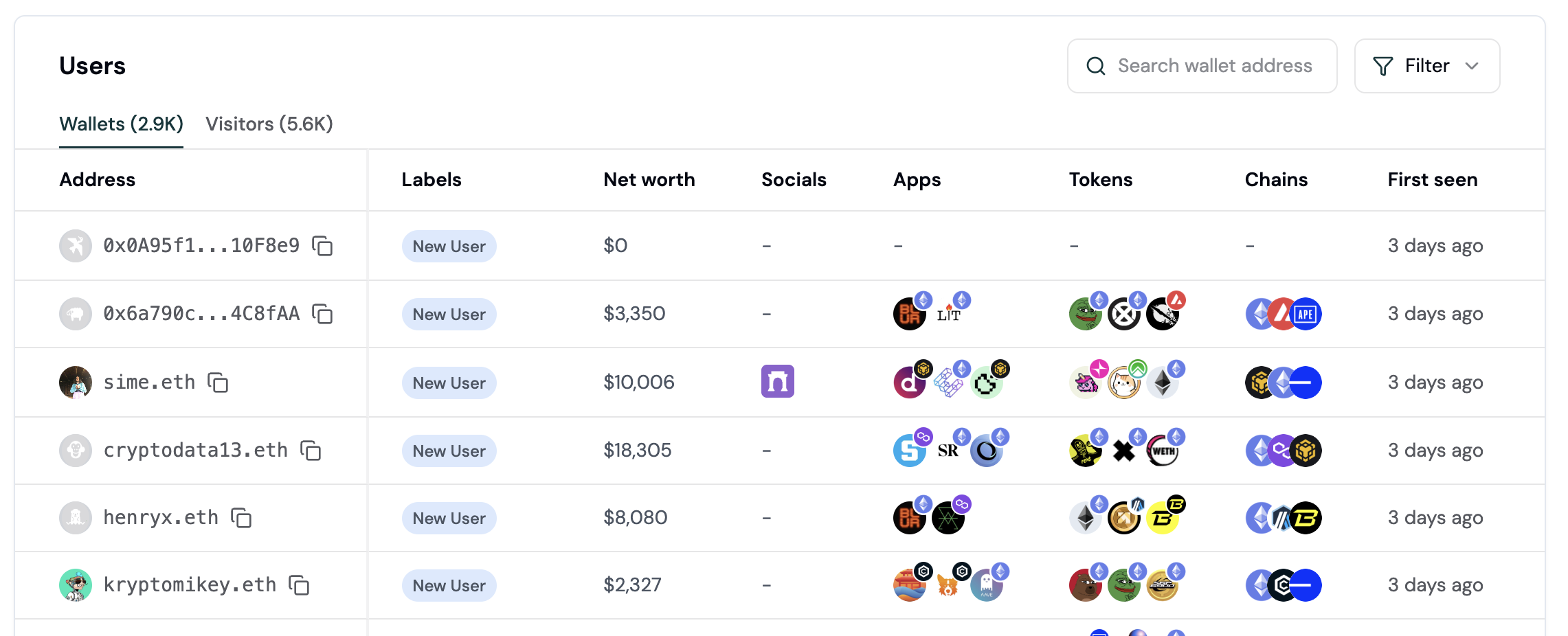
Part 2: Apply Property Filters
Click the Filter button to add conditions. You can filter by:- Lifecycle: New, Returning, Power user, At Risk, Churned, Resurrected
- Net Worth: Exact ranges (10k, 100k, $100k+, custom)
- Wallet Labels: Verified accounts, sanctions flags, passport scores, and behavioural labels such as lender, borrower, staker, perp trader or bridge user
- Apps Used: Filter to users who used specific apps
- Tokens Held: Filter by specific token holdings
- Chains: Filter by blockchain activity (Ethereum, Polygon, etc.)
- Device: Mobile, desktop, tablet
- Country: Geographic filtering
Part 3: Apply Attribution Filters
Under Attribution section, filter by:- UTM Source / Medium / Campaign: First-touch or last-touch attribution
- Referrer: How users arrived at your app
- First Touch vs Last Touch: Distinguish acquisition vs conversion sources
Part 4: Build Behavioral Segments
Click Filter and select Behaviour to create segments based on user actions. Define conditions like: “Users who performed Event X at least N times in the last Y days” Combine multiple behaviors with AND/NOT logic:- Users who completed at least 2 swaps AND connected a wallet
- Users who visited the app 5+ times AND did NOT make a transaction
Part 5: Save as a Segment
Once your filters are set, click the Save Segment button in the top right. Give it a name like “Q1 Whale Prospects” or “Churned Power Users”. Saved segments appear in a dropdown menu for quick reuse across the app. You can apply the same segment to multiple dashboards and reports.Part 6: Export Your Segment
With your segment active, click Export as CSV in the top right. Formo downloads a CSV file with columns: address, ENS name, net worth, lifecycle stage, last activity, and more.Part 7: Use Exported Data for Campaigns
Import the CSV into your marketing tools:- X/Twitter: Upload to Tailwind, Buffer, or Twitter Ads for wallet-based targeting
- Farcaster: Use Neynar or Warpcast’s audience upload feature
- Lens: Import to Lens’ native campaign tools
- Email: If you have wallet owners’ emails, import for email campaigns
Ready-to-Use Segment Recipes
Recipe 1: Whale Prospects
Target high-net-worth users who are brand new. Filter config:- Net Worth: > $100,000
- Lifecycle: New
Recipe 2: Churned Power Users
Re-engage users who were once active but disappeared. Filter config:- Lifecycle: Churned
num_sessions and last_seen via SQL Explorer.
Recipe 3: Campaign Converts
Identify users who arrived from a specific campaign and converted. Filter config:- UTM Source: [your campaign source]
- Last Touch: [same campaign]
- Behavioral: Completed Transaction at least 1 time
Recipe 4: DeFi Crossover
Find users who use competitor apps and yours (cross-protocol opportunity). Filter config:- Apps Used: [Competitor App A] AND [Your App]
- Behavioral: Performed swap at least 1 time in your app
Recipe 5: Dormant High-Value
Wake up large wallets that haven’t returned recently. Filter config:- Net Worth: > $50,000
- Lifecycle: Churned OR Returning
last_seen via SQL Explorer.
Targeting Recipes for Campaigns
ICP Definition by App Type
Four Ready-Made Segment Recipes
Recipe: High-Value DeFi Users
Recipe: Churned Whales
Recipe: Competitor Users
Recipe: Campaign Responders
Campaign Channels
- X/Twitter ads (upload CSV to Twitter Ads Manager)
- Farcaster outreach (use Neynar audience upload)
- Discord community targeting
- Airdrop/rewards distribution
Track Campaign Performance
Campaign Messaging by Segment Type
Tailor your messaging based on the segment you’re targeting:UTM Tracking Tip
Add unique UTM parameters to your campaign links:FAQ
Can I combine segments with other filters?
Can I combine segments with other filters?
Yes. Apply a saved segment, then add additional filters on top. The results will be the intersection of both.
Do saved segments update automatically, or are they a fixed snapshot?
Do saved segments update automatically, or are they a fixed snapshot?
Segments save your filter criteria, not a fixed list of wallets. Reopening a segment re-evaluates the filters against current data, so membership updates as wallets start or stop matching.