

Part 1: Navigate to the Chart Builder
1
Click Dashboards in the sidebar, then click Add Chart.
2
In the chart type selector, choose Funnel.
3
Name your funnel (e.g., “Landing to First Swap”) and click Create.
Part 2: Define Your Funnel Steps
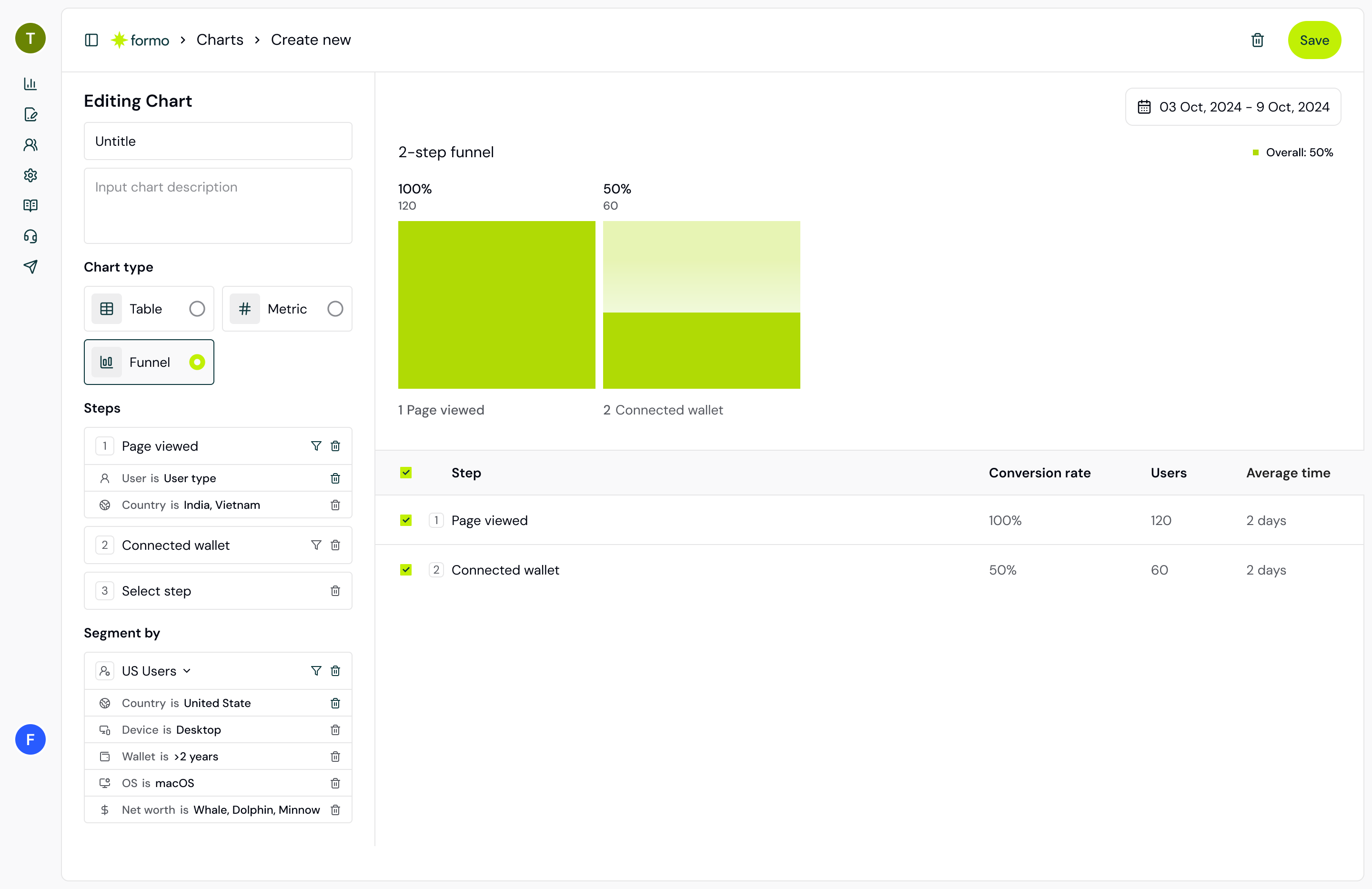
Funnels require at least 2 steps. Each step is an event that users must complete in sequence. Let’s build a classic conversion funnel: Step 1: Page View1
Click the + Add Step button.
2
Select page from the event dropdown. This captures every user who lands on your app.
3
(Optional) Add a filter: Path = “/swap” to track only users who visit your swap page.
1
Click + Add Step again.
2
Select connect from the events list.
3
(Optional) Add a filter to track only specific chains: chain_id = 1 (Ethereum mainnet).
1
Click + Add Step once more.
2
Select transaction from the events list. This counts users who completed an onchain transaction.
3
(Optional) Add a filter: to = “0x…” to track swaps on your DEX only.
Three-step funnel in the builder
Part 3: Set Your Conversion Window
The conversion window defines how much time a user has to complete the next step. For example, if Step 1 is “page” and Step 2 is “connect”, a 1-day window means we count the user toward Step 2 only if they connect a wallet within 24 hours of landing.1
Scroll to Conversion Window in the settings panel.
2
Enter a number and choose a unit (Hours, Days, or Weeks). The default window is 2 days, but you can tune it to your funnel:
- Short windows (hours): Fast decisions (DEX swaps, quick stakes)
- A few days: Deliberate decisions (pool deposits, farm selections)
- Weeks: Long consideration cycles (lending protocols, governance)
Part 4: Choose Step Order
Formo supports two step order modes: Sequential Each step must follow the previous step. User must view a page, then connect, then swap. Most common. Any order Each step is independent. User can swap without connecting first (e.g., batch transactions, programmatic access). Choose this if your funnel steps can happen in any order.1
Click the Step order dropdown (default: Sequential).
2
Select Any order only if your user journey allows non-sequential steps.
Part 5: Analyze the Results
Once your funnel is configured, the preview pane shows your funneling data in real time:- Absolute numbers: Count of users at each step
- Conversion rate: Percentage of users who advance
- Drop-off: Users who left at each step
- Visual width: Bar width represents conversion percentage
Funnel showing 80% landing page to 15% wallet connect drop
Part 6: Add Breakdown Dimensions
Break down your funnel by user attributes to find patterns:1
In the settings panel, scroll to Breakdowns.
2
Select a dimension:
- Referrer: Which traffic source converts best?
- Country: Geographic patterns?
- Device: Mobile vs desktop conversion?
- UTM Source: Which campaign drives best users?
3
The funnel splits into multiple bands, one per breakdown value. Compare conversion rates across each.
Part 7: Use Conversion Insights
Formo analyzes your funnel data to find what drives conversions. Go to the Insights page to see:- Lift: Which attributes increase conversion probability
- Odds ratio: How much more (or less) likely users with this attribute convert
- Penetration: How common this attribute is among your users
Part 8: Save Your Funnel to a Dashboard
1
Click Save to Dashboard in the top right.
2
Select an existing dashboard or create a new one (e.g., “Conversion Analytics”).
3
Add a title for the chart (e.g., “Swap Conversion Funnel”) and click Save.
Real-World Example: DEX Swap Funnel
Here’s how to set up a high-quality funnel for a DEX:
Set conversion window to 1 day (most swaps happen quickly). Add breakdowns for referrer and device to see which sources and platforms convert best. Check Insights regularly to catch new patterns.
Best Practices
- Segment your funnels: Don’t mix swap and pool deposit users in one funnel. Create separate funnels for each user path.
- Monitor daily: Check your funnel once a week. Look for drops (potential bugs) or spikes (successful campaigns).
- Pair with retention: A high-conversion funnel is great, but if users don’t return, you’re not growing. Use Retention tracking to measure long-term value.
- Use Ask AI: Click Ask AI (the AI assistant) and ask “Why did my wallet connection rate drop 10% this week?” Formo will analyze your data.
- Contract events: If you track Contract Events, you can create funnels for specific contract interactions (e.g., “approved” to “swap” to “received”).
DeFi-Specific Funnel Recipes
Staking Funnel
Track staking adoption with this canonical four-step funnel:
High drop-off at Step 2 (wallet connect) indicates UX friction; at Step 3 (approval) suggests confusing token permissions.
Liquidity Provision Funnel
Liquidity provision funnels are longer because users must approve two tokens, then add liquidity:
Two approval steps cause most drop-off.
Multi-Step DeFi Flow: Deposit to Borrow
Track the full lending funnel (Deposit > Borrow > Repay):
Use Any order step order here (borrow and swap may happen out of order).
Key DeFi Drop-Off Patterns
Common friction points and solutions:Whale Swap Alert Setup
Monitor high-value swaps on your DEX:- Create a funnel with step: transaction + filter amount_usd > 100000
- Add breakdown by address to spot repeat whale traders
- Set an alert to get notified when whale wallets transact
- Use Insights to find attributes of whale traders and target similar users
Failed Transaction Alert
Track when transactions fail to identify UX issues that cause drop-off:- Go to Project Settings > Alerts
- Click Create Alert
- Configure: Trigger type = Events, Condition =
type = transaction - Set a destination to a webhook or Slack
- Filter the delivered events for
properties.status = "failed"on your receiver (status isn’t a filterable alert condition), and investigate spikes, which often correlate with funnel drop-off at the transaction step
FAQ
Can I use contract events in my funnel?
Can I use contract events in my funnel?
Yes. If you’ve set up Contract Events, you can select any of them in the funnel builder. For example, a Uniswap funnel might be: “page” > “swap (contract event)” > “Transfer (contract event)”.
What's the difference between sequential and any-order step order?
What's the difference between sequential and any-order step order?
Sequential: User must complete steps in order. Page view, then wallet connect, then swap.Any order: Steps are independent. User can swap without a page view event (e.g., direct contract calls, wallet batch operations). Use any-order step order when your steps can happen in any sequence.
What conversion window should I use?
What conversion window should I use?
Enter a number and pick a unit (Hours, Days, or Weeks):
- Swap, stake, claim: hours (fast decisions)
- Pool deposits, farming: a few days (deliberate)
- Loans, governance: weeks (long consideration)