> ## Documentation Index
> Fetch the complete documentation index at: https://docs.formo.so/llms.txt
> Use this file to discover all available pages before exploring further.
# Product analytics overview
> Track the full user journey from acquisition to onchain conversion and retention with unified product analytics for DeFi and crypto applications.
Capture the full user journey from page visit to onchain transaction, with unified analytics and attribution for crypto.
 ## Features
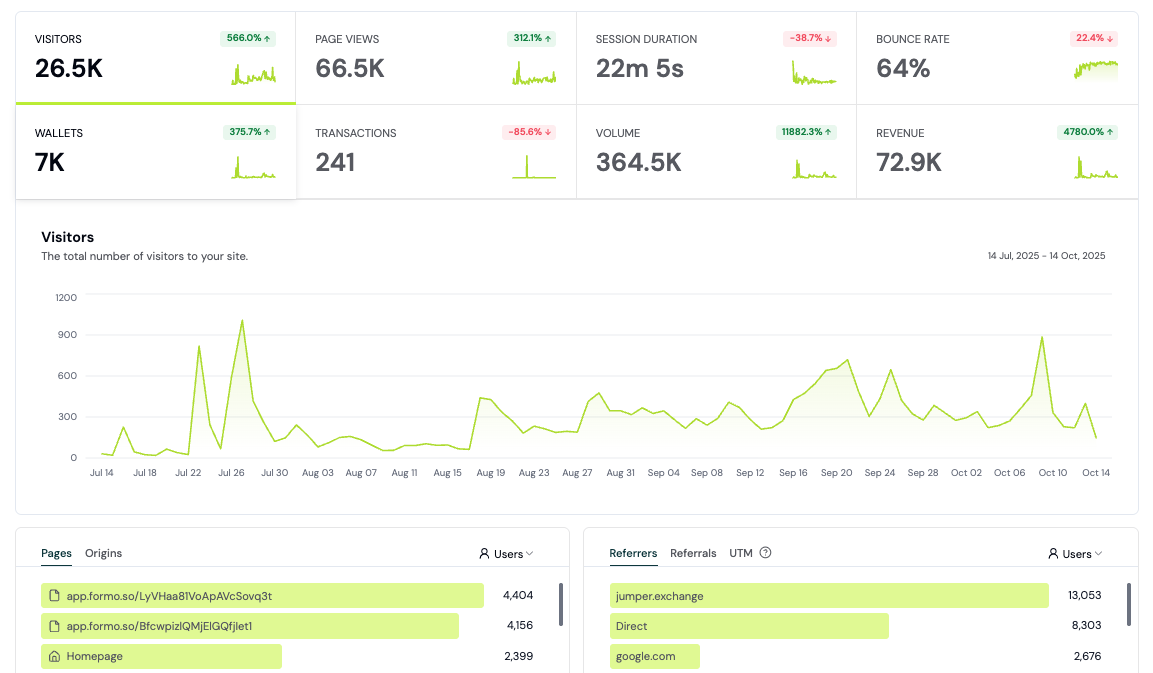
* 🎯 **Key metrics.** Track visitors, wallets, transactions, and revenue with full attribution.
* 🏃♀️➡️ **Activity feed.** Real-time event stream for monitoring user behavior.
* 🌍 **Live view.** See real-time activity on a rotating globe.
* ⚡️ **Custom events.** Track key conversions and user actions on your app.
* 🌐 **Contract events.** Track smart contract events in realtime.
* 📈 **Dashboards.** Create your own charts and dashboards for business reporting.
* 🔍 **Explorer.** Run custom SQL queries against your analytics data.
* 📊 **Funnels.** Follow your users from first visit to conversion with multi-step funnels.
* 🧭 **Flows.** Analyze user paths and flows throughout your app.
* 📅 **Retention.** Measure how many users return to your app over weeks and months.
* 🔔 **Alerts.** Get notified of high-value users and important actions.
* 💡 **Insights.** AI-powered weekly analysis of acquisition quality, activation, revenue, and churn.
* ✨ **Ask Formo.** Use natural language to query your data and get insights.
## Autocapture
Autocapture helps you automatically capture events, interactions, and attribution on your onchain app.
Once you install the Formo SDK, **it automatically collects and tracks user [events](/data/events/overview)** (including page views, wallet connects, and transactions) without the need for manual tracking or custom code.
It's the easiest way to capture the user interactions on your site. No need to rely on manual tracking. No need to choose what to measure. No need to wrangle engineers to write code.
## FAQ
After installing the SDK, Formo automatically tracks [pageviews](/data/events/page), sessions, [wallet connections](/data/events/connect), [disconnections](/data/events/disconnect), [chain switches](/data/events/chain), [transactions](/data/events/transaction), and [signatures](/data/events/signature). You can also define [custom events](/features/product-analytics/custom-events) and [contract events](/features/product-analytics/contract-events).
Yes. Cross-subdomain tracking is enabled by default (`crossSubdomainCookies: true`), so visitor identity is shared across all subdomains of your root domain out of the box. See the [Web SDK documentation](/sdks/web#cross-subdomain-tracking) for details.
Formo generates an anonymous visitor ID (UUID) stored in a first-party cookie on your domain. This ID is not linked to any personal information - no IP addresses or device fingerprints are used. A server-side daily-rotating hash is also used for session deduplication. See [what we collect](/data/what-we-collect) for details.
Yes. Use the [Explorer](/features/product-analytics/explore) to run SQL queries directly against your analytics data. You can also use the [Query API](/api/query) or connect [BI tools](/data/bi) like Metabase or Grafana.
## Next steps
Track conversion from first visit to onchain transaction
Run custom SQL queries on your data
Create custom charts for your team
Monitor smart contract activity in real-time
## Features
* 🎯 **Key metrics.** Track visitors, wallets, transactions, and revenue with full attribution.
* 🏃♀️➡️ **Activity feed.** Real-time event stream for monitoring user behavior.
* 🌍 **Live view.** See real-time activity on a rotating globe.
* ⚡️ **Custom events.** Track key conversions and user actions on your app.
* 🌐 **Contract events.** Track smart contract events in realtime.
* 📈 **Dashboards.** Create your own charts and dashboards for business reporting.
* 🔍 **Explorer.** Run custom SQL queries against your analytics data.
* 📊 **Funnels.** Follow your users from first visit to conversion with multi-step funnels.
* 🧭 **Flows.** Analyze user paths and flows throughout your app.
* 📅 **Retention.** Measure how many users return to your app over weeks and months.
* 🔔 **Alerts.** Get notified of high-value users and important actions.
* 💡 **Insights.** AI-powered weekly analysis of acquisition quality, activation, revenue, and churn.
* ✨ **Ask Formo.** Use natural language to query your data and get insights.
## Autocapture
Autocapture helps you automatically capture events, interactions, and attribution on your onchain app.
Once you install the Formo SDK, **it automatically collects and tracks user [events](/data/events/overview)** (including page views, wallet connects, and transactions) without the need for manual tracking or custom code.
It's the easiest way to capture the user interactions on your site. No need to rely on manual tracking. No need to choose what to measure. No need to wrangle engineers to write code.
## FAQ
After installing the SDK, Formo automatically tracks [pageviews](/data/events/page), sessions, [wallet connections](/data/events/connect), [disconnections](/data/events/disconnect), [chain switches](/data/events/chain), [transactions](/data/events/transaction), and [signatures](/data/events/signature). You can also define [custom events](/features/product-analytics/custom-events) and [contract events](/features/product-analytics/contract-events).
Yes. Cross-subdomain tracking is enabled by default (`crossSubdomainCookies: true`), so visitor identity is shared across all subdomains of your root domain out of the box. See the [Web SDK documentation](/sdks/web#cross-subdomain-tracking) for details.
Formo generates an anonymous visitor ID (UUID) stored in a first-party cookie on your domain. This ID is not linked to any personal information - no IP addresses or device fingerprints are used. A server-side daily-rotating hash is also used for session deduplication. See [what we collect](/data/what-we-collect) for details.
Yes. Use the [Explorer](/features/product-analytics/explore) to run SQL queries directly against your analytics data. You can also use the [Query API](/api/query) or connect [BI tools](/data/bi) like Metabase or Grafana.
## Next steps
Track conversion from first visit to onchain transaction
Run custom SQL queries on your data
Create custom charts for your team
Monitor smart contract activity in real-time