

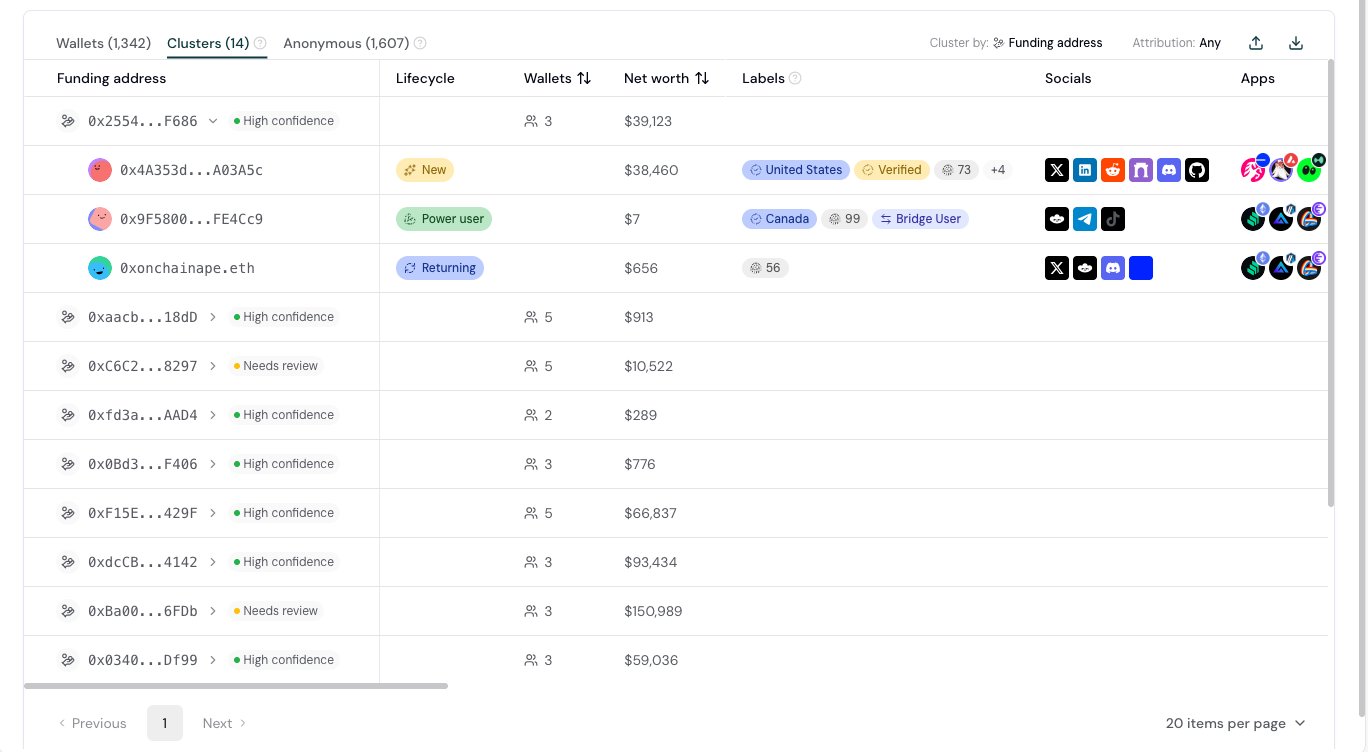
Clusters on the Users page, clustered by funding address.
Overview
Identity resolution answers one question: which of your wallets belong to the same person or team? A wallet address is not a user. One person often has several wallets: a main wallet, a hardware wallet, a trading wallet, a wallet for each chain. Some people create many wallets on purpose, to collect a referral bonus, an airdrop, or a competition reward more than one time. When you treat each wallet as a separate user, three things go wrong:- You overstate your audience. 1,000 active wallets can be 600 people. Growth, retention, and conversion numbers by wallet look better or worse than the real ones.
- You misjudge your best users. The value of one user is spread across several wallets, so a high-value user looks like several small ones.
- You pay for the same user more than one time. Incentive programs that reward each wallet reward the people who create the most wallets.
Two ways to link wallets
Formo links wallets with two independent signals. One comes from your app and one comes from the chain. Formo keeps them separate, because they prove different things.
The two signals cover each other. Identity is a direct match on data from your app, so it needs no inference. It still is not proof of one owner, because two people can share one device. And an operator who uses a new browser profile for each wallet is invisible to it. The funding address sees that operator, but it needs care, because exchanges and bridges also fund many unrelated wallets. A link that both signals confirm is the strongest one.
Identity clusters
Identity clusters group wallets that belong to the same user. Two shared identifiers link wallets:- The anonymous ID. The same browser or device, across sessions and days.
- The user ID that you set with
identify.
Funding clusters
Funding clusters group the wallets of your project that were first funded onchain by the same address. The funding address of a wallet is the account that sent the wallet its first native gas on a chain. When several wallets of your project share a funding address, they form one funding cluster. The cluster is named by that address. Funding clusters find what identity clusters cannot: an operator who prepares many wallets from one source and then uses each wallet from a different device.How Formo finds the funding address
- Formo reads the first incoming native transfer of the wallet on each supported EVM chain and on Solana.
- When a contract sent the transfer, for example a disperse contract, Formo uses the account that signed the transaction.
- When the wallet signed its own funding transaction, for example a claim or its own bridge deposit, the wallet has no funding address on that chain.
- A wallet can have a different funding address on each chain. It can be in more than one funding cluster.
Services do not form clusters
Most first funding does not come from a person. It comes from infrastructure: exchanges, bridges, relayers, and gas services. Such an address funds many unrelated wallets, so Formo does not build a cluster from it. Formo recognises a service in several ways:- Public address labels for exchanges, bridges, and gas services.
- Activity. An account that sends far more transactions than a person can is a service, also when it has no public label yet.
- Relayers. An account that deploys a separate contract for each user links no wallets.
- Reach. An address that funded a very large number of wallets across all projects is a service.
Confidence level
Each funding cluster shows a confidence level.
Hover the level to see the reasons, for example how many wallets share an identity cluster and within how many days the wallets were funded.
Needs review does not mean that the cluster is wrong. A farming operation that funds its wallets from an outside address and uses a separate device for each wallet shows as Needs review. A short funding window, for example ten wallets funded within minutes, is a strong sign of one operator.
Where you see clusters
Clusters tab
On the Users page, open the Clusters tab. Use the Cluster by control to switch between Identity and Funding address. Expand a cluster to see its wallets. Filters, segments, and search apply to both views.Wallets tab
The Links column shows how many other wallets are linked to each wallet. It counts each linked wallet one time, whatever the reason. Hover the number to see the linked wallets and an icon for the reason of each link.Wallet profile
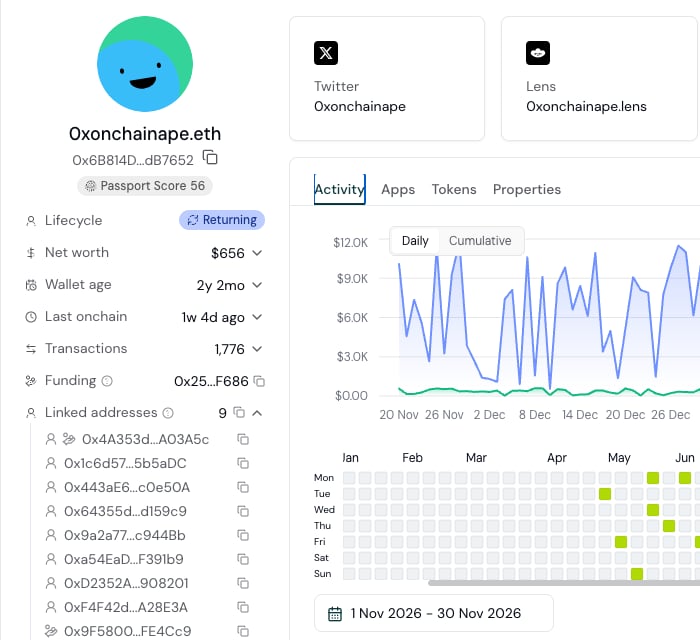
A wallet profile with its funding address and its linked addresses.
- Funding shows the funding address of the wallet, or the service that funded it.
- Linked addresses lists every wallet linked to this one, with an icon for each reason.
A wallet can have more than one reason. A wallet that shares both an identity cluster and a funding address with this one shows both icons, which is the strongest link.
CSV export
Exports from the Users page include the links:
The two count columns are separate, and a wallet that is linked both ways is in both. So they do not add up to the number in the Links column, which counts each linked wallet one time for every reason. The Linked addresses column holds that full list.
How to review a funding cluster
- On the Clusters tab, set Cluster by to Funding address.
- Sort by Wallets to see the largest clusters first.
- Read the confidence level and its reasons.
- Expand the cluster. Compare the wallets: their first seen dates, countries, devices, and activity in your app.
- Open a wallet profile to see every link of that wallet and the reason for each one.
- Export the cluster as a CSV file to review it with your team or to exclude the wallets from a program.
Limits
Read funding clusters as a signal, not as proof.- The link is inferred. One person can send gas to a friend. Wallets in one funding cluster can belong to different people.
- Labels arrive late. A new service wallet can form a cluster for a short time before Formo recognises it. The confidence level marks such a cluster as Needs review.
- Coverage fills in over time. Formo looks up the funding address when a wallet is active on your app. A wallet that was not active recently can have no funding address yet.
- Contract funding is not visible on every chain. On some chains Formo sees direct transfers only. A wallet that was first funded through a contract on such a chain can show a later funding address, or none.
- No transitive merge. If address A funded wallet B, and wallet B funded wallet C, Formo shows two clusters that share wallet B, not one chain.
Privacy and access
- Clusters never cross projects. Formo builds them from the wallets of one project only.
- Funding links are not used in your user counts, monthly active users, or billing.
- Clusters, linked addresses, and funding data are sensitive profile data. Owners and Admins can hide them from Viewers. See Role Based Access Control.
FAQ
Why does a wallet show linked addresses but no identity cluster?
Why does a wallet show linked addresses but no identity cluster?
The wallet is linked by funding address only. Open the Clusters tab and set Cluster by to Funding address to see its cluster.
Why does the funding address of a wallet show an exchange?
Why does the funding address of a wallet show an exchange?
The wallet received its first gas from an exchange withdrawal. That tells you where the wallet got its funds. It does not link the wallet to other wallets, because an exchange funds many unrelated people.
Can a wallet be in several clusters?
Can a wallet be in several clusters?
A wallet is in one identity cluster at most. It can be in several funding clusters when different addresses funded it on different chains.
Do funding clusters change my monthly active users?
Do funding clusters change my monthly active users?
No. User counts, monthly active users, and billing do not use funding links.
Which chains are covered?
Which chains are covered?
Funding addresses are found on the major EVM chains and on Solana. Public labels for services cover the major EVM chains. On Solana, Formo recognises services by their activity.