

- Events, Users, Sessions, Revenue, and Sources are first-party data scoped to your project.
- Wallet Profiles are based on public onchain data (net worth, apps, tokens, chains, social profiles, etc.) and are globally accessible across all projects.
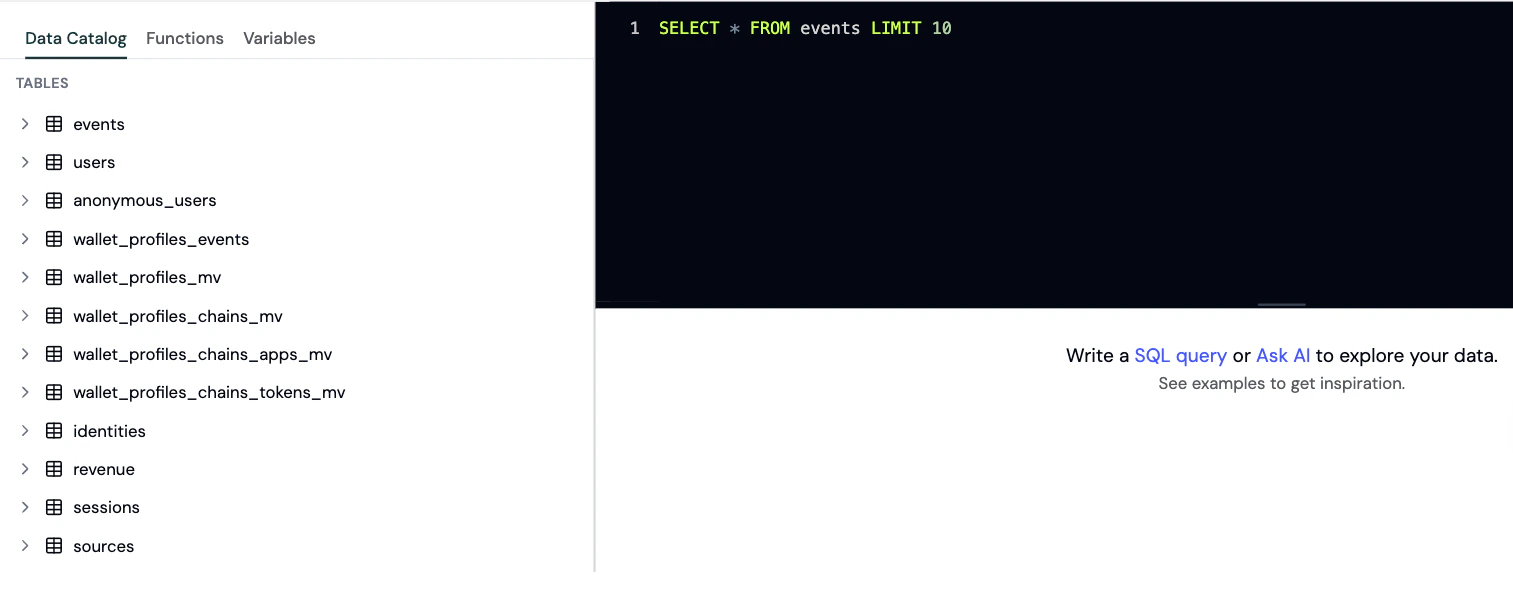
Browse the schema and run SQL queries in the Explorer.
- SQL dialect: ClickHouse SQL (not standard SQL)
- Default row limit: 100 rows (add your own
LIMITclause to override) - Project scoping: All queries are automatically filtered to your project - you never need to add
WHERE project_id = ... - Aggregate tables: Several tables use ClickHouse
AggregateFunctiontypes that require-Mergesuffix functions (see Working with Aggregate Tables) - Functions and variables: Formo supports dynamic date variables and other built-in functions. Query data with the Query API and Profiles API, explore with the BI integration, export with Data sync, or write SQL directly in the Explorer.
Data flow
Tables
events
The core event log. Contains all user interaction events - page views, custom events, wallet connects, and onchain contract events (decoded_log).
Use cases: Event-level analysis, user journey tracking, custom event queries, debugging
Example:
users
Aggregated wallet user profiles with attribution, engagement, and revenue metrics. Each row represents one wallet address. Use cases: User segmentation, attribution analysis, lifecycle tracking, wallet analytics
Lifecycle definitions (based on
activity_dates, computed against a reference date that defaults to today):
- New:
first_seenwithin the last 30 days and still active - Returning: default (first seen more than 30 days ago, active recently, but not Power, At Risk, or Resurrected)
- Power:
first_seenmore than 30 days ago and 5+ unique active days in the last 30 days - At Risk:
first_seenmore than 30 days ago, still active, butlast_seen14+ days ago with fewer than 5 active days in the last 30 days, no 30+ day gap, and 1+ active day in the prior window (days 30 to 60 ago) - Churned:
last_seenmore than 30 days ago - Resurrected:
first_seenmore than 30 days ago and re-engaged within the last 30 days after a 30+ day gap
anonymous_users
Profiles for users who haven’t connected a wallet yet. Same structure asusers but keyed by anonymous_id instead of address.
Use cases: Pre-wallet user analysis, conversion funnel tracking, anonymous visitor segmentation
Total users =
users (wallet-connected) + anonymous_users (pre-wallet)
All other columns are identical to the users table, with
anonymous_id replacing address as the primary key, except activity_dates. In anonymous_users, activity_dates is AggregateFunction(groupUniqArray, Date), read with groupUniqArrayMerge(activity_dates), not groupUniqArrayIfMerge() as in users.
sessions
Aggregated session data with engagement metrics and attribution. Each row represents one session on a given date. Use cases: Session analysis, bounce rate calculations, session duration, user attributiondevice, browser, os, location, and the attribution columns (referrer, referrer_url, ref, utm_*, channel_type) are argMin states that resolve to the session’s first-touch (entry) value. Read them with argMinMerge(...), not by selecting the column directly. paid_source (acquiring ad network) and click_id (raw click ID) resolve independently at the first non-empty paid touch, so they can come from different events within the same session; don’t assume click_id belongs to the paid_source network.sources
Daily aggregated traffic source metrics and attribution data. Each row represents one day of activity from a specific referrer/UTM combination. Use cases: Marketing attribution, referrer performance, traffic source analysis, campaign ROIrevenue
Financial metrics with full attribution context. Tracks revenue, transaction volume, and points. Use cases: Revenue attribution, ROI analysis, financial performance by source/campaign
Example:
identities
Identity graph linking anonymous sessions to wallet addresses. Each row represents a connection between an anonymous user and a wallet. Use cases: Conversion tracking, user journey analysis, linking pre/post-wallet activity
Example:
user_profiles_mv
Project-scoped, first-party user profile traits captured fromidentify events. One row per address, holding the latest value of each trait. This is the identity-data counterpart to wallet_profiles_mv (which holds public onchain profile data); user_profiles_mv holds the traits you send.
Use cases: User enrichment, first-party identity resolution, personalization, outreach
Example:
wallet_profiles_mv
Global wallet profile data aggregated across all chains. One row per wallet address with social profiles, contact info, and net worth. Use cases: Wallet intelligence, social identity resolution, user enrichment, outreachwallet_profiles_chains_mv
Wallet profile data broken down by blockchain network. Each row represents a wallet’s activity on a specific chain. Use cases: Chain-specific analysis, cross-chain behavior tracking, multi-chain user segmentation
Example:
wallet_profiles_chains_tokens_mv
Token holdings data per wallet per chain. Each row represents one token held by a wallet on a specific chain. Use cases: Token portfolio analysis, token-based segmentation, whale identificationwallet_profiles_chains_apps_mv
DeFi app usage data per wallet per chain. Each row represents a wallet’s interaction with a specific DeFi protocol. Use cases: DeFi app adoption analysis, protocol usage tracking, user portfolio analysiswallet_profiles_events
Raw timestamped wallet profile data from blockchain analysis. Contains the unprocessed profile updates that feed into thewallet_profiles_* materialized views.
Use cases: Debugging wallet profile data, historical profile snapshots, raw data access
wallet_profiles_labels
Wallet labels and tags for categorizing and filtering wallet addresses. Each row is a label assigned to an address, optionally scoped to a chain. Use cases: Wallet categorization, risk scoring, user segmentation, compliance filteringuser_labels
Project-scoped labels and tags you assign to wallet addresses (e.g. your own segments, scores, or categories). The latest value per(tag_id, address, chain_id) is kept automatically. This is the project-specific counterpart to wallet_profiles_labels, which holds global labels supplied by Formo’s wallet profiler.
Use cases: Custom segmentation, scoring, audience building, tagging
Table relationships
anonymous_id and session_id to address, enabling you to track user behavior before and after wallet connection.
Variables
Template variables are replaced with actual values at query time. Use them to build charts and dashboards that respond to a shared date picker instead of hardcoded ranges.Date range variables
{{date_from}}
Start date of the selected date range. Replaced with a YYYY-MM-DD string at query time.
Example:
{{date_to}}
End date of the selected date range. Replaced with a YYYY-MM-DD string at query time.
Example:
Functions
Custom SQL functions that resolve at query time. Functions use the{{ function_name(...) }} syntax - the macro is expanded into a numeric literal before your query runs, so results can be used anywhere a number would be (SELECT, WHERE, arithmetic, etc.).
Rules:
- Maximum 10 function calls per query
- Results are cached for 15 minutes
Price oracle functions
Fetch live token prices directly inside your SQL queries. Use these to convert token amounts to USD values without joining external price data manually.alchemy.token_price
Get token price by contract address and chain ID from Alchemy.
Signature: {{ alchemy.token_price('ADDRESS', CHAIN_ID, 'CURRENCY') }}
Parameters:
ADDRESS- EVM contract address (0x-prefixed, 42 characters)CHAIN_ID- Numeric chain ID (e.g.,1for Ethereum,8453for Base,42161for Arbitrum)CURRENCY- One ofusd,eur,eth,btc
alchemy.token_price_by_symbol
Get token price by symbol from Alchemy.
Signature: {{ alchemy.token_price_by_symbol('SYMBOL', 'CURRENCY') }}
Parameters:
SYMBOL- Token symbol (e.g.,ETH,BTC,SOL)CURRENCY- One ofusd,eur,eth,btc
pyth.token_price
Get token price by pair name from Pyth.
Signature: {{ pyth.token_price('BASE/QUOTE') }}
Parameters:
BASE/QUOTE- Price pair (e.g.,ETH/USD,BTC/USD,SOL/USD)
Working with aggregate tables
Several tables (users, anonymous_users, sessions, sources, identities, user_profiles_mv) use ClickHouse AggregateFunction types. These store intermediate aggregation states, not final values.
Rules
- Always
GROUP BYthe primary key when querying aggregate tables - Use
-Mergesuffix forAggregateFunctioncolumns (e.g.,argMaxMerge(last_utm_source)) - Use standard functions for
SimpleAggregateFunctioncolumns (e.g.,min(first_seen),max(last_seen)) - Never
SELECT *on aggregate tables - it returns binary aggregate states, not readable values