> ## Documentation Index
> Fetch the complete documentation index at: https://docs.formo.so/llms.txt
> Use this file to discover all available pages before exploring further.
# Audience insights
> Analyze your audience with breakdowns of onchain activity, top apps, token holdings, preferred chains, net worth distribution, and user demographics.
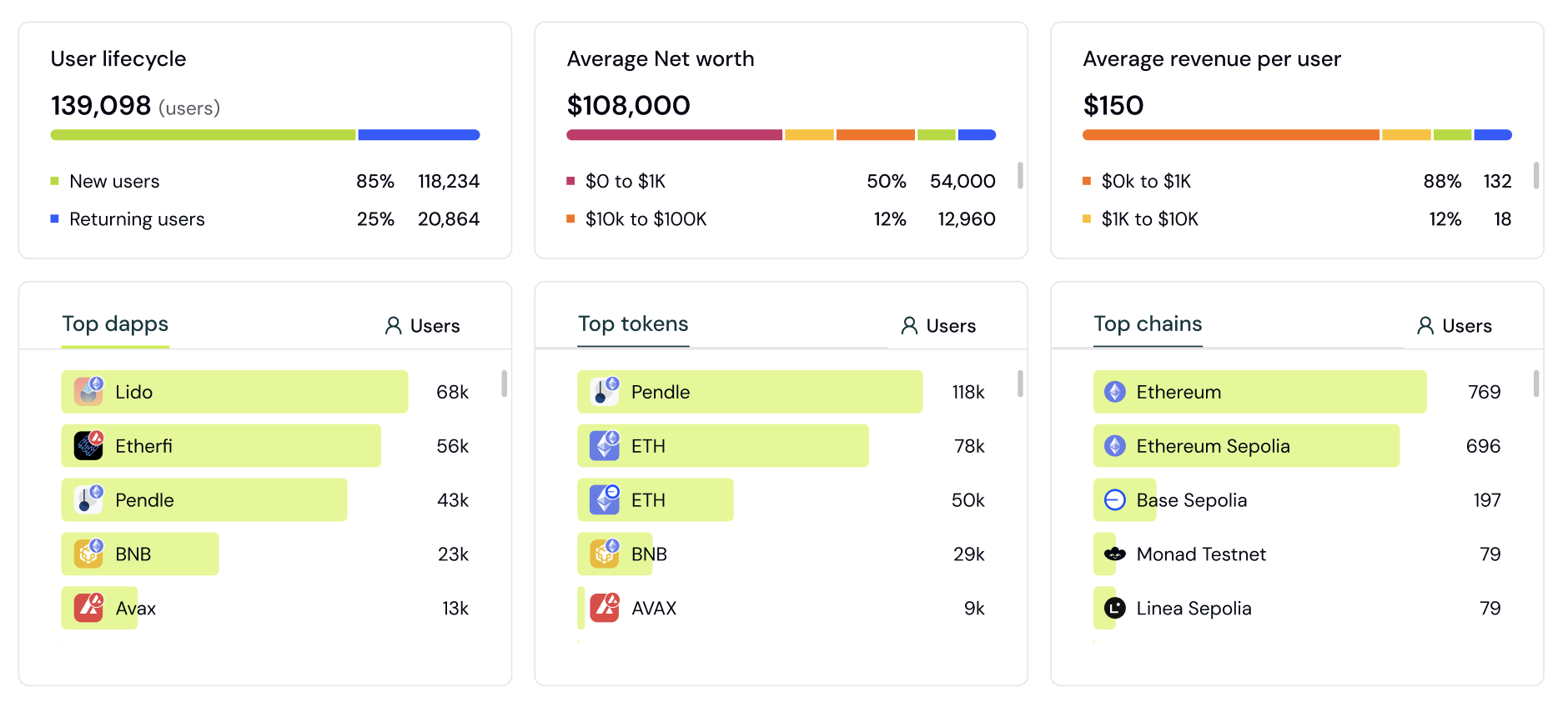 Track and analyze visitors and users in real-time, with automatic labeling and profile data.
Get insights into your audience's onchain activity and other user properties:
* Top apps
* Top tokens
* Top chains
* A breakdown of users by net worth
* A breakdown of users by revenue / wallet spend
* Wallet labels
Each user is automatically labelled and grouped into segments such as 'New User' or 'Returning User'.
Understand the top wallets, devices, OS, and net worth of your users.
Select a user to view their Wallet Profile.
## Filters
Apply filters to understand how different segments of users interact with your app at different times.
### Filter by Lifecycle
Filter users by their [lifecycle stage](/features/wallet-intelligence/wallet-profiles#user-lifecycle) to create segments based on engagement level. Target new users, returning users, power users, resurrected users, at-risk users, or churned users.
### Filter by Apps, Tokens, Chains
Apply filters such as "users who use app X and Y" for apps, tokens, and chains. This enables you to create granular segments combining multiple criteria.
### Filter by First-Touch and Last-Touch Attribution
Filter users by referrer, referral, and UTM properties using first-touch and last-touch attribution. Understand which channels first introduced users to your app versus which channels drove the final conversion.
### Filter by App and Token Amounts
Filter users' apps and tokens by specific amounts. For example, "Show me users of Ethena with more than \$1000 balance."
***
## How to analyze your user base
Audience Insights gives you a bird's-eye view of who your users are. This guide walks you through exploring your audience composition and finding actionable segments.
### Step 1: Open Audience Insights
1. Go to the [Formo Dashboard](https://app.formo.so)
2. Select your project
3. Click **Users** in the left navigation
The **Users** page includes an Audience Insights section (Top Apps, Top Tokens, Top Chains, user lifecycle, sessions per wallet, and net worth breakdowns) above the users table, showing aggregate metrics about your entire user base.
### Step 2: Explore the overview charts
The dashboard shows key breakdowns of your audience:
| Chart | What it shows |
| -------------------------- | ----------------------------------------------------------------- |
| **Net Worth Distribution** | Users grouped by wallet value ($0-1k, $1k-10k, $10k-100k, $100k+) |
| **Top Apps** | Most common crypto apps your users interact with |
| **Top Tokens** | Most held tokens across your user base |
| **Top Chains** | Which networks your users are active on |
| **Lifecycle** | New, Returning, Power Users, Churned breakdown |
### Step 3: Apply filters to segment
Click **Add Filter** to narrow down to specific user groups:
**Example: Find your most valuable DeFi users**
| Filter | Value |
| --------- | ------------------ |
| Net Worth | > \$10,000 |
| Apps | Contains "Uniswap" |
| Lifecycle | Power User |
**Example: Find users from a specific campaign**
| Filter | Value |
| ------------ | ------------- |
| UTM Source | twitter |
| UTM Campaign | launch\_promo |
**Example: Find whales who use competitor apps**
| Filter | Value |
| --------- | -------------------------- |
| Net Worth | > \$100,000 |
| Apps | Contains "Competitor Name" |
### Step 4: Analyze filtered results
After applying filters, the charts update to show only matching users:
* **Compare segments**: How do Twitter users differ from Discord users?
* **Find opportunities**: Which tokens do your whales hold that you don't support yet?
* **Identify patterns**: What apps do your power users have in common?
### Step 5: Save as a segment
Turn useful filter combinations into reusable segments:
1. Apply your filters
2. Click **Save as Segment**
3. Name your segment (e.g., "High-Value DeFi Users")
4. Access it anytime from [Segments](/features/wallet-intelligence/segments)
### Common analysis workflows
**Understand your best users:**
1. Filter by Lifecycle = "Power User"
2. Look at Top Apps and Top Tokens
3. Identify common characteristics to target in acquisition
**Evaluate campaign quality:**
1. Filter by UTM Source = your campaign
2. Compare net worth distribution to overall average
3. Check if campaign users have higher/lower value
**Find expansion opportunities:**
1. Look at Top Chains your users are on
2. Identify chains you don't fully support yet
3. Prioritize based on user demand
**Competitive analysis:**
1. Filter by Apps containing competitor names
2. See how many of your users also use competitors
3. Understand what else these users are doing
### Next Steps
Save filters as reusable segments
Drill into individual users
Understand auto-generated labels
Export segments for marketing campaigns
Track and analyze visitors and users in real-time, with automatic labeling and profile data.
Get insights into your audience's onchain activity and other user properties:
* Top apps
* Top tokens
* Top chains
* A breakdown of users by net worth
* A breakdown of users by revenue / wallet spend
* Wallet labels
Each user is automatically labelled and grouped into segments such as 'New User' or 'Returning User'.
Understand the top wallets, devices, OS, and net worth of your users.
Select a user to view their Wallet Profile.
## Filters
Apply filters to understand how different segments of users interact with your app at different times.
### Filter by Lifecycle
Filter users by their [lifecycle stage](/features/wallet-intelligence/wallet-profiles#user-lifecycle) to create segments based on engagement level. Target new users, returning users, power users, resurrected users, at-risk users, or churned users.
### Filter by Apps, Tokens, Chains
Apply filters such as "users who use app X and Y" for apps, tokens, and chains. This enables you to create granular segments combining multiple criteria.
### Filter by First-Touch and Last-Touch Attribution
Filter users by referrer, referral, and UTM properties using first-touch and last-touch attribution. Understand which channels first introduced users to your app versus which channels drove the final conversion.
### Filter by App and Token Amounts
Filter users' apps and tokens by specific amounts. For example, "Show me users of Ethena with more than \$1000 balance."
***
## How to analyze your user base
Audience Insights gives you a bird's-eye view of who your users are. This guide walks you through exploring your audience composition and finding actionable segments.
### Step 1: Open Audience Insights
1. Go to the [Formo Dashboard](https://app.formo.so)
2. Select your project
3. Click **Users** in the left navigation
The **Users** page includes an Audience Insights section (Top Apps, Top Tokens, Top Chains, user lifecycle, sessions per wallet, and net worth breakdowns) above the users table, showing aggregate metrics about your entire user base.
### Step 2: Explore the overview charts
The dashboard shows key breakdowns of your audience:
| Chart | What it shows |
| -------------------------- | ----------------------------------------------------------------- |
| **Net Worth Distribution** | Users grouped by wallet value ($0-1k, $1k-10k, $10k-100k, $100k+) |
| **Top Apps** | Most common crypto apps your users interact with |
| **Top Tokens** | Most held tokens across your user base |
| **Top Chains** | Which networks your users are active on |
| **Lifecycle** | New, Returning, Power Users, Churned breakdown |
### Step 3: Apply filters to segment
Click **Add Filter** to narrow down to specific user groups:
**Example: Find your most valuable DeFi users**
| Filter | Value |
| --------- | ------------------ |
| Net Worth | > \$10,000 |
| Apps | Contains "Uniswap" |
| Lifecycle | Power User |
**Example: Find users from a specific campaign**
| Filter | Value |
| ------------ | ------------- |
| UTM Source | twitter |
| UTM Campaign | launch\_promo |
**Example: Find whales who use competitor apps**
| Filter | Value |
| --------- | -------------------------- |
| Net Worth | > \$100,000 |
| Apps | Contains "Competitor Name" |
### Step 4: Analyze filtered results
After applying filters, the charts update to show only matching users:
* **Compare segments**: How do Twitter users differ from Discord users?
* **Find opportunities**: Which tokens do your whales hold that you don't support yet?
* **Identify patterns**: What apps do your power users have in common?
### Step 5: Save as a segment
Turn useful filter combinations into reusable segments:
1. Apply your filters
2. Click **Save as Segment**
3. Name your segment (e.g., "High-Value DeFi Users")
4. Access it anytime from [Segments](/features/wallet-intelligence/segments)
### Common analysis workflows
**Understand your best users:**
1. Filter by Lifecycle = "Power User"
2. Look at Top Apps and Top Tokens
3. Identify common characteristics to target in acquisition
**Evaluate campaign quality:**
1. Filter by UTM Source = your campaign
2. Compare net worth distribution to overall average
3. Check if campaign users have higher/lower value
**Find expansion opportunities:**
1. Look at Top Chains your users are on
2. Identify chains you don't fully support yet
3. Prioritize based on user demand
**Competitive analysis:**
1. Filter by Apps containing competitor names
2. See how many of your users also use competitors
3. Understand what else these users are doing
### Next Steps
Save filters as reusable segments
Drill into individual users
Understand auto-generated labels
Export segments for marketing campaigns