> ## Documentation Index
> Fetch the complete documentation index at: https://docs.formo.so/llms.txt
> Use this file to discover all available pages before exploring further.
# User segmentation
> Create audience segments by grouping users based on wallet properties, onchain behavior, demographics, and lifecycle stage for targeted campaigns.
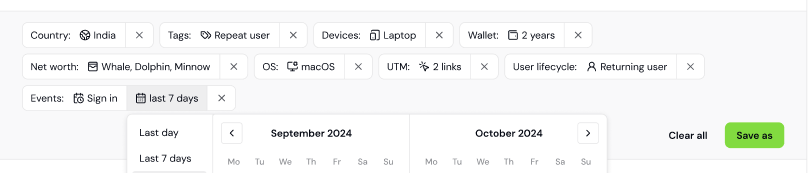 Segments are groups of users that share a certain set of properties or who perform a similar sequence of events.
Formo lets you define segments, view the list of users that comprise them, compare them in your analysis, and share them with your team.
## Creating a segment
1. Go to **Users** in the sidebar
2. Apply filters to define your target audience (e.g., wallet labels, net worth, lifecycle stage)
3. Click **Save as Segment** to save your filtered view
4. Give your segment a name and click **Save**
Your segment is now saved and can be reused across the dashboard.
Target exactly the right people based on any number or combination of conditions:
* US Users: Users with the 'Coinbase Verified Country' label set to the US
* Verified humans: Users with a 'Human Passport Unique Humanity Score' above 50
* Power users with high balances: Users with the 'Power User' lifecycle label who have net worth above \$1M
* Dropped-Off Users: Users who did not come back the following week
You can use wallet labels, offchain, and onchain properties to create your segments.
## User Lifecycle
Each user's lifecycle stage is automatically calculated based on their activity. Filter users by lifecycle to create segments and audiences based on their engagement level.
See [User Lifecycle](/features/wallet-intelligence/wallet-profiles#user-lifecycle) for a breakdown of the different lifecycle stages.
## Behavioural Segments
Create behavioural segments: groups of users who performed any action (in-app events, [custom events](/features/product-analytics/custom-events), [contract events](/features/product-analytics/contract-events)) N or more times in a given time period.
Behavioural segments work with other wallet properties such as net worth, apps, tokens, device, and attribution data to create granular segments.
For example:
| Segment | Use Case |
| :------------------------------------------------------------------------------------------------------------------- | :--------------------- |
| U.S. users from a specific UTM campaign who visited /swap at least 1 time in the last 90 days | Surface key prospects |
| Users who connected their wallet and made a transaction more than 3 times in the last 30 days | Identify power users |
| DeFi users who use Ethena with >\$10,000 net worth, who started but rejected a transaction 1 time in the last 7 days | Activate at-risk users |
Behavioural segments support multiple events with AND/NOT logic.
For example, you can create a segment for churned wallets as users who performed "connect wallet" in the last 7 days (>=1) AND did NOT perform "connect wallet" between 14 and 7 days ago (=0)
## Export CSV
Export users and segments into a CSV file. Create segments of active users in your Ideal Customer Profile (ICP) and set up targeted campaigns on social channels such as X, Farcaster, Lens, and others.
Segments are groups of users that share a certain set of properties or who perform a similar sequence of events.
Formo lets you define segments, view the list of users that comprise them, compare them in your analysis, and share them with your team.
## Creating a segment
1. Go to **Users** in the sidebar
2. Apply filters to define your target audience (e.g., wallet labels, net worth, lifecycle stage)
3. Click **Save as Segment** to save your filtered view
4. Give your segment a name and click **Save**
Your segment is now saved and can be reused across the dashboard.
Target exactly the right people based on any number or combination of conditions:
* US Users: Users with the 'Coinbase Verified Country' label set to the US
* Verified humans: Users with a 'Human Passport Unique Humanity Score' above 50
* Power users with high balances: Users with the 'Power User' lifecycle label who have net worth above \$1M
* Dropped-Off Users: Users who did not come back the following week
You can use wallet labels, offchain, and onchain properties to create your segments.
## User Lifecycle
Each user's lifecycle stage is automatically calculated based on their activity. Filter users by lifecycle to create segments and audiences based on their engagement level.
See [User Lifecycle](/features/wallet-intelligence/wallet-profiles#user-lifecycle) for a breakdown of the different lifecycle stages.
## Behavioural Segments
Create behavioural segments: groups of users who performed any action (in-app events, [custom events](/features/product-analytics/custom-events), [contract events](/features/product-analytics/contract-events)) N or more times in a given time period.
Behavioural segments work with other wallet properties such as net worth, apps, tokens, device, and attribution data to create granular segments.
For example:
| Segment | Use Case |
| :------------------------------------------------------------------------------------------------------------------- | :--------------------- |
| U.S. users from a specific UTM campaign who visited /swap at least 1 time in the last 90 days | Surface key prospects |
| Users who connected their wallet and made a transaction more than 3 times in the last 30 days | Identify power users |
| DeFi users who use Ethena with >\$10,000 net worth, who started but rejected a transaction 1 time in the last 7 days | Activate at-risk users |
Behavioural segments support multiple events with AND/NOT logic.
For example, you can create a segment for churned wallets as users who performed "connect wallet" in the last 7 days (>=1) AND did NOT perform "connect wallet" between 14 and 7 days ago (=0)
## Export CSV
Export users and segments into a CSV file. Create segments of active users in your Ideal Customer Profile (ICP) and set up targeted campaigns on social channels such as X, Farcaster, Lens, and others.