> ## Documentation Index
> Fetch the complete documentation index at: https://docs.formo.so/llms.txt
> Use this file to discover all available pages before exploring further.
# Web
> Install and configure the Formo Web SDK to track page views, wallet connects, transactions, and custom events in your website or web app.
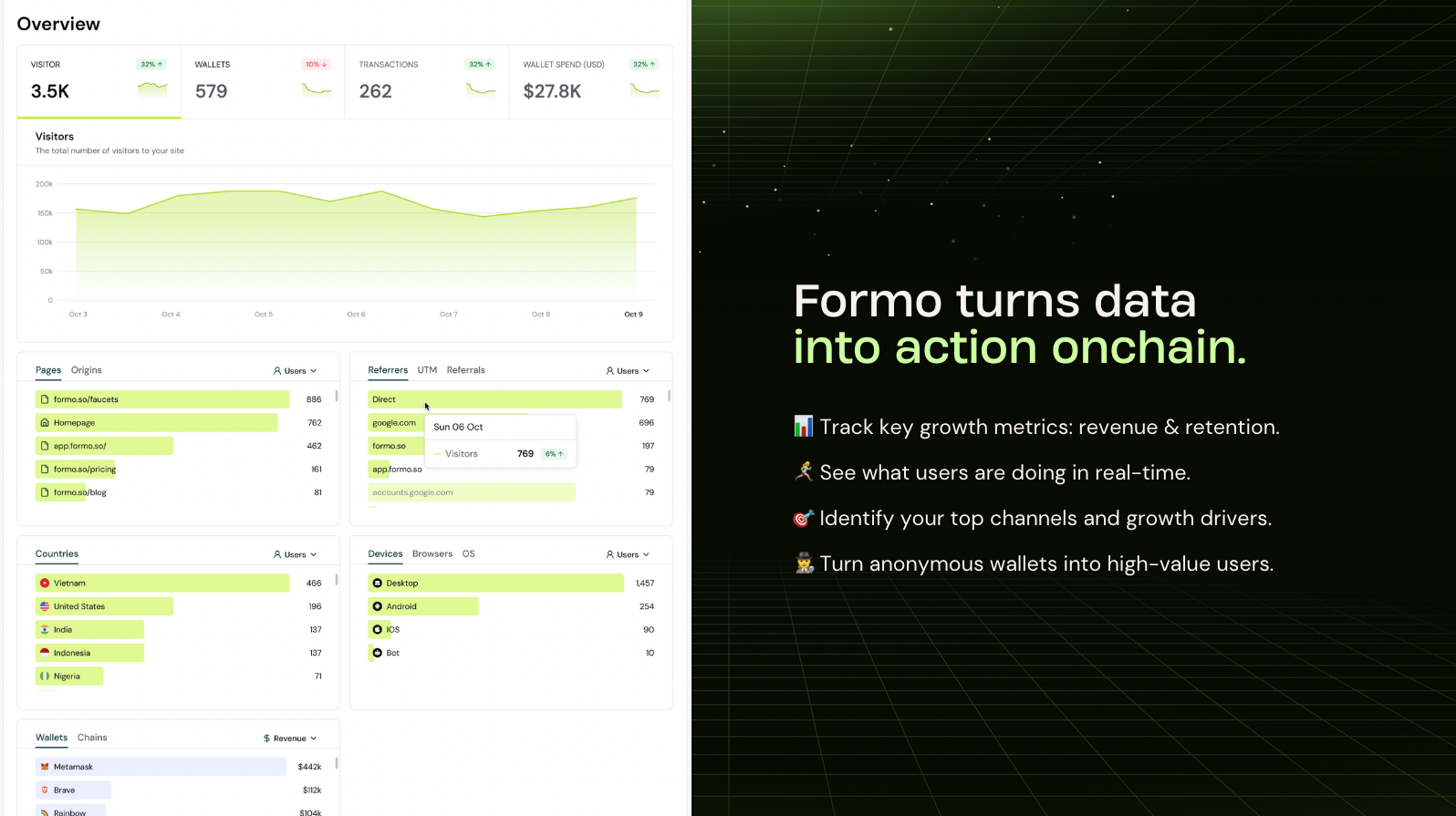 The Formo Web SDK is [open source](https://github.com/getformo/sdk) and implements the standard [Events API](/data/events/overview#events-api).
## Installation
Use this pre-built prompt to get started faster: [Install Formo with AI](/install#install-with-ai).
There are several ways to install the Formo SDK:
* [Wagmi](#wagmi) is recommended for EVM apps with wallet connection
* [Solana](#solana-integration) for Solana apps using framework-kit
* [HTML Snippet](#html-snippet) is recommended for static websites
* [React & Next.js (without Wagmi)](#react--nextjs-without-wagmi)
* [Angular](#angular) for Angular apps using the bare EIP-1193 provider
We recommend installing Formo on **both your website (example.com) and your app (app.example.com)** on the same project with the same SDK write key.
The standard setup is to use the HTML snippet on your website and Wagmi on your app, with [cross-subdomain tracking](#cross-subdomain-tracking) enabled.
### Wagmi
If you're already using [Wagmi](https://wagmi.sh), this is the recommended way to install Formo for apps.
When `wagmi` options are provided, the SDK hooks directly into Wagmi's state management instead of wrapping EIP-1193 providers. This provides:
* Native event handling via Wagmi's built-in state system
* Better compatibility with wallet connection libraries (RainbowKit, ConnectKit, etc.)
* Full tracking of signatures and transactions via TanStack Query's mutation cache
Note that transaction and signature autocapture requires the use of [wagmi React hooks](#wagmi-integration)
Install the Web SDK via NPM.
```bash theme={null}
npm install @formo/analytics --save
```
```tsx theme={null}
// App.tsx
import { WagmiProvider, createConfig, http } from 'wagmi';
import { QueryClient, QueryClientProvider } from '@tanstack/react-query';
import { FormoAnalyticsProvider } from '@formo/analytics';
import { mainnet } from 'wagmi/chains';
const wagmiConfig = createConfig({
chains: [mainnet],
transports: {
[mainnet.id]: http(),
},
});
const queryClient = new QueryClient();
function App() {
return (
);
}
```
### HTML Snippet
Install this snippet at the `` of your website:
```html theme={null}
```
Enable [Subresource Integrity (SRI)](/security/sri) to improve site security.
### React & Next.js (without Wagmi)
Use [Wagmi](#wagmi) for more reliable and secure event tracking.
Install the Web SDK via NPM.
```bash theme={null}
npm install @formo/analytics --save
```
```tsx theme={null}
// App.tsx (or App.js)
import { FormoAnalyticsProvider } from '@formo/analytics';
const root = ReactDOM.createRoot(document.getElementById('root') as HTMLElement);
root.render(
);
```
```tsx theme={null}
// Usage on a page component
import { useFormo } from '@formo/analytics';
const HomePage = () => {
const analytics = useFormo();
useEffect(() => {
// Track a custom event
analytics.track('Swap Completed', { points: 100 });
}, [analytics]);
return
The Formo Web SDK is [open source](https://github.com/getformo/sdk) and implements the standard [Events API](/data/events/overview#events-api).
## Installation
Use this pre-built prompt to get started faster: [Install Formo with AI](/install#install-with-ai).
There are several ways to install the Formo SDK:
* [Wagmi](#wagmi) is recommended for EVM apps with wallet connection
* [Solana](#solana-integration) for Solana apps using framework-kit
* [HTML Snippet](#html-snippet) is recommended for static websites
* [React & Next.js (without Wagmi)](#react--nextjs-without-wagmi)
* [Angular](#angular) for Angular apps using the bare EIP-1193 provider
We recommend installing Formo on **both your website (example.com) and your app (app.example.com)** on the same project with the same SDK write key.
The standard setup is to use the HTML snippet on your website and Wagmi on your app, with [cross-subdomain tracking](#cross-subdomain-tracking) enabled.
### Wagmi
If you're already using [Wagmi](https://wagmi.sh), this is the recommended way to install Formo for apps.
When `wagmi` options are provided, the SDK hooks directly into Wagmi's state management instead of wrapping EIP-1193 providers. This provides:
* Native event handling via Wagmi's built-in state system
* Better compatibility with wallet connection libraries (RainbowKit, ConnectKit, etc.)
* Full tracking of signatures and transactions via TanStack Query's mutation cache
Note that transaction and signature autocapture requires the use of [wagmi React hooks](#wagmi-integration)
Install the Web SDK via NPM.
```bash theme={null}
npm install @formo/analytics --save
```
```tsx theme={null}
// App.tsx
import { WagmiProvider, createConfig, http } from 'wagmi';
import { QueryClient, QueryClientProvider } from '@tanstack/react-query';
import { FormoAnalyticsProvider } from '@formo/analytics';
import { mainnet } from 'wagmi/chains';
const wagmiConfig = createConfig({
chains: [mainnet],
transports: {
[mainnet.id]: http(),
},
});
const queryClient = new QueryClient();
function App() {
return (
);
}
```
### HTML Snippet
Install this snippet at the `` of your website:
```html theme={null}
```
Enable [Subresource Integrity (SRI)](/security/sri) to improve site security.
### React & Next.js (without Wagmi)
Use [Wagmi](#wagmi) for more reliable and secure event tracking.
Install the Web SDK via NPM.
```bash theme={null}
npm install @formo/analytics --save
```
```tsx theme={null}
// App.tsx (or App.js)
import { FormoAnalyticsProvider } from '@formo/analytics';
const root = ReactDOM.createRoot(document.getElementById('root') as HTMLElement);
root.render(
);
```
```tsx theme={null}
// Usage on a page component
import { useFormo } from '@formo/analytics';
const HomePage = () => {
const analytics = useFormo();
useEffect(() => {
// Track a custom event
analytics.track('Swap Completed', { points: 100 });
}, [analytics]);
return Welcome to the Home Page!
;
};
export default HomePage;
```
### Angular
`FormoAnalyticsProvider` and `useFormo()` are React-only. Angular apps import from the React-free `@formo/analytics/core` subpath and wrap `FormoAnalytics.init()` in an injectable service, with wallets connected over the bare EIP-1193 provider (`window.ethereum`). Full working example: [with-angular](https://github.com/getformo/examples/tree/main/with-angular).
Install the Web SDK along with the `buffer` polyfill. Angular's esbuild build doesn't auto-polyfill Node globals, but the SDK uses `Buffer` to decode signed-message payloads. Without it, signing throws `ReferenceError: Buffer is not defined`.
```bash theme={null}
npm install @formo/analytics buffer viem --save
```
```ts theme={null}
// src/polyfills.ts
import { Buffer } from 'buffer';
(globalThis as unknown as { Buffer?: typeof Buffer }).Buffer ??= Buffer;
```
```jsonc theme={null}
// angular.json (build > options)
{
"polyfills": ["src/polyfills.ts"],
"allowedCommonJsDependencies": ["viem"]
}
```
Wrap `FormoAnalytics.init()` in an injectable service. Import from `@formo/analytics/core`; the root entry pulls in the React provider, which Angular doesn't need:
```ts theme={null}
// src/app/services/formo-analytics.service.ts
import { Injectable } from '@angular/core';
import { FormoAnalytics } from '@formo/analytics/core';
import type { IFormoAnalytics, IFormoEventProperties } from '@formo/analytics/core';
@Injectable({ providedIn: 'root' })
export class FormoAnalyticsService {
private analytics: IFormoAnalytics | null = null;
async init(): Promise {
if (typeof window === 'undefined') return;
this.analytics = await FormoAnalytics.init('', {
autocapture: { connect: true, disconnect: true, chain: true, signature: true, transaction: true },
});
}
identify(address: string): void {
void this.analytics?.identify({ address });
}
track(event: string, properties?: IFormoEventProperties): void {
void this.analytics?.track(event, properties);
}
}
```
Initialize it with `provideAppInitializer` so the SDK's autocapture wraps `window.ethereum` **before** any wallet interaction:
```ts theme={null}
// src/app/app.config.ts
import { ApplicationConfig, inject, provideAppInitializer } from '@angular/core';
import { provideRouter } from '@angular/router';
import { routes } from './app.routes';
import { FormoAnalyticsService } from './services/formo-analytics.service';
export const appConfig: ApplicationConfig = {
providers: [
provideRouter(routes),
provideAppInitializer(() => inject(FormoAnalyticsService).init()),
],
};
```
## Identify users
Call [`identify()`](/data/events/identify) after a user connects their wallet or signs in on your website or app:
```ts theme={null}
analytics.identify({ address });
OR
window.formo.identify(...);
```
If no parameters are specified, the Formo SDK will attempt to auto-identify the wallet address.
Call `identify()` in a `useEffect` that triggers when the wallet address changes:
```tsx theme={null}
import { useFormo } from '@formo/analytics';
import { useAccount } from 'wagmi';
import { useEffect } from 'react';
function App() {
const { address } = useAccount();
const analytics = useFormo();
useEffect(() => {
if (address && analytics) {
analytics.identify({ address });
}
}, [address, analytics]);
}
```
The SDK includes `parsePrivyProperties()` which extracts profile properties (email, social accounts) and all linked wallet addresses from the Privy user object.
Call `identify()` in a `useEffect` that triggers when the Privy user becomes available:
```tsx theme={null}
import { useFormo, parsePrivyProperties } from '@formo/analytics';
import { usePrivy } from '@privy-io/react-auth';
import { useEffect } from 'react';
function App() {
const { user } = usePrivy();
const formo = useFormo();
useEffect(() => {
if (!user || !formo) return;
const { properties, wallets } = parsePrivyProperties(user);
for (const wallet of wallets) {
formo.identify({ address: wallet.address, userId: user.id }, properties);
}
}, [user, formo]);
}
```
`parsePrivyProperties()` returns:
* `properties` - a flat object with `email`, `discord`, `twitter`, `farcaster`, `github`, `telegram`, `google`, `apple`, and other social identifiers from the Privy user's linked accounts
* `wallets` - all wallets linked to the Privy user, so each wallet is identified with the same profile properties
```html theme={null}
```
Inject the analytics service and call `identify()` from the same place you discover the wallet address:
```ts theme={null}
import { Injectable, inject, signal } from '@angular/core';
import { FormoAnalyticsService } from './services/formo-analytics.service';
import type { Address } from 'viem';
@Injectable({ providedIn: 'root' })
export class WalletService {
private readonly formo = inject(FormoAnalyticsService);
readonly address = signal(null);
async connect(): Promise {
const [account] = await window.ethereum!.request({ method: 'eth_requestAccounts' });
this.address.set(account);
this.formo.identify(account);
}
}
```
See the [with-angular example](https://github.com/getformo/examples/tree/main/with-angular) for a full working example.
## Track events
The Web SDK automatically captures common events such as page views and wallet events (connect, disconnect, signature, transaction, etc) with full attribution (referrer, UTM, referrals.)
To track custom events (in-app actions, key conversions) use the [`track`](/data/events/track) function:
```ts theme={null}
import { useFormo } from '@formo/analytics';
const analytics = useFormo();
analytics.track("Position Opened", // custom event name
{
pool_id: "LINK/ETH", // custom event property
amount: "1200", // custom event property
volume: -59.99, // volume (reserved property, can be positive or negative to track outflows)
revenue: 99.99, // revenue (reserved property, must be a non-negative number)
}
)
OR
window.formo.track(...)
```
Using a [standardized naming convention](/data/events/track#naming-events) for your custom events is recommended.
You can [track volume, revenue, and points](/data/events/track#tracking-volume-revenue-points) in custom events.
## Code examples
examples/with-privy
examples/with-dynamic
examples/with-turnkey
examples/with-react
examples/with-next-app-router
examples/with-next-page-router
examples/with-metamask
examples/with-thirdweb
examples/with-reown
examples/with-crossmint
examples/with-openfort
examples/with-angular
examples/with-solana
examples/with-react-native
## Configuration
### Local testing
The SDK skips tracking in localhost by default.
To enable tracking locally during development, set `tracking` to `true`:
```tsx theme={null}
```
### Logging
Control the level of logs the SDK prints to the console with the following logLevel settings:
```tsx theme={null}
```
| Log Level | Description |
| --------- | -------------------------------------------------------------------------------------------------- |
| trace | Shows the most detailed diagnostic information, useful for tracing program execution flow. |
| debug | Shows all messages, including function context information for each public method the SDK invokes. |
| info | Shows informative messages about normal application operation. |
| warn | Default. Shows error and warning messages. |
| error | Shows error messages only. |
### Autocapture
You can configure which wallet events are automatically captured by the SDK:
```javascript theme={null}
// Enable full autocapture (default)
const analytics = await FormoAnalytics.init('YOUR_API_KEY', {
autocapture: true
});
// Disable autocapture for signature and transaction events
const analytics = await FormoAnalytics.init('YOUR_API_KEY', {
autocapture: {
connect: true,
disconnect: true,
signature: false, // Disable signature tracking
transaction: false, // Disable transaction tracking
chain: true
}
});
// Disable all autocapture
const analytics = await FormoAnalytics.init('YOUR_API_KEY', {
autocapture: false
});
```
### Batching
To support high-performance environments, the SDK sends events in batches.
```tsx theme={null}
```
Customize this behavior with the `flushAt` and `flushInterval` configuration parameters.
### Ready callback
The `ready` callback function executes once the Formo SDK is fully loaded and ready to use. This is useful for performing initialization tasks or calling SDK methods that require the SDK to be ready.
```tsx theme={null}
```
For Browser installations, you can use the ready callback in the `onload` attribute:
```html theme={null}
```
### Environments
You can control tracking behavior in different environments (test, staging) with the `tracking` option:
```javascript theme={null}
// Initialize with a boolean (simple on/off)
const analytics = await FormoAnalytics.init('your-write-key', {
tracking: true // Enable tracking everywhere, including localhost
});
// Initialize only on production environment
const analytics = await FormoAnalytics.init('your-write-key', {
tracking: ENV === 'production'
});
// Initialize with an object for exclusion rules
const analytics = await FormoAnalytics.init('your-write-key', {
tracking: {
excludeHosts: ['stage-v2.puri.fi'], // Exclude tracking based on window.location.hostname
excludePaths: ['/test', '/debug'], // Exclude tracking based on window.location.pathname
excludeChains: [5] // Exclude tracking on Goerli testnet (5)
}
});
```
Specify exact hostnames and exact paths in exclusion lists.
### Excluding query parameters
Formo automatically captures the page URL, query string, individual query-parameter properties, and the referrer.
If your URLs carry sensitive data (auth tokens, one-time codes, emails), use `tracking.excludeQueryParams` to strip those parameters in the browser, before any event is sent so they are never transmitted or stored:
```tsx theme={null}
{children}
```
| Option | Type | Default | Description |
| -------------------- | ---------- | ------- | ----------------------------------------------------------------------------------------------------------------------------------------------------- |
| `excludeQueryParams` | `string[]` | `[]` | Query parameter names to strip from captured URLs before any event is sent. Applied on top of an always-on built-in denylist that cannot be disabled. |
The following parameters are **always** stripped, regardless of configuration:
* `privy_oauth_code` — Privy OAuth authorization code
* `privy_oauth_state` — Privy OAuth CSRF state token
* `privy_oauth_provider` — Privy OAuth provider identifier
Excluded parameters are removed from the `url`, `query`, `referrer`, and other event properties. Matching is case-insensitive.
### Consent management
The Formo Web SDK includes simplified consent management functionality to help you comply with privacy regulations like GDPR, CCPA, and ePrivacy Directive.
Control user tracking preferences with simple opt-out and opt-in methods:
```javascript theme={null}
import { useFormo } from '@formo/analytics';
const analytics = useFormo();
// Check if user has opted out of tracking
console.log(analytics.hasOptedOutTracking())
// If user has not opted out, tracking is enabled
analytics.track('page_view');
// Opt out of tracking (stops all tracking for the user)
analytics.optOutTracking();
// Opt back into tracking (re-enables tracking for the user)
analytics.optInTracking();
```
For browser installations:
```javascript theme={null}
// Manage consent
window.formo.optOutTracking();
window.formo.optInTracking();
```
### Cross subdomain tracking
By default, Formo sets identity cookies on the root domain, sharing visitor identity across all subdomains. This ensures accurate visitor counts and consistent attribution across your subdomains out of the box.
| Value | Behavior |
| ---------------- | ----------------------------------------------------------------------------------------------------------------------------- |
| `true` (default) | Cookies are set on the root domain (e.g. `.example.com`), sharing visitor identity across all subdomains. |
| `false` | Cookies are scoped to the current hostname only. A cookie set on `app.example.com` is **not** visible from `www.example.com`. |
With the default `crossSubdomainCookies` setting:
* **Cross subdomain tracking**: track users as they move between your marketing site, app, docs, and other subdomains.
* **Accurate attribution**: attribute conversions to the correct channel, even when users cross subdomains.
* **Automatic migration**: the SDK migrates existing host-scoped cookies to the apex domain so visitors are not double-counted.
To disable cross-subdomain tracking and scope cookies to the current hostname only, set `crossSubdomainCookies` to `false`:
```html theme={null}
```
```tsx theme={null}
```
```javascript theme={null}
const analytics = await FormoAnalytics.init('YOUR_API_KEY', {
crossSubdomainCookies: false
});
```
### Referrals
Formo autodetects `ref`, `referral`, and `refcode` query parameters in the URL. You can customize how referrals are detected by the SDK:
```tsx theme={null}
```
In the above configuration, Formo will detect referrals from:
* the `via` and `ref` query parameters in the URL, and
* from the `/referral/([^/]+)` path pattern
### Wagmi integration
For apps using [Wagmi](https://wagmi.sh), enable native integration by providing the Wagmi config and QueryClient:
```tsx theme={null}
```
Transaction and signature autocapture requires the use of [wagmi React hooks](https://wagmi.sh/react/api/hooks) (`useWriteContract`, `useSendTransaction`, `useSignMessage`). Calls via `@wagmi/core` or viem directly bypass the mutation cache and won't be tracked. If you are not using these hooks, use the non-wagmi React or Next.js installation methods instead.
When Wagmi mode is enabled, the SDK:
* Hooks directly into Wagmi's state management for connection events
* Uses TanStack Query's mutation cache for signature and transaction tracking
* Skips EIP-1193 provider wrapping (no proxy behavior)
| Event Type | Without QueryClient | With QueryClient |
| ------------ | ------------------- | ---------------- |
| Connect | ✅ Tracked | ✅ Tracked |
| Disconnect | ✅ Tracked | ✅ Tracked |
| Chain Change | ✅ Tracked | ✅ Tracked |
| Signatures | ❌ Not tracked | ✅ Tracked |
| Transactions | ❌ Not tracked | ✅ Tracked |
Use the same `QueryClient` instance for both Wagmi and Formo to avoid creating multiple cache instances.
### Solana integration
The Formo Web SDK supports Solana via [framework-kit](https://github.com/solana-foundation/framework-kit) (`@solana/client` + `@solana/react-hooks`). The SDK subscribes to framework-kit's zustand store as a read-only observer. It never wraps or intercepts wallet methods.
See the full [Solana example app](https://github.com/getformo/examples/tree/main/with-solana) for a working implementation.
```bash theme={null}
npm install @formo/analytics @solana/client @solana/react-hooks
```
Wrap your app with `FormoAnalyticsProvider` and pass `client.store` in the solana options. The SDK automatically tracks wallet connects, disconnects, account switches, and network changes.
```tsx theme={null}
import { createClient, autoDiscover } from '@solana/client';
import { SolanaProvider } from '@solana/react-hooks';
import { FormoAnalyticsProvider } from '@formo/analytics';
const client = createClient({
cluster: 'devnet',
walletConnectors: autoDiscover(),
});
function App() {
return (
);
}
```
Then use the `useFormo` hook in any component:
```tsx theme={null}
import { useFormo } from '@formo/analytics';
function MyComponent() {
const formo = useFormo();
const handleClick = () => {
formo.track('button_click', { page: 'home' });
};
}
```
If you're not using React or need manual control, call `FormoAnalytics.init()` directly:
```tsx theme={null}
import { createClient, autoDiscover } from '@solana/client';
import { FormoAnalytics } from '@formo/analytics';
const client = createClient({
cluster: 'devnet',
walletConnectors: autoDiscover(),
});
const formo = await FormoAnalytics.init('', {
evm: false,
solana: {
store: client.store,
},
});
```
**Autocaptured events**
The following Solana wallet events are autocaptured via zustand store subscription:
| Event | Trigger |
| ------------ | ----------------------------------------------------- |
| Connect | Wallet connects via `useWalletConnection().connect()` |
| Disconnect | Wallet disconnects |
| Chain change | Cluster/network switches via `setCluster()` |
**Manually tracking Solana transactions and signatures**
Transaction and signature events for Solana wallets must be tracked explicitly because framework-kit's React hooks (`useSolTransfer`, `useSendTransaction`, `useTransactionPool`) manage transaction state locally and don't write to the store.
```tsx theme={null}
import { useFormo, TransactionStatus, SignatureStatus, SOLANA_CHAIN_IDS } from '@formo/analytics';
const formo = useFormo();
// Transactions
formo.transaction({ status: TransactionStatus.STARTED, chainId: SOLANA_CHAIN_IDS['devnet'], address });
const sig = await solTransfer.send({ destination, amount });
formo.transaction({ status: TransactionStatus.CONFIRMED, chainId: SOLANA_CHAIN_IDS['devnet'], address, transactionHash: sig });
// Signatures (signMessage / signTransaction)
formo.signature({ status: SignatureStatus.REQUESTED, chainId: SOLANA_CHAIN_IDS['devnet'], address, message });
const result = await session.signMessage(encoded);
formo.signature({ status: SignatureStatus.CONFIRMED, chainId: SOLANA_CHAIN_IDS['devnet'], address, message });
```
For Solana-only apps, set `evm: false` to disable EVM provider detection (EIP-1193 / EIP-6963). This prevents unnecessary tracking of injected EVM wallets.
## FAQ
The [Wagmi integration](#wagmi) automatically tracks wallet connections, disconnections, chain switches, transactions, and signatures by hooking into Wagmi's wallet adapter. The standard [React integration](#react--nextjs-without-wagmi) tracks wallet events by wrapping the EIP-1193 wallet provider to track signatures and transactions. Use the Wagmi integration if your dApp uses Wagmi and its hooks.
Use [formo.track()](/data/events/track) to send custom events with any properties you need. For example: `formo.track('swap', { tokenIn: 'USDC', tokenOut: 'ETH', amount: 1000 })`. Custom events appear in the [Activity](/features/product-analytics/activity) feed and can be queried in the [Explorer](/features/product-analytics/explore).
Yes. The SDK provides built-in [consent management](#consent-management) with `optOutTracking()` and `optInTracking()` methods. Call `optOutTracking()` to stop all tracking for a user, and `optInTracking()` to re-enable it. Formo does not use third-party cookies, IP addresses, or device fingerprinting, so most jurisdictions do not require a cookie consent banner.
Yes. The SDK includes a dedicated [Privy integration](#identify-users) with `parsePrivyProperties()` to extract profile properties and linked wallet addresses. For other wallet providers, use the standard [React integration](#react--nextjs-without-wagmi). If your wallet provider uses Wagmi under the hood (many do, including Privy), you can also use the [Wagmi integration](#wagmi) for automatic wallet event tracking.
## Proxy
To avoid ad-blockers from blocking your requests, we recommend setting up a reverse proxy.
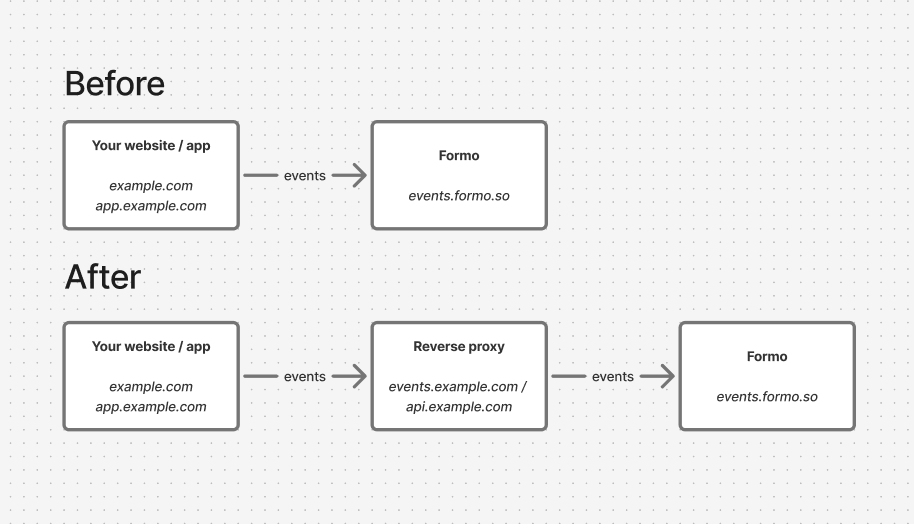 Here are the domains used by Formo to load the SDK and send data:
| Domain | Use case |
| --------------- | ----------------------------------------------------------------------------------------------------------- |
| cdn.formo.so | Loads the SDK (only for [Website installation](#html-snippet)) e.g. `https://cdn.formo.so/analytics@latest` |
| events.formo.so | Receives data from the SDK (`https://events.formo.so/v0/raw_events`) |
### CDN
Some ad blockers block specific SDK-related downloads and API calls based on the domain name and URL.
To circumvent this issue you can download and serve the Formo SDK from `cdn.formo.so` to your own domain e.g. `yourdomain.com/formo.js`.
### Next.js rewrites
If you are using Next.js, you can take advantage of [rewrites](https://nextjs.org/docs/app/api-reference/config/next-config-js/rewrites) to behave like a reverse proxy. To do so, add a `rewrites()` function to your next.config.js file:
```javascript theme={null}
// next.config.js
module.exports = {
async rewrites() {
return [
{
source: "/formo.js",
destination: "https://cdn.formo.so/analytics@latest", // If using website install script
},
{
source: "/api/ingest",
destination: "https://events.formo.so/v0/raw_events",
},
];
},
};
```
Then, replace the website install script to:
```javascript theme={null}
```
Then, configure the Formo SDK to send requests via your rewrite. Update the `apiHost` parameter in the Formo SDK:
```javascript theme={null}
```
> See an [example Next.js app](https://github.com/getformo/examples/tree/main/next-app-router) here.
### Next.js middleware
If you are using Next.js and rewrites aren't working for you, you can write [custom middleware](https://nextjs.org/docs/14/pages/building-your-application/routing/middleware) to proxy requests to Formo.
Create a file named `middleware.js/ts` in your base directory (same level as the app folder).
```javascript theme={null}
import { NextResponse } from "next/server";
export function middleware(request: any) {
const hostname = "events.formo.so";
const requestHeaders = new Headers(request.headers);
requestHeaders.set("host", hostname);
let url = request.nextUrl.clone();
url.protocol = "https";
url.hostname = hostname;
url.port = 443;
url.pathname = url.pathname.replace(/^\/ingest/, "");
return NextResponse.rewrite(url, {
headers: requestHeaders,
});
}
export const config = {
matcher: "/ingest/:path*",
};
```
In this file, set up code to match requests to a custom route, set a new host header, change the URL to point to Formo, and rewrite the response.
Once done, configure the Formo SDK to send requests via your rewrite:
```javascript theme={null}
```
### Others
Alternatively, you can set up your own proxy (with Cloudfront, Cloudflare, etc) and pass the URL as the SDK `apiHost`:
```javascript theme={null}
```
### Verification
To verify the proxy is working:
* Visit your website / app
* Open the network tab in your browser's developer tools
* Check that analytics requests are going through your domain instead of `events.formo.so`
* Check that events show up in the Activity page on the Formo dashboard
Here are the domains used by Formo to load the SDK and send data:
| Domain | Use case |
| --------------- | ----------------------------------------------------------------------------------------------------------- |
| cdn.formo.so | Loads the SDK (only for [Website installation](#html-snippet)) e.g. `https://cdn.formo.so/analytics@latest` |
| events.formo.so | Receives data from the SDK (`https://events.formo.so/v0/raw_events`) |
### CDN
Some ad blockers block specific SDK-related downloads and API calls based on the domain name and URL.
To circumvent this issue you can download and serve the Formo SDK from `cdn.formo.so` to your own domain e.g. `yourdomain.com/formo.js`.
### Next.js rewrites
If you are using Next.js, you can take advantage of [rewrites](https://nextjs.org/docs/app/api-reference/config/next-config-js/rewrites) to behave like a reverse proxy. To do so, add a `rewrites()` function to your next.config.js file:
```javascript theme={null}
// next.config.js
module.exports = {
async rewrites() {
return [
{
source: "/formo.js",
destination: "https://cdn.formo.so/analytics@latest", // If using website install script
},
{
source: "/api/ingest",
destination: "https://events.formo.so/v0/raw_events",
},
];
},
};
```
Then, replace the website install script to:
```javascript theme={null}
```
Then, configure the Formo SDK to send requests via your rewrite. Update the `apiHost` parameter in the Formo SDK:
```javascript theme={null}
```
> See an [example Next.js app](https://github.com/getformo/examples/tree/main/next-app-router) here.
### Next.js middleware
If you are using Next.js and rewrites aren't working for you, you can write [custom middleware](https://nextjs.org/docs/14/pages/building-your-application/routing/middleware) to proxy requests to Formo.
Create a file named `middleware.js/ts` in your base directory (same level as the app folder).
```javascript theme={null}
import { NextResponse } from "next/server";
export function middleware(request: any) {
const hostname = "events.formo.so";
const requestHeaders = new Headers(request.headers);
requestHeaders.set("host", hostname);
let url = request.nextUrl.clone();
url.protocol = "https";
url.hostname = hostname;
url.port = 443;
url.pathname = url.pathname.replace(/^\/ingest/, "");
return NextResponse.rewrite(url, {
headers: requestHeaders,
});
}
export const config = {
matcher: "/ingest/:path*",
};
```
In this file, set up code to match requests to a custom route, set a new host header, change the URL to point to Formo, and rewrite the response.
Once done, configure the Formo SDK to send requests via your rewrite:
```javascript theme={null}
```
### Others
Alternatively, you can set up your own proxy (with Cloudfront, Cloudflare, etc) and pass the URL as the SDK `apiHost`:
```javascript theme={null}
```
### Verification
To verify the proxy is working:
* Visit your website / app
* Open the network tab in your browser's developer tools
* Check that analytics requests are going through your domain instead of `events.formo.so`
* Check that events show up in the Activity page on the Formo dashboard