> ## Documentation Index
> Fetch the complete documentation index at: https://docs.formo.so/llms.txt
> Use this file to discover all available pages before exploring further.
# How to Segment and Export Wallets for Targeted Campaigns
> Build targeted user segments using wallet properties, onchain behavior, and lifecycle data, then export them as CSV for marketing campaigns on X and Farcaster.
Stop marketing to everyone. Start marketing to the right wallets.
Wallet segmentation is how you identify and target your most valuable users. With Formo, you can slice your audience by net worth, lifecycle stage, onchain behavior, and more, then export those segments for campaigns on X, Farcaster, and Lens.
## Part 1: Start on the Users Page
Open Formo's dashboard and click **Users** in the sidebar. You'll see a table of all users with their wallet addresses, lifecycle stages, net worth, labels, and last activity timestamp.
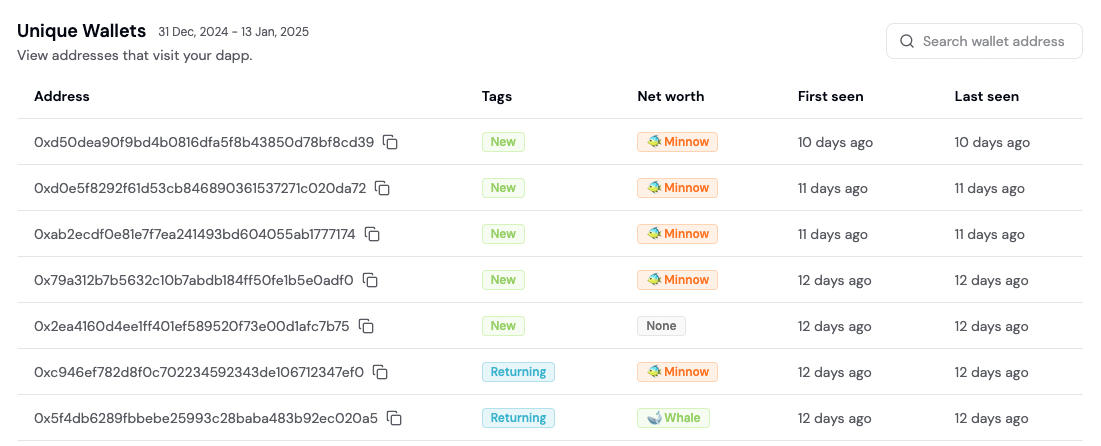 Each row is a wallet. Every column is filterable. This is your segmentation starting point.
## Part 2: Apply Property Filters
Click the **Filter** button to add conditions. You can filter by:
* **Lifecycle**: New, Returning, Power User, Resurrected, At Risk, Churned
* **Net Worth**: Exact ranges ($0-$10k, $10k-$100k, \$100k+, custom)
* **Wallet Labels**: Verified accounts, sanctions flags, passport scores
* **Apps Used**: Filter to users who used specific dapps
* **Tokens Held**: Filter by specific token holdings
* **Chains**: Filter by blockchain activity (Ethereum, Polygon, etc.)
* **Device**: Mobile, desktop, tablet
* **Country**: Geographic filtering
For example, to target whale prospects, filter for net worth > \$100k AND lifecycle = New.
## Part 3: Apply Attribution Filters
Under **Attribution** section, filter by:
* **UTM Source / Medium / Campaign**: First-touch or last-touch attribution
* **Referrer**: How users arrived at your dapp
* **First Touch vs Last Touch**: Distinguish acquisition vs conversion sources
Example: Show me all users from a specific Twitter campaign (utm\_source=twitter) who had at least one transaction.
## Part 4: Build Behavioral Segments
Click the **Behavioral** tab to create segments based on user actions.
Define conditions like: "Users who performed Event X at least N times in the last Y days"
Combine multiple behaviors with AND/NOT logic:
* Users who completed at least 2 swaps AND connected a wallet
* Users who visited the app 5+ times AND did NOT make a transaction
These filters are powerful for identifying power users vs disengaged users.
## Part 5: Save as a Segment
Once your filters are set, click the **Save as Segment** button in the top right. Give it a name like "Q1 Whale Prospects" or "Churned Power Users".
Saved segments appear in a dropdown menu for quick reuse across the app. You can apply the same segment to multiple dashboards and reports.
## Part 6: Export Your Segment
With your segment active, click **Export as CSV** in the top right.
Formo downloads a CSV file with columns: address, ENS name, net worth, lifecycle stage, last activity, and more. This is campaign-ready data.
## Part 7: Use Exported Data for Campaigns
Import the CSV into your marketing tools:
* **X/Twitter**: Upload to Tailwind, Buffer, or Twitter Ads for wallet-based targeting
* **Farcaster**: Use Neynar or Warpcast's audience upload feature
* **Lens**: Import to Lens' native campaign tools
* **Email**: If you have wallet owners' emails, import for email campaigns
Each exported wallet is a real, verified onchain identity with transaction history.
## Ready-to-Use Segment Recipes
### Recipe 1: Whale Prospects
Target high-net-worth users who are brand new.
Filter config:
* Net Worth: > \$100,000
* Lifecycle: New
* Sessions: = 1
### Recipe 2: Churned Power Users
Re-engage users who were once active but disappeared.
Filter config:
* Lifecycle: Churned
* Sessions: > 10
* No Activity: > 30 days
### Recipe 3: Campaign Converts
Identify users who arrived from a specific campaign and converted.
Filter config:
* UTM Source: \[your campaign source]
* Last Touch: \[same campaign]
* Behavioral: Completed Transaction at least 1 time
### Recipe 4: DeFi Crossover
Find users who use competitor dapps and yours (cross-protocol opportunity).
Filter config:
* Apps Used: \[Competitor App A] AND \[Your App]
* Behavioral: Performed swap at least 1 time in your app
### Recipe 5: Dormant High-Value
Wake up large wallets that haven't returned recently.
Filter config:
* Net Worth: > \$50,000
* Lifecycle: Churned OR Returning
* Last Activity: > 14 days ago
## Targeting Recipes for Campaigns
### ICP Definition by App Type
| App Type | Characteristics | Avg. Net Worth | Transaction Frequency |
| ----------- | --------------------------------------------------- | -------------- | --------------------- |
| **DEX** | Active traders, high risk tolerance, frequent swaps | $50k-$500k | 10+ txs/month |
| **Lending** | Risk-averse, capital preservation focus | \$100k+ | 2-5 txs/month |
| **Gaming** | Regular engagement, competitive interest | $5k-$50k | 20+ txs/month |
| **Bridge** | Multi-chain users, often whales | \$200k+ | 5+ txs/month |
### Four Ready-Made Segment Recipes
**Recipe: High-Value DeFi Users**
| Filter | Condition |
| --------- | ----------------------- |
| Label | DeFi Active |
| Net Worth | > \$50,000 |
| Lifecycle | Power User OR Returning |
**Recipe: Churned Whales**
| Filter | Condition |
| ------------- | ------------- |
| Net Worth | > \$100,000 |
| Lifecycle | Churned |
| Last Activity | > 30 days ago |
**Recipe: Competitor Users**
| Filter | Condition |
| --------- | ---------------------- |
| Apps Used | \[Competitor App Name] |
| Net Worth | > \$10,000 |
| Your App | Has NOT transacted |
**Recipe: Campaign Responders**
| Filter | Condition |
| ---------------- | ---------------- |
| UTM Source | twitter |
| UTM Campaign | \[Campaign Name] |
| Wallet Connected | Yes |
### Campaign Channels
* X/Twitter ads (upload CSV to Twitter Ads Manager)
* Farcaster outreach (use Neynar audience upload)
* Discord community targeting
* Airdrop/rewards distribution
### Track Campaign Performance
| Metric | Measurement |
| ------------------ | ---------------------------------- |
| Wallet Connections | Count from UTM tracking |
| Transactions | Conversions from segment |
| Volume | Total value transferred |
| Cohort Retention | Segment reactivation after 30 days |
### Campaign Messaging by Segment Type
Tailor your messaging based on the segment you're targeting:
| Segment | Goal | Message Strategy |
| -------------------- | ------------- | ------------------------------------------------------------------------ |
| **High-Value Users** | Retention | Exclusive feature previews, VIP support, governance participation |
| **Churned Users** | Re-engagement | "We miss you" messaging, new feature announcements, incentives to return |
| **Competitor Users** | Acquisition | Differentiation messaging, migration incentives, comparison content |
| **New Users** | Activation | Onboarding content, first-transaction rewards, educational materials |
### UTM Tracking Tip
Add unique UTM parameters to your campaign links:
```
https://yourapp.com?utm_source=twitter&utm_campaign=whale_targets&utm_medium=social
```
Formo captures these automatically. Filter by UTM in the Attribution section to measure each campaign's impact.
## Next Steps
* Use [Activity](/features/product-analytics/activity) to segment users by campaign and measure ROI
* [Build Funnels](/guides/funnels) to compare segment conversion rates
* [Set Up Alerts](/features/product-analytics/alerts) to get notified when high-value wallets connect
* [Analyze User Flows](/guides/flows) to understand how different segments navigate your app
## FAQ
Yes. Apply a saved segment, then add additional filters on top. The results will be the intersection of both.
Yes. Export the CSV and import it into your platform of choice.
Each row is a wallet. Every column is filterable. This is your segmentation starting point.
## Part 2: Apply Property Filters
Click the **Filter** button to add conditions. You can filter by:
* **Lifecycle**: New, Returning, Power User, Resurrected, At Risk, Churned
* **Net Worth**: Exact ranges ($0-$10k, $10k-$100k, \$100k+, custom)
* **Wallet Labels**: Verified accounts, sanctions flags, passport scores
* **Apps Used**: Filter to users who used specific dapps
* **Tokens Held**: Filter by specific token holdings
* **Chains**: Filter by blockchain activity (Ethereum, Polygon, etc.)
* **Device**: Mobile, desktop, tablet
* **Country**: Geographic filtering
For example, to target whale prospects, filter for net worth > \$100k AND lifecycle = New.
## Part 3: Apply Attribution Filters
Under **Attribution** section, filter by:
* **UTM Source / Medium / Campaign**: First-touch or last-touch attribution
* **Referrer**: How users arrived at your dapp
* **First Touch vs Last Touch**: Distinguish acquisition vs conversion sources
Example: Show me all users from a specific Twitter campaign (utm\_source=twitter) who had at least one transaction.
## Part 4: Build Behavioral Segments
Click the **Behavioral** tab to create segments based on user actions.
Define conditions like: "Users who performed Event X at least N times in the last Y days"
Combine multiple behaviors with AND/NOT logic:
* Users who completed at least 2 swaps AND connected a wallet
* Users who visited the app 5+ times AND did NOT make a transaction
These filters are powerful for identifying power users vs disengaged users.
## Part 5: Save as a Segment
Once your filters are set, click the **Save as Segment** button in the top right. Give it a name like "Q1 Whale Prospects" or "Churned Power Users".
Saved segments appear in a dropdown menu for quick reuse across the app. You can apply the same segment to multiple dashboards and reports.
## Part 6: Export Your Segment
With your segment active, click **Export as CSV** in the top right.
Formo downloads a CSV file with columns: address, ENS name, net worth, lifecycle stage, last activity, and more. This is campaign-ready data.
## Part 7: Use Exported Data for Campaigns
Import the CSV into your marketing tools:
* **X/Twitter**: Upload to Tailwind, Buffer, or Twitter Ads for wallet-based targeting
* **Farcaster**: Use Neynar or Warpcast's audience upload feature
* **Lens**: Import to Lens' native campaign tools
* **Email**: If you have wallet owners' emails, import for email campaigns
Each exported wallet is a real, verified onchain identity with transaction history.
## Ready-to-Use Segment Recipes
### Recipe 1: Whale Prospects
Target high-net-worth users who are brand new.
Filter config:
* Net Worth: > \$100,000
* Lifecycle: New
* Sessions: = 1
### Recipe 2: Churned Power Users
Re-engage users who were once active but disappeared.
Filter config:
* Lifecycle: Churned
* Sessions: > 10
* No Activity: > 30 days
### Recipe 3: Campaign Converts
Identify users who arrived from a specific campaign and converted.
Filter config:
* UTM Source: \[your campaign source]
* Last Touch: \[same campaign]
* Behavioral: Completed Transaction at least 1 time
### Recipe 4: DeFi Crossover
Find users who use competitor dapps and yours (cross-protocol opportunity).
Filter config:
* Apps Used: \[Competitor App A] AND \[Your App]
* Behavioral: Performed swap at least 1 time in your app
### Recipe 5: Dormant High-Value
Wake up large wallets that haven't returned recently.
Filter config:
* Net Worth: > \$50,000
* Lifecycle: Churned OR Returning
* Last Activity: > 14 days ago
## Targeting Recipes for Campaigns
### ICP Definition by App Type
| App Type | Characteristics | Avg. Net Worth | Transaction Frequency |
| ----------- | --------------------------------------------------- | -------------- | --------------------- |
| **DEX** | Active traders, high risk tolerance, frequent swaps | $50k-$500k | 10+ txs/month |
| **Lending** | Risk-averse, capital preservation focus | \$100k+ | 2-5 txs/month |
| **Gaming** | Regular engagement, competitive interest | $5k-$50k | 20+ txs/month |
| **Bridge** | Multi-chain users, often whales | \$200k+ | 5+ txs/month |
### Four Ready-Made Segment Recipes
**Recipe: High-Value DeFi Users**
| Filter | Condition |
| --------- | ----------------------- |
| Label | DeFi Active |
| Net Worth | > \$50,000 |
| Lifecycle | Power User OR Returning |
**Recipe: Churned Whales**
| Filter | Condition |
| ------------- | ------------- |
| Net Worth | > \$100,000 |
| Lifecycle | Churned |
| Last Activity | > 30 days ago |
**Recipe: Competitor Users**
| Filter | Condition |
| --------- | ---------------------- |
| Apps Used | \[Competitor App Name] |
| Net Worth | > \$10,000 |
| Your App | Has NOT transacted |
**Recipe: Campaign Responders**
| Filter | Condition |
| ---------------- | ---------------- |
| UTM Source | twitter |
| UTM Campaign | \[Campaign Name] |
| Wallet Connected | Yes |
### Campaign Channels
* X/Twitter ads (upload CSV to Twitter Ads Manager)
* Farcaster outreach (use Neynar audience upload)
* Discord community targeting
* Airdrop/rewards distribution
### Track Campaign Performance
| Metric | Measurement |
| ------------------ | ---------------------------------- |
| Wallet Connections | Count from UTM tracking |
| Transactions | Conversions from segment |
| Volume | Total value transferred |
| Cohort Retention | Segment reactivation after 30 days |
### Campaign Messaging by Segment Type
Tailor your messaging based on the segment you're targeting:
| Segment | Goal | Message Strategy |
| -------------------- | ------------- | ------------------------------------------------------------------------ |
| **High-Value Users** | Retention | Exclusive feature previews, VIP support, governance participation |
| **Churned Users** | Re-engagement | "We miss you" messaging, new feature announcements, incentives to return |
| **Competitor Users** | Acquisition | Differentiation messaging, migration incentives, comparison content |
| **New Users** | Activation | Onboarding content, first-transaction rewards, educational materials |
### UTM Tracking Tip
Add unique UTM parameters to your campaign links:
```
https://yourapp.com?utm_source=twitter&utm_campaign=whale_targets&utm_medium=social
```
Formo captures these automatically. Filter by UTM in the Attribution section to measure each campaign's impact.
## Next Steps
* Use [Activity](/features/product-analytics/activity) to segment users by campaign and measure ROI
* [Build Funnels](/guides/funnels) to compare segment conversion rates
* [Set Up Alerts](/features/product-analytics/alerts) to get notified when high-value wallets connect
* [Analyze User Flows](/guides/flows) to understand how different segments navigate your app
## FAQ
Yes. Apply a saved segment, then add additional filters on top. The results will be the intersection of both.
Yes. Export the CSV and import it into your platform of choice.