> ## Documentation Index
> Fetch the complete documentation index at: https://docs.formo.so/llms.txt
> Use this file to discover all available pages before exploring further.
# How to Track and Improve User Retention
> Measure Day 7, 30, and 90 retention rates for your crypto app with cohort analysis, identify churn patterns, and build segments to re-engage at-risk users.
Acquiring users is expensive. Keeping them is where the real growth happens. In crypto, a 10 percent improvement in Day 7 retention can be worth thousands in LTV. This guide shows you how to measure retention, spot churn, and re-engage at-risk users.
## Part 1: View Retention on the Overview Page
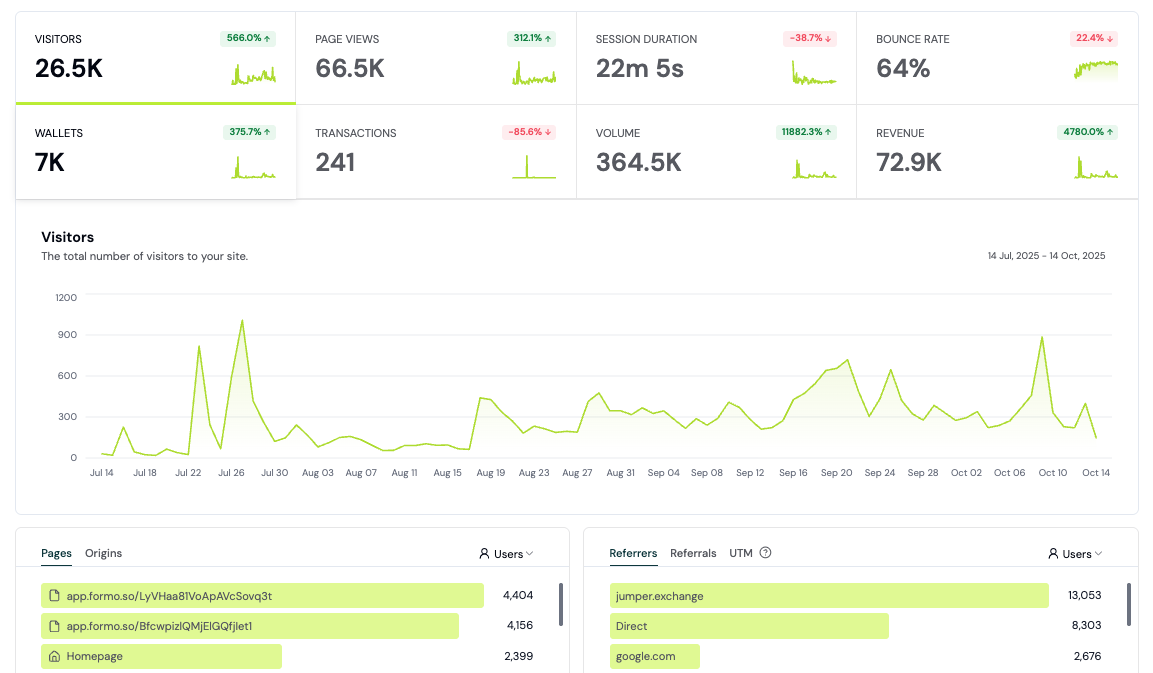
The fastest way to see retention is on your **Overview** dashboard:
Open the **Overview** page in Formo.
Scroll down to the **Retention** section. You'll see:
* **Day 7 Retention**: Percent of users active on Day 7 (default 14-day window)
* **Day 30 Retention**: Percent of users active on Day 30
* **Day 90 Retention**: Percent of users active on Day 90
* **Delta**: Week-over-week change (up or down)
Compare your retention to your baseline. A 2-3 percent week-over-week improvement is excellent. A 5+ percent drop is a red flag.
 ## Part 2: Build a Retention Cohort Chart
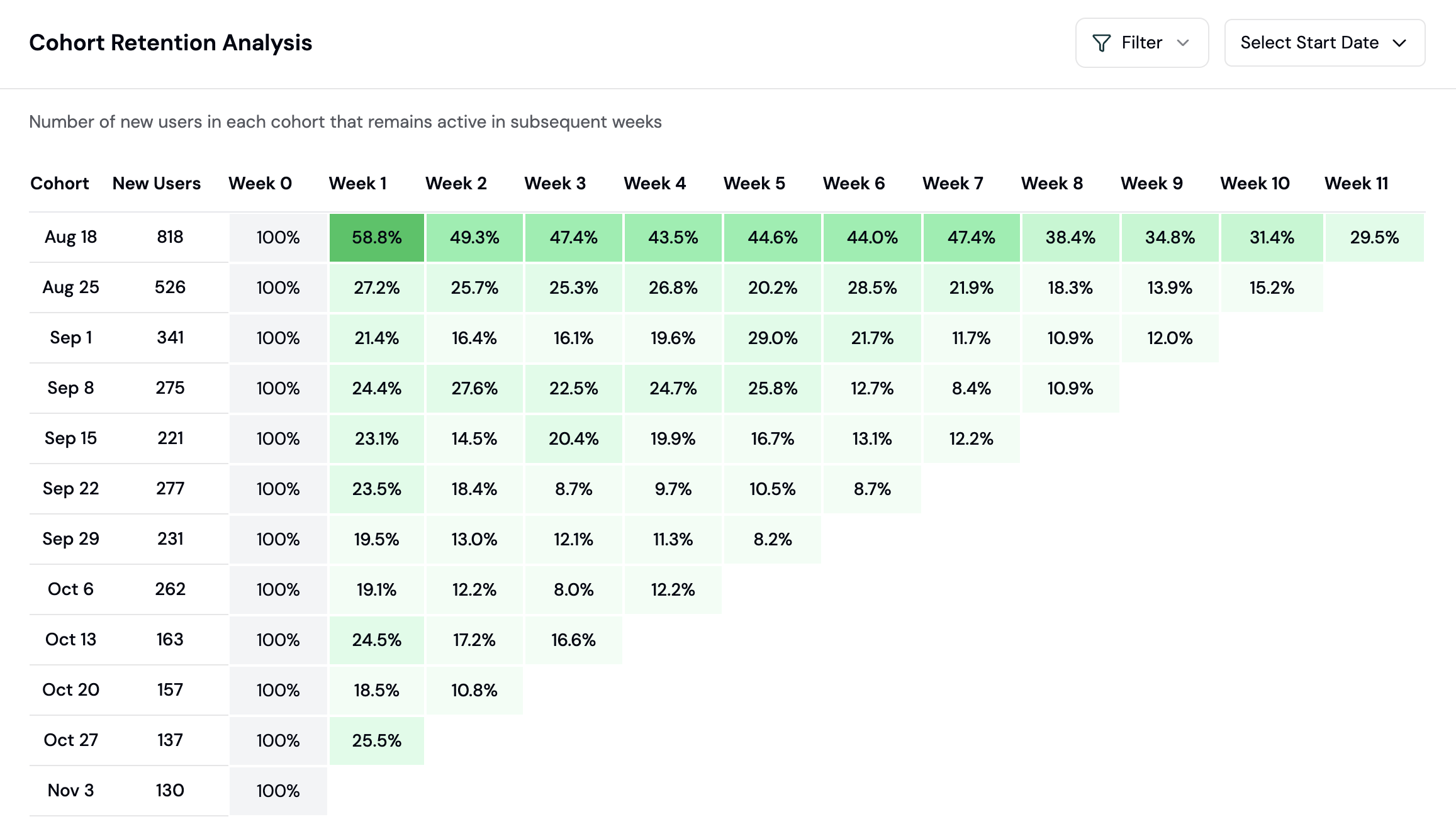
For deeper insights, create a retention cohort chart on a dashboard. This shows how each cohort of users (grouped by signup date) retains over time:
Click **Dashboards** → **Create Chart** → select **Retention** chart type.
Choose your **cohort grouping**:
* **Daily**: See retention of users who signed up on each day
* **Weekly**: Group by signup week (cleaner view for smaller apps)
* **Monthly**: For apps with high volume
Click **Save to Dashboard**. This cohort chart is now live.
The retention table shows cohorts (rows) and retention days (columns). Green cells mean high retention. Red means churn. Look for diagonal patterns:
* **Declining diagonal**: Older cohorts have worse retention. (Possible: product degraded, new cohorts are higher quality)
* **Level diagonal**: Consistent retention across all cohorts. (Healthy.)
* **Rising diagonal**: Newer cohorts retain better. (Possible: product improvements are working)
## Part 2: Build a Retention Cohort Chart
For deeper insights, create a retention cohort chart on a dashboard. This shows how each cohort of users (grouped by signup date) retains over time:
Click **Dashboards** → **Create Chart** → select **Retention** chart type.
Choose your **cohort grouping**:
* **Daily**: See retention of users who signed up on each day
* **Weekly**: Group by signup week (cleaner view for smaller apps)
* **Monthly**: For apps with high volume
Click **Save to Dashboard**. This cohort chart is now live.
The retention table shows cohorts (rows) and retention days (columns). Green cells mean high retention. Red means churn. Look for diagonal patterns:
* **Declining diagonal**: Older cohorts have worse retention. (Possible: product degraded, new cohorts are higher quality)
* **Level diagonal**: Consistent retention across all cohorts. (Healthy.)
* **Rising diagonal**: Newer cohorts retain better. (Possible: product improvements are working)
 ## Part 3: Identify Churn Patterns
The **Insights** page uses AI to spot churn signals. Check it weekly:
Click **Insights** in the sidebar.
Look for the **Issues** section. Formo flags patterns like:
* "Users from country=US are churning 25% faster than average"
* "Mobile users have 40% lower Day 7 retention"
* "Cohort from Week 3 of March dropped 15% on Day 5"
Click on an insight to drill into the data. Ask: Is this a real problem or noise?
**Red flags to act on immediately:**
* A sudden drop in Day 7 retention (5%+ week-over-week) usually means a bug or product issue
* A specific geography or device churning faster suggests a UX or localization problem
* A cohort that performs poorly across all retention windows suggests they were bad-fit users to begin with
## Part 4: Segment Churned and At-Risk Users
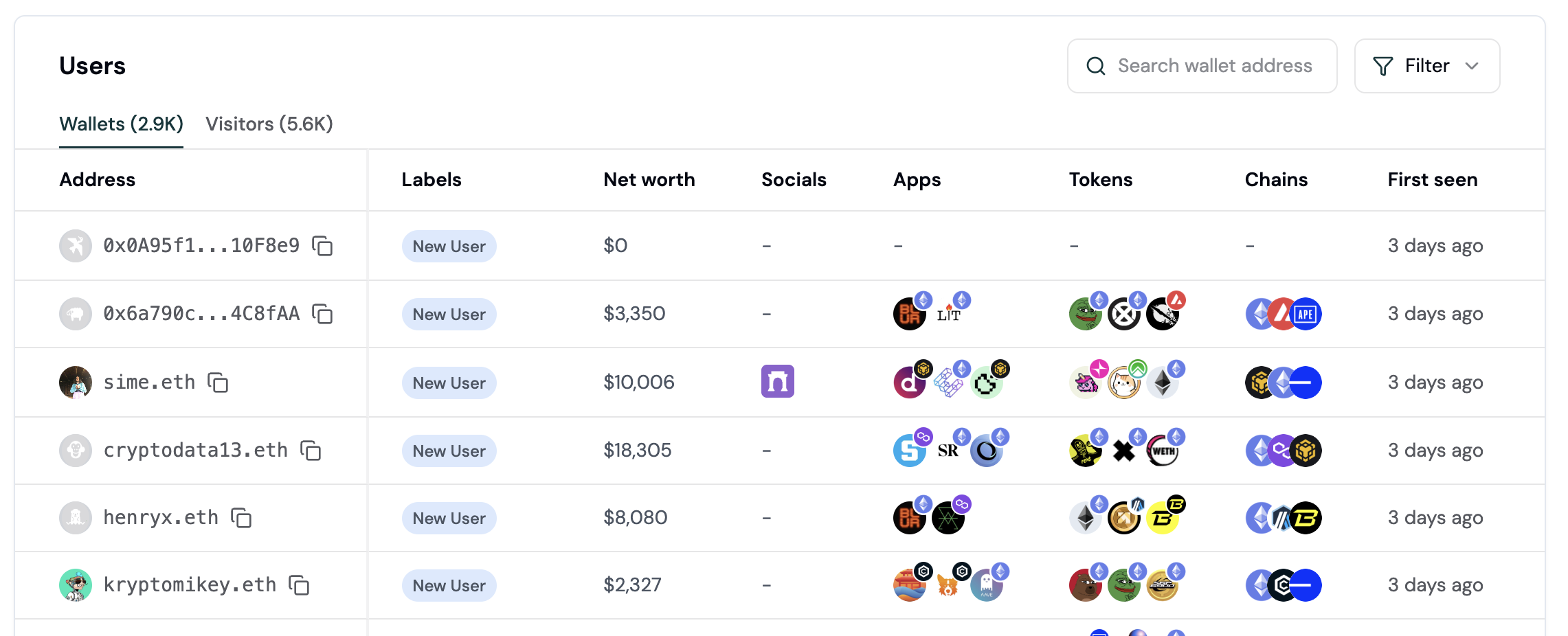
To re-engage users, you must first identify them. Use the **Users** page to create segments:
Click **Users** in the sidebar to see all users.
Apply filters to find at-risk users:
* **Lifecycle = "Churned"**: Users inactive for 30+ days
* **Lifecycle = "Resurrecting"**: Users who returned after being inactive
* **Last Activity \< 7 days ago**: Users who haven't returned this week
Click **Save as Segment**. Name it "Churned Users Q1 2026".
Once saved, you can export this segment as CSV for re-engagement campaigns or use it to build exclusion lists.
## Part 3: Identify Churn Patterns
The **Insights** page uses AI to spot churn signals. Check it weekly:
Click **Insights** in the sidebar.
Look for the **Issues** section. Formo flags patterns like:
* "Users from country=US are churning 25% faster than average"
* "Mobile users have 40% lower Day 7 retention"
* "Cohort from Week 3 of March dropped 15% on Day 5"
Click on an insight to drill into the data. Ask: Is this a real problem or noise?
**Red flags to act on immediately:**
* A sudden drop in Day 7 retention (5%+ week-over-week) usually means a bug or product issue
* A specific geography or device churning faster suggests a UX or localization problem
* A cohort that performs poorly across all retention windows suggests they were bad-fit users to begin with
## Part 4: Segment Churned and At-Risk Users
To re-engage users, you must first identify them. Use the **Users** page to create segments:
Click **Users** in the sidebar to see all users.
Apply filters to find at-risk users:
* **Lifecycle = "Churned"**: Users inactive for 30+ days
* **Lifecycle = "Resurrecting"**: Users who returned after being inactive
* **Last Activity \< 7 days ago**: Users who haven't returned this week
Click **Save as Segment**. Name it "Churned Users Q1 2026".
Once saved, you can export this segment as CSV for re-engagement campaigns or use it to build exclusion lists.
 **User Lifecycle Stages:** New, Returning, Power User, Resurrected, At Risk, and Churned, assigned from each wallet's activity recency and frequency. See [User Lifecycle](/features/wallet-intelligence/wallet-profiles#user-lifecycle) for the exact rules and thresholds.
Use these stages to build segments for targeted campaigns.
## Part 5: Export Your Segment for Re-Engagement
In your saved segment, click **Export as CSV**.
Download the file. It contains wallet addresses, ENS names, and event counts.
Use this list to:
* Send a Farcaster DM campaign: "We missed you. Here's what's new."
* Create a rewards campaign: "Return this week, get 100 points."
* Build a lookalike audience: "Find more users like these high-retainers."
## Part 6: Set Up Alerts for Key User Events
Monitor important user activity with alerts. Get notified when high-value wallets connect or key events happen:
Go to **Project Settings → Alerts**.
Click **Create Alert**.
Configure your alert trigger (e.g., whale wallet connects, transaction from a high-value user). Choose notification method (Slack webhook).
Save. You'll be alerted in real time when the event fires.
See [Alerts documentation](/features/product-analytics/alerts) for full setup.
## Part 7: Use Ask Formo to Understand Churn
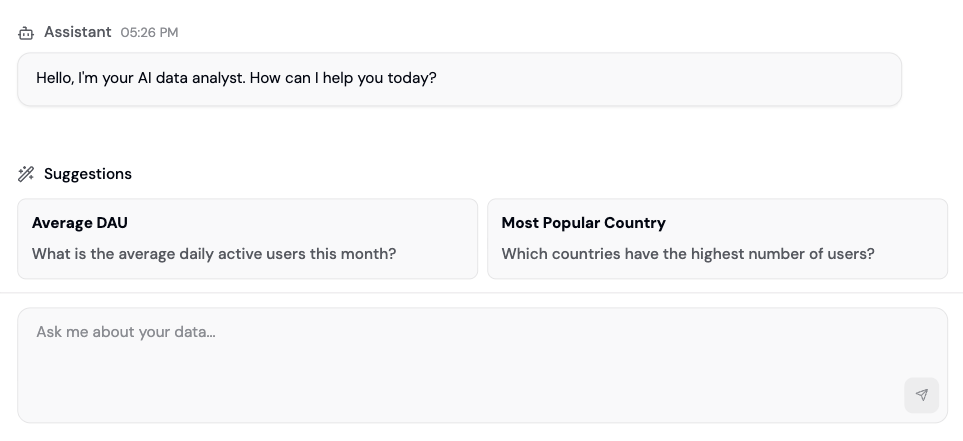
Open **Ask Formo** (the AI assistant) and ask natural language questions:
* "Why is Day 7 retention down 10% this week?"
* "Which countries have the worst retention?"
* "Do mobile users churn faster than web?"
* "What do my highest-retaining users have in common?"
Formo analyzes your data and provides insights with supporting numbers.
**User Lifecycle Stages:** New, Returning, Power User, Resurrected, At Risk, and Churned, assigned from each wallet's activity recency and frequency. See [User Lifecycle](/features/wallet-intelligence/wallet-profiles#user-lifecycle) for the exact rules and thresholds.
Use these stages to build segments for targeted campaigns.
## Part 5: Export Your Segment for Re-Engagement
In your saved segment, click **Export as CSV**.
Download the file. It contains wallet addresses, ENS names, and event counts.
Use this list to:
* Send a Farcaster DM campaign: "We missed you. Here's what's new."
* Create a rewards campaign: "Return this week, get 100 points."
* Build a lookalike audience: "Find more users like these high-retainers."
## Part 6: Set Up Alerts for Key User Events
Monitor important user activity with alerts. Get notified when high-value wallets connect or key events happen:
Go to **Project Settings → Alerts**.
Click **Create Alert**.
Configure your alert trigger (e.g., whale wallet connects, transaction from a high-value user). Choose notification method (Slack webhook).
Save. You'll be alerted in real time when the event fires.
See [Alerts documentation](/features/product-analytics/alerts) for full setup.
## Part 7: Use Ask Formo to Understand Churn
Open **Ask Formo** (the AI assistant) and ask natural language questions:
* "Why is Day 7 retention down 10% this week?"
* "Which countries have the worst retention?"
* "Do mobile users churn faster than web?"
* "What do my highest-retaining users have in common?"
Formo analyzes your data and provides insights with supporting numbers.
 ## Real-World Example: Improving Retention by 5%
**Scenario**: Your DEX app has 25% Day 7 retention. You want to hit 30%.
**Identify the problem** (Week 1): Create a retention cohort chart. See that mobile users churn 15 points faster than web.
**Understand the why** (Week 2): Use Ask Formo: "Why are mobile users churning faster?" Discover: mobile users have 3x higher transaction failures due to MetaMask timeout.
**Build a fix** (Week 3): Increase timeout from 30s to 60s. Roll out to 10% of mobile users.
**Measure impact** (Week 4): Create a segment of "mobile users who upgraded on Day 3". Compare their Day 7 retention vs old cohorts. See 8% improvement in that segment.
**Roll out fully** (Week 5): Deploy 60s timeout to all. Your Day 7 retention climbs from 25% to 28%. Repeat for other friction points.
By the end of 6 weeks, you've hit 30% Day 7 retention. That's a 20% improvement in user value.
## Best Practices
* **Weekly deep dives**: Check Insights every Monday. Act on red flags immediately.
* **Cohort comparisons**: Compare Week 1 vs Week 2 cohorts. Which is healthier? Why?
* **Segment tests**: Create two segments (e.g., "High fee payers" vs "Low fee payers"). Compare retention. High spenders often retain better, revealing your value lever.
* **Pair with conversion**: High conversion doesn't mean high retention. A user who swaps once and never returns is not a retained user. Optimize for both.
* **Monitor by source**: Create segments by referrer. Which traffic sources give best-retaining users? Double down there.
* **Check wallet labels**: If you use [Wallet Intelligence](/features/wallet-intelligence/overview), segment by wallet label (e.g., "Verified Coinbase User"). Some labels correlate with higher retention.
## Churn Prevention Playbook
Churn isn't just "users who left." It's a measurable, predictable pattern. Use this playbook to define, detect, and prevent churn in your specific app.
**Churn Definition by App Type**
| App Type | Churn Threshold | Rationale |
| ------------------- | --------------- | --------------------------------------------------------------------- |
| DeFi (DEX, Lending) | 30+ days | Long gaps between trades are normal, but 30 days suggests abandonment |
| Gaming | 14+ days | Daily drivers; 2 weeks without a session signals churn |
| Bridge/Cross-chain | 60+ days | Multi-week cycles are normal; 60 days is the safety threshold |
**Monthly Churn Rate Query**
Use this SQL to calculate month-over-month churn:
```sql theme={null}
SELECT
toStartOfMonth(first_seen) as cohort_month,
count(*) as total_users,
countIf(last_seen < now() - INTERVAL 30 DAY) as churned_users,
round(countIf(last_seen < now() - INTERVAL 30 DAY) / count(*) * 100, 2) as churn_rate_pct
FROM users
GROUP BY cohort_month
ORDER BY cohort_month DESC
```
**At-Risk Segments to Build**
Create these three segments in the Users page and save them for weekly monitoring:
1. **At-Risk Power Users** (High priority)
* Filter: `Sessions > 20` AND `Last Activity 7-14 days ago`
* Why: These users have proven value. Re-engage before they churn.
2. **New Users Not Returning** (Medium priority)
* Filter: `Sessions < 5` AND `Last Activity 3-7 days ago`
* Why: Early-stage friction. A small push converts them to returning users.
3. **Declining Activity** (Watch list)
* Filter: `Sessions > 10` AND `Last Activity 7-30 days ago`
* Why: Gradual drop-off. These need incentives before hitting 30+ days.
**Churn Alert Templates**
Set up these alerts in Project Settings:
* **Whale Going Inactive**: User with `Lifetime Value > $10k` AND `Last Activity > 7 days`
* **Power User Declining**: User with `Sessions > 15` AND `Day-over-day activity drop > 50%`
* **Failed Transaction Spike**: Cohort-level alert if `Failed Transactions` increase 3x week-over-week
**Re-engagement Campaign Strategies**
| Segment | Trigger | Action | Expected Lift |
| ----------------------- | ----------------------------- | ------------------------------ | ------------- |
| Power users going quiet | 7 days of inactivity | VIP email + bonus points | 15-25% return |
| New users stalling | 3 days, fewer than 5 sessions | In-app nudge + tutorial replay | 20-30% return |
| Recently churned | 30-45 days inactive | "We miss you" discount offer | 10-15% return |
**Analyze Churned User Behavior with Flows**
Use [User Path charts](/guides/flows) to understand what churned users did in their last session:
1. Go to **Dashboards** > **Create Chart** > select **User Path**
2. Filter by users whose lifecycle is **Churned**
3. Look for patterns: failed transactions, abandoned flows, or limited exploration
Compare churned vs. retained users side by side:
* **Churned cohort**: Active 60+ days ago, has not returned in 30+ days
* **Retained cohort**: Active 60+ days ago, has returned in the last 30 days
Compare their first-week behavior: sessions count, features used, transaction volume, and entry referrer. This reveals what retained users do differently - and what to optimize in onboarding.
## Next Steps
You've set up retention tracking. Here's what to do next:
* **[Create a Conversion Funnel](/guides/funnels)**: High retention is good, but you need high conversion first.
* **[Use Segments for Re-engagement](/features/wallet-intelligence/segments)**: Build audiences of churned users for campaigns.
* **[Build a Custom Dashboard](/guides/custom-dashboard)**: Track retention alongside other key metrics in one view.
* **[Set Up Alerts](/features/product-analytics/alerts)**: Get notified when high-value users or key events happen.
* **[Explore Your Users](/features/wallet-intelligence/wallet-profiles)**: Click on a user in the Users page to see their full profile, including lifecycle stage and activity feed.
## FAQ
Day 7 retention = (Users active on Day 7 / Users who signed up on Day 0) \* 100
A user is considered active if they have at least one session (page view or transaction) on that day.
Example: 1000 users sign up on Monday. 250 of them return and are active on the following Monday. Day 7 retention = 25%.
* **Day 7**: Users who returned within 7 days of signup. Measures short-term activation.
* **Day 30**: Users active within 30 days. Measures habit formation.
* **Day 90**: Users active within 90 days. Measures long-term value.
All three matter. Day 7 catches immediate churn. Day 30 shows if you built a habit. Day 90 shows if users stick around.
Priority order:
1. **Resurrecting**: Users who just came back. Momentum is on your side.
2. **At-risk Returning**: Users with only 2-3 sessions. Easy to convert to Power Users.
3. **Recent Churned**: Users inactive for 30-60 days. Still remember your product.
4. **Old Churned**: Users inactive for 6+ months. Hard to re-activate.
Focus on 1 and 2 first for best ROI.
Yes. Create two retention charts (or use breakdowns). Filter the first by UTM Source = "twitter" and the second by UTM Source = "discord". Compare Day 7 retention across both. You'll likely see significant differences.
If one source has 2x better retention, invest more in that channel.
By default, retention is measured from signup date. You can create custom cohort charts by setting a custom event (e.g., "first\_transaction") as your cohort start. Contact support if you need help.
## Real-World Example: Improving Retention by 5%
**Scenario**: Your DEX app has 25% Day 7 retention. You want to hit 30%.
**Identify the problem** (Week 1): Create a retention cohort chart. See that mobile users churn 15 points faster than web.
**Understand the why** (Week 2): Use Ask Formo: "Why are mobile users churning faster?" Discover: mobile users have 3x higher transaction failures due to MetaMask timeout.
**Build a fix** (Week 3): Increase timeout from 30s to 60s. Roll out to 10% of mobile users.
**Measure impact** (Week 4): Create a segment of "mobile users who upgraded on Day 3". Compare their Day 7 retention vs old cohorts. See 8% improvement in that segment.
**Roll out fully** (Week 5): Deploy 60s timeout to all. Your Day 7 retention climbs from 25% to 28%. Repeat for other friction points.
By the end of 6 weeks, you've hit 30% Day 7 retention. That's a 20% improvement in user value.
## Best Practices
* **Weekly deep dives**: Check Insights every Monday. Act on red flags immediately.
* **Cohort comparisons**: Compare Week 1 vs Week 2 cohorts. Which is healthier? Why?
* **Segment tests**: Create two segments (e.g., "High fee payers" vs "Low fee payers"). Compare retention. High spenders often retain better, revealing your value lever.
* **Pair with conversion**: High conversion doesn't mean high retention. A user who swaps once and never returns is not a retained user. Optimize for both.
* **Monitor by source**: Create segments by referrer. Which traffic sources give best-retaining users? Double down there.
* **Check wallet labels**: If you use [Wallet Intelligence](/features/wallet-intelligence/overview), segment by wallet label (e.g., "Verified Coinbase User"). Some labels correlate with higher retention.
## Churn Prevention Playbook
Churn isn't just "users who left." It's a measurable, predictable pattern. Use this playbook to define, detect, and prevent churn in your specific app.
**Churn Definition by App Type**
| App Type | Churn Threshold | Rationale |
| ------------------- | --------------- | --------------------------------------------------------------------- |
| DeFi (DEX, Lending) | 30+ days | Long gaps between trades are normal, but 30 days suggests abandonment |
| Gaming | 14+ days | Daily drivers; 2 weeks without a session signals churn |
| Bridge/Cross-chain | 60+ days | Multi-week cycles are normal; 60 days is the safety threshold |
**Monthly Churn Rate Query**
Use this SQL to calculate month-over-month churn:
```sql theme={null}
SELECT
toStartOfMonth(first_seen) as cohort_month,
count(*) as total_users,
countIf(last_seen < now() - INTERVAL 30 DAY) as churned_users,
round(countIf(last_seen < now() - INTERVAL 30 DAY) / count(*) * 100, 2) as churn_rate_pct
FROM users
GROUP BY cohort_month
ORDER BY cohort_month DESC
```
**At-Risk Segments to Build**
Create these three segments in the Users page and save them for weekly monitoring:
1. **At-Risk Power Users** (High priority)
* Filter: `Sessions > 20` AND `Last Activity 7-14 days ago`
* Why: These users have proven value. Re-engage before they churn.
2. **New Users Not Returning** (Medium priority)
* Filter: `Sessions < 5` AND `Last Activity 3-7 days ago`
* Why: Early-stage friction. A small push converts them to returning users.
3. **Declining Activity** (Watch list)
* Filter: `Sessions > 10` AND `Last Activity 7-30 days ago`
* Why: Gradual drop-off. These need incentives before hitting 30+ days.
**Churn Alert Templates**
Set up these alerts in Project Settings:
* **Whale Going Inactive**: User with `Lifetime Value > $10k` AND `Last Activity > 7 days`
* **Power User Declining**: User with `Sessions > 15` AND `Day-over-day activity drop > 50%`
* **Failed Transaction Spike**: Cohort-level alert if `Failed Transactions` increase 3x week-over-week
**Re-engagement Campaign Strategies**
| Segment | Trigger | Action | Expected Lift |
| ----------------------- | ----------------------------- | ------------------------------ | ------------- |
| Power users going quiet | 7 days of inactivity | VIP email + bonus points | 15-25% return |
| New users stalling | 3 days, fewer than 5 sessions | In-app nudge + tutorial replay | 20-30% return |
| Recently churned | 30-45 days inactive | "We miss you" discount offer | 10-15% return |
**Analyze Churned User Behavior with Flows**
Use [User Path charts](/guides/flows) to understand what churned users did in their last session:
1. Go to **Dashboards** > **Create Chart** > select **User Path**
2. Filter by users whose lifecycle is **Churned**
3. Look for patterns: failed transactions, abandoned flows, or limited exploration
Compare churned vs. retained users side by side:
* **Churned cohort**: Active 60+ days ago, has not returned in 30+ days
* **Retained cohort**: Active 60+ days ago, has returned in the last 30 days
Compare their first-week behavior: sessions count, features used, transaction volume, and entry referrer. This reveals what retained users do differently - and what to optimize in onboarding.
## Next Steps
You've set up retention tracking. Here's what to do next:
* **[Create a Conversion Funnel](/guides/funnels)**: High retention is good, but you need high conversion first.
* **[Use Segments for Re-engagement](/features/wallet-intelligence/segments)**: Build audiences of churned users for campaigns.
* **[Build a Custom Dashboard](/guides/custom-dashboard)**: Track retention alongside other key metrics in one view.
* **[Set Up Alerts](/features/product-analytics/alerts)**: Get notified when high-value users or key events happen.
* **[Explore Your Users](/features/wallet-intelligence/wallet-profiles)**: Click on a user in the Users page to see their full profile, including lifecycle stage and activity feed.
## FAQ
Day 7 retention = (Users active on Day 7 / Users who signed up on Day 0) \* 100
A user is considered active if they have at least one session (page view or transaction) on that day.
Example: 1000 users sign up on Monday. 250 of them return and are active on the following Monday. Day 7 retention = 25%.
* **Day 7**: Users who returned within 7 days of signup. Measures short-term activation.
* **Day 30**: Users active within 30 days. Measures habit formation.
* **Day 90**: Users active within 90 days. Measures long-term value.
All three matter. Day 7 catches immediate churn. Day 30 shows if you built a habit. Day 90 shows if users stick around.
Priority order:
1. **Resurrecting**: Users who just came back. Momentum is on your side.
2. **At-risk Returning**: Users with only 2-3 sessions. Easy to convert to Power Users.
3. **Recent Churned**: Users inactive for 30-60 days. Still remember your product.
4. **Old Churned**: Users inactive for 6+ months. Hard to re-activate.
Focus on 1 and 2 first for best ROI.
Yes. Create two retention charts (or use breakdowns). Filter the first by UTM Source = "twitter" and the second by UTM Source = "discord". Compare Day 7 retention across both. You'll likely see significant differences.
If one source has 2x better retention, invest more in that channel.
By default, retention is measured from signup date. You can create custom cohort charts by setting a custom event (e.g., "first\_transaction") as your cohort start. Contact support if you need help.