> ## Documentation Index
> Fetch the complete documentation index at: https://docs.formo.so/llms.txt
> Use this file to discover all available pages before exploring further.
# How to Use Ask Formo to Surface Growth Insights
> Use Formo's AI assistant to explore analytics data with natural language questions, generate SQL queries automatically, and uncover hidden growth insights.
What if you could just ask your data a question? No SQL, no dashboard hunting, no waiting for an analyst. With Ask Formo, you can.
Ask natural language questions about your protocol and get instant answers. The AI generates SQL queries, runs them, and shows you charts and summaries. It's like having a data analyst on call.
## Part 1: Open Ask Formo
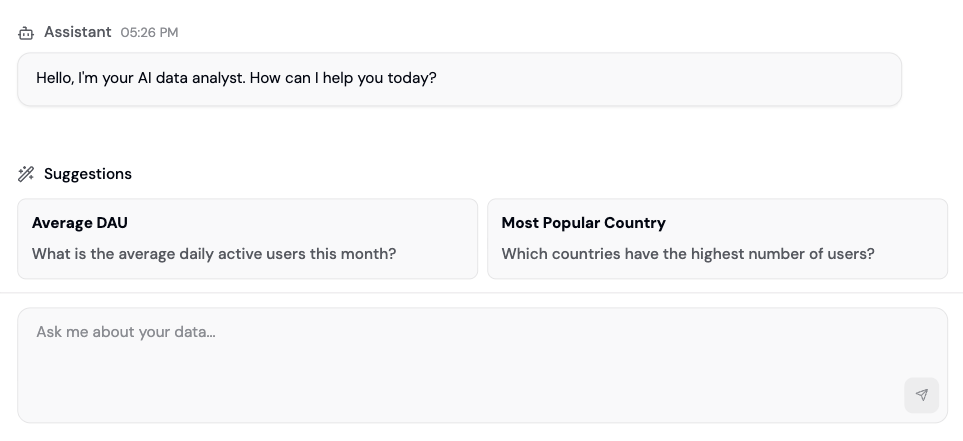
You can access Ask Formo in two ways:
1. **Click "Ask Formo"** in the left sidebar (chat bubble icon)
2. **Click the chat bubble** in the bottom right corner of any page
Both open the same chat interface. You'll see your conversation history on the left and the chat window on the right.
 ## Part 2: Ask Your First Question
Start with something straightforward. Click in the message box and type a question:
**Example:** "How many unique wallets connected this week?"
Hit enter. The AI will:
1. Parse your question
2. Generate a SQL query from it
3. Run the query against your data
4. Return a summary, a chart, and the generated SQL
You'll see the answer instantly. No waiting for a data analyst.
## Part 2: Ask Your First Question
Start with something straightforward. Click in the message box and type a question:
**Example:** "How many unique wallets connected this week?"
Hit enter. The AI will:
1. Parse your question
2. Generate a SQL query from it
3. Run the query against your data
4. Return a summary, a chart, and the generated SQL
You'll see the answer instantly. No waiting for a data analyst.
 ## Part 3: Understand the Response
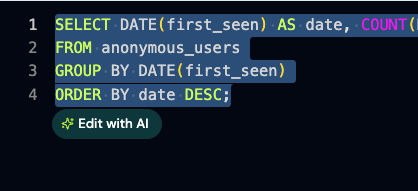
Each Ask Formo response includes:
* **Summary:** A plain English explanation of what the data shows
* **Chart:** A visualization of the results (line, bar, pie, etc.)
* **SQL:** The exact query the AI ran (you can copy and edit it)
You can click "View in Explorer" to open the SQL editor if you want to tweak the query or save it as a chart.
## Part 4: Ask Follow-Up Questions
This is where Ask Formo gets powerful. Ask follow-ups without repeating context:
**You:** "How many unique wallets connected this week?"
**AI:** \[Shows 12,453 wallets]
**You:** "How many of those were new?"
**AI:** \[Filters to new wallets. Understands "those" = the wallets from last question]
**You:** "What were their top referral sources?"
**AI:** \[Breaks down new wallets by referrer. Still understands the context]
The AI maintains conversation memory, so each question builds on the previous one. No need to re-ask context.
## Part 5: Use the Insights Page for Automated Analysis
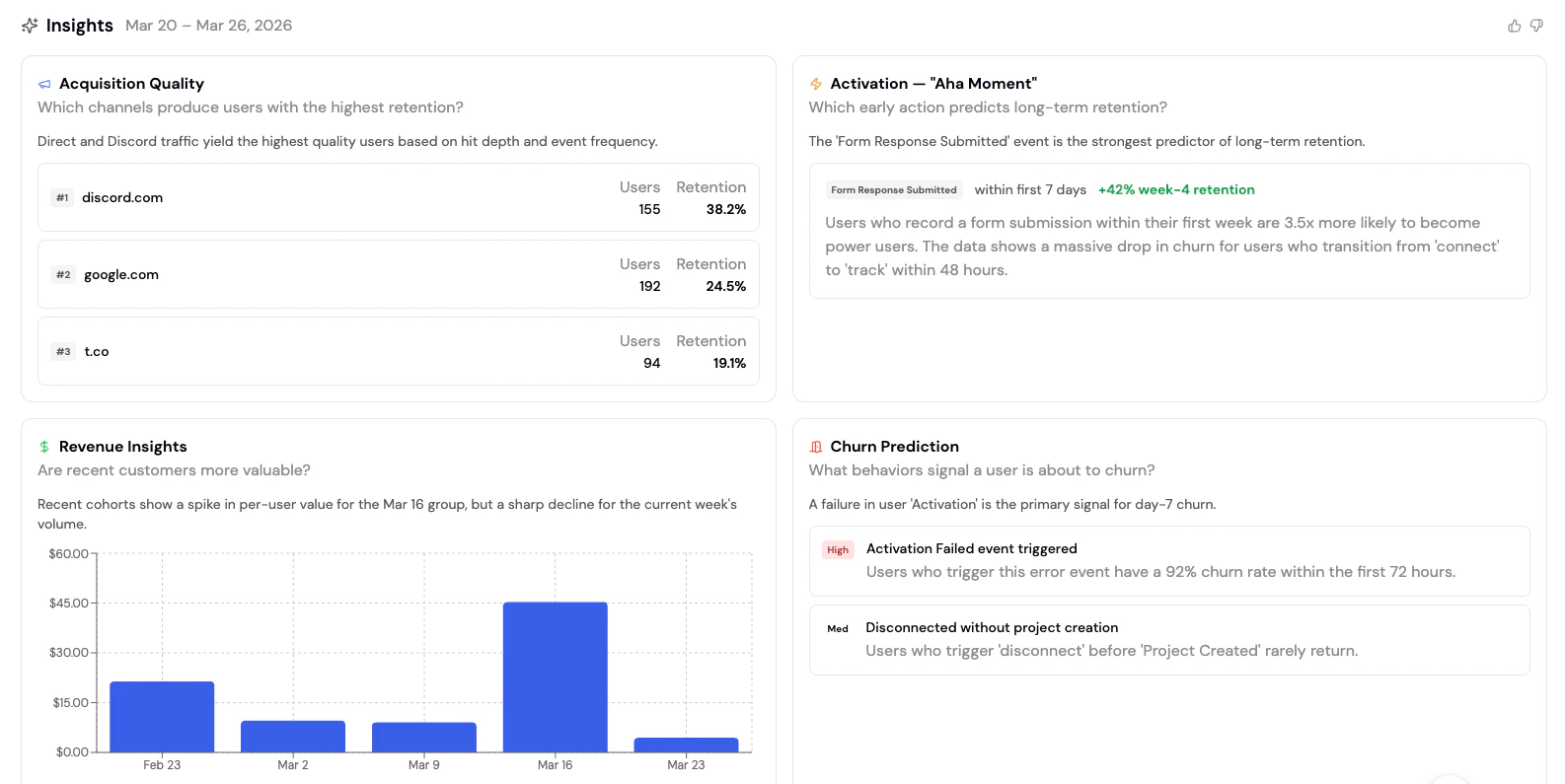
Beyond Ask Formo, visit **Insights** in the sidebar for AI-generated analysis of your entire protocol:
## Part 3: Understand the Response
Each Ask Formo response includes:
* **Summary:** A plain English explanation of what the data shows
* **Chart:** A visualization of the results (line, bar, pie, etc.)
* **SQL:** The exact query the AI ran (you can copy and edit it)
You can click "View in Explorer" to open the SQL editor if you want to tweak the query or save it as a chart.
## Part 4: Ask Follow-Up Questions
This is where Ask Formo gets powerful. Ask follow-ups without repeating context:
**You:** "How many unique wallets connected this week?"
**AI:** \[Shows 12,453 wallets]
**You:** "How many of those were new?"
**AI:** \[Filters to new wallets. Understands "those" = the wallets from last question]
**You:** "What were their top referral sources?"
**AI:** \[Breaks down new wallets by referrer. Still understands the context]
The AI maintains conversation memory, so each question builds on the previous one. No need to re-ask context.
## Part 5: Use the Insights Page for Automated Analysis
Beyond Ask Formo, visit **Insights** in the sidebar for AI-generated analysis of your entire protocol:
 ### Wins
Positive trends the AI detected (e.g., "DAU up 25% this week")
### Issues
Problems worth investigating (e.g., "Retention dropped below historical average")
### Opportunities
Actionable insights (e.g., "Traffic from Twitter is converting 3x better than Discord")
### Actions
Recommended next steps based on your data
### Acquisition Quality
Which channels bring the best LTV users?
### Activation
Which cohorts complete key actions fastest?
### Revenue
Which cohorts spend the most onchain?
### Churn Prediction
Which users are at risk of churning?
### Behavioral Insights
Common patterns in high-value users
## Part 6: Save Your Questions as Dashboards
Found a question you want to check weekly? Save it:
1. Ask your question in Ask Formo
2. Click **Save as Chart**
3. Name it and choose your board
4. It's now on your dashboard, auto-updating with new data
Now your whole team sees those insights every time they open your dashboard.
## Example Questions
Be specific with dates and metrics. Instead of "How are we doing?" try "What's my DAU compared to last week?" or "Show me conversion by traffic source for the last 30 days."
### User acquisition
**Prompt:** "Where are my users coming from this month?"
**What you'll learn:** Top referrers, UTM sources, and traffic channels.
**Follow-up:** "Which referrer has the best conversion rate?"
### Active users
**Prompt:** "How many active users did we have last week?"
**What you'll learn:** DAU trend with day-over-day changes.
**Follow-up:** "Show me daily active wallets for the last 30 days and compare to the previous 30 days"
### Conversion funnel
**Prompt:** "What percentage of visitors connect their wallet?"
**What you'll learn:** Top-of-funnel conversion rate.
**Follow-up:** "Of those who connect, how many complete a transaction?"
### User retention
**Prompt:** "What's my week-1 retention rate?"
**What you'll learn:** How many users return after their first visit.
**Follow-up:** "Show me retention by acquisition source"
### Revenue analysis
**Prompt:** "What's our daily revenue trend for the past month?"
**What you'll learn:** Revenue/volume metrics and trends.
**Follow-up:** "Break this down by day of week"
### User segments
**Prompt:** "Which customers have the highest usage?"
**What you'll learn:** High-value user identification and behavior patterns.
**Follow-up:** "How many whales (net worth > \$100k) do I have, and what's their average transaction volume?"
### Geographic distribution
**Prompt:** "Which countries have the most active users?"
**What you'll learn:** Geographic breakdown of your user base.
**Follow-up:** "Which country has the highest average transaction value?"
### Feature adoption
**Prompt:** "How many users visited the /stake page this week?"
**What you'll learn:** Feature page traffic.
**Follow-up:** "Of those, how many completed a staking transaction?"
### Drop-off analysis
**Prompt:** "Where do users drop off in the transaction flow?"
**What you'll learn:** Conversion bottlenecks.
**Follow-up:** "Is drop-off higher on mobile or desktop?"
### Anomaly detection
**Prompt:** "Are there any unusual patterns in my data this week?"
**What you'll learn:** Spikes, drops, or outliers worth investigating.
**Follow-up:** "What might have caused the spike on Tuesday?"
### Acquisition quality
**Prompt:** "Which channels produce users with the highest retention?"
**What you'll learn:** Which acquisition sources bring the best long-term users.
**Follow-up:** "Correlate signup source with 30-day retention - which acquisition channels have the best retention rates?"
### Activation
**Prompt:** "Which early action predicts long-term retention?"
**What you'll learn:** The "aha moment" event that separates retained users from churned ones.
**Follow-up:** "What percentage of users complete that action in their first session?"
### Revenue cohorts
**Prompt:** "Are recent customers more valuable?"
**What you'll learn:** Whether newer cohorts are spending more or less than older ones.
**Follow-up:** "Break down average revenue per user by weekly cohort"
### Behavioral insights
**Prompt:** "What do power users do that casual users don't?"
**What you'll learn:** Behaviors that differentiate high-value users from the rest.
**Follow-up:** "Which features have the biggest usage gap between power and casual users?"
### Churn prediction
**Prompt:** "What behaviors signal a user is about to churn?"
**What you'll learn:** Early warning signals for at-risk users.
**Follow-up:** "Find the top 10 users by session count, show their activity over time, and flag any that look like potential churns"
### Other questions
**Revenue attribution:**
> "Which UTM campaign drove the most transaction volume?"
**Competitive insights:**
> "How many of my users also use Uniswap?"
**Time patterns:**
> "What time of day do most transactions happen?"
**Platform comparison:**
> "How does mobile vs desktop conversion compare?"
## Best Practices
**Be specific with time ranges.** Instead of "How many transactions?" say "How many transactions in the last 7 days?" The AI will ask if you're unclear.
**Use follow-ups to drill deeper.** Don't try to ask everything in one question. Start broad, then ask follow-ups to explore specific angles.
**Ask about wallet labels.** If you've set up [wallet intelligence](/guides/wallet-segmentation), ask the AI to segment by label. "Show me DAU by wallet label" reveals which user types drive value.
**Copy SQL for custom charts.** If the AI generates a query you love, copy it and paste it into the Explorer or a SQL chart on your dashboard. Now you have a reusable analysis.
**Check Insights daily.** The Insights page updates automatically. Make it part of your morning routine to spot issues before they become crises.
## Next Steps
* [Create a custom dashboard](/guides/custom-dashboard) to visualize key metrics
* [Build a funnel](/guides/funnels) to understand your acquisition flow
* [Use the Explorer](/guides/sql-explorer) to write custom SQL queries for deeper analysis
* [Set up wallet segmentation](/guides/wallet-segmentation) to analyze user cohorts
* [See AI prompts for DeFi marketers](https://formo.so/blog/ai-prompts-defi-marketers) for more question ideas
## FAQ
Yes, Ask Formo can query all events, properties, and custom SQL tables in your project schema. It respects your project's permissions, so team members only see data they have access to.
You can query as far back as your project has data (usually from your first SDK install, months to years ago). Ask away: "Show me DAU for the last 6 months."
No, Ask Formo only reads and analyzes data. To create new events or properties, configure them in your SDK or contract events setup.
### Wins
Positive trends the AI detected (e.g., "DAU up 25% this week")
### Issues
Problems worth investigating (e.g., "Retention dropped below historical average")
### Opportunities
Actionable insights (e.g., "Traffic from Twitter is converting 3x better than Discord")
### Actions
Recommended next steps based on your data
### Acquisition Quality
Which channels bring the best LTV users?
### Activation
Which cohorts complete key actions fastest?
### Revenue
Which cohorts spend the most onchain?
### Churn Prediction
Which users are at risk of churning?
### Behavioral Insights
Common patterns in high-value users
## Part 6: Save Your Questions as Dashboards
Found a question you want to check weekly? Save it:
1. Ask your question in Ask Formo
2. Click **Save as Chart**
3. Name it and choose your board
4. It's now on your dashboard, auto-updating with new data
Now your whole team sees those insights every time they open your dashboard.
## Example Questions
Be specific with dates and metrics. Instead of "How are we doing?" try "What's my DAU compared to last week?" or "Show me conversion by traffic source for the last 30 days."
### User acquisition
**Prompt:** "Where are my users coming from this month?"
**What you'll learn:** Top referrers, UTM sources, and traffic channels.
**Follow-up:** "Which referrer has the best conversion rate?"
### Active users
**Prompt:** "How many active users did we have last week?"
**What you'll learn:** DAU trend with day-over-day changes.
**Follow-up:** "Show me daily active wallets for the last 30 days and compare to the previous 30 days"
### Conversion funnel
**Prompt:** "What percentage of visitors connect their wallet?"
**What you'll learn:** Top-of-funnel conversion rate.
**Follow-up:** "Of those who connect, how many complete a transaction?"
### User retention
**Prompt:** "What's my week-1 retention rate?"
**What you'll learn:** How many users return after their first visit.
**Follow-up:** "Show me retention by acquisition source"
### Revenue analysis
**Prompt:** "What's our daily revenue trend for the past month?"
**What you'll learn:** Revenue/volume metrics and trends.
**Follow-up:** "Break this down by day of week"
### User segments
**Prompt:** "Which customers have the highest usage?"
**What you'll learn:** High-value user identification and behavior patterns.
**Follow-up:** "How many whales (net worth > \$100k) do I have, and what's their average transaction volume?"
### Geographic distribution
**Prompt:** "Which countries have the most active users?"
**What you'll learn:** Geographic breakdown of your user base.
**Follow-up:** "Which country has the highest average transaction value?"
### Feature adoption
**Prompt:** "How many users visited the /stake page this week?"
**What you'll learn:** Feature page traffic.
**Follow-up:** "Of those, how many completed a staking transaction?"
### Drop-off analysis
**Prompt:** "Where do users drop off in the transaction flow?"
**What you'll learn:** Conversion bottlenecks.
**Follow-up:** "Is drop-off higher on mobile or desktop?"
### Anomaly detection
**Prompt:** "Are there any unusual patterns in my data this week?"
**What you'll learn:** Spikes, drops, or outliers worth investigating.
**Follow-up:** "What might have caused the spike on Tuesday?"
### Acquisition quality
**Prompt:** "Which channels produce users with the highest retention?"
**What you'll learn:** Which acquisition sources bring the best long-term users.
**Follow-up:** "Correlate signup source with 30-day retention - which acquisition channels have the best retention rates?"
### Activation
**Prompt:** "Which early action predicts long-term retention?"
**What you'll learn:** The "aha moment" event that separates retained users from churned ones.
**Follow-up:** "What percentage of users complete that action in their first session?"
### Revenue cohorts
**Prompt:** "Are recent customers more valuable?"
**What you'll learn:** Whether newer cohorts are spending more or less than older ones.
**Follow-up:** "Break down average revenue per user by weekly cohort"
### Behavioral insights
**Prompt:** "What do power users do that casual users don't?"
**What you'll learn:** Behaviors that differentiate high-value users from the rest.
**Follow-up:** "Which features have the biggest usage gap between power and casual users?"
### Churn prediction
**Prompt:** "What behaviors signal a user is about to churn?"
**What you'll learn:** Early warning signals for at-risk users.
**Follow-up:** "Find the top 10 users by session count, show their activity over time, and flag any that look like potential churns"
### Other questions
**Revenue attribution:**
> "Which UTM campaign drove the most transaction volume?"
**Competitive insights:**
> "How many of my users also use Uniswap?"
**Time patterns:**
> "What time of day do most transactions happen?"
**Platform comparison:**
> "How does mobile vs desktop conversion compare?"
## Best Practices
**Be specific with time ranges.** Instead of "How many transactions?" say "How many transactions in the last 7 days?" The AI will ask if you're unclear.
**Use follow-ups to drill deeper.** Don't try to ask everything in one question. Start broad, then ask follow-ups to explore specific angles.
**Ask about wallet labels.** If you've set up [wallet intelligence](/guides/wallet-segmentation), ask the AI to segment by label. "Show me DAU by wallet label" reveals which user types drive value.
**Copy SQL for custom charts.** If the AI generates a query you love, copy it and paste it into the Explorer or a SQL chart on your dashboard. Now you have a reusable analysis.
**Check Insights daily.** The Insights page updates automatically. Make it part of your morning routine to spot issues before they become crises.
## Next Steps
* [Create a custom dashboard](/guides/custom-dashboard) to visualize key metrics
* [Build a funnel](/guides/funnels) to understand your acquisition flow
* [Use the Explorer](/guides/sql-explorer) to write custom SQL queries for deeper analysis
* [Set up wallet segmentation](/guides/wallet-segmentation) to analyze user cohorts
* [See AI prompts for DeFi marketers](https://formo.so/blog/ai-prompts-defi-marketers) for more question ideas
## FAQ
Yes, Ask Formo can query all events, properties, and custom SQL tables in your project schema. It respects your project's permissions, so team members only see data they have access to.
You can query as far back as your project has data (usually from your first SDK install, months to years ago). Ask away: "Show me DAU for the last 6 months."
No, Ask Formo only reads and analyzes data. To create new events or properties, configure them in your SDK or contract events setup.