> ## Documentation Index
> Fetch the complete documentation index at: https://docs.formo.so/llms.txt
> Use this file to discover all available pages before exploring further.
# Wallet profiles
> View unified wallet profiles that combine offchain and onchain data including DeFi positions, token balances, session history, and user properties.
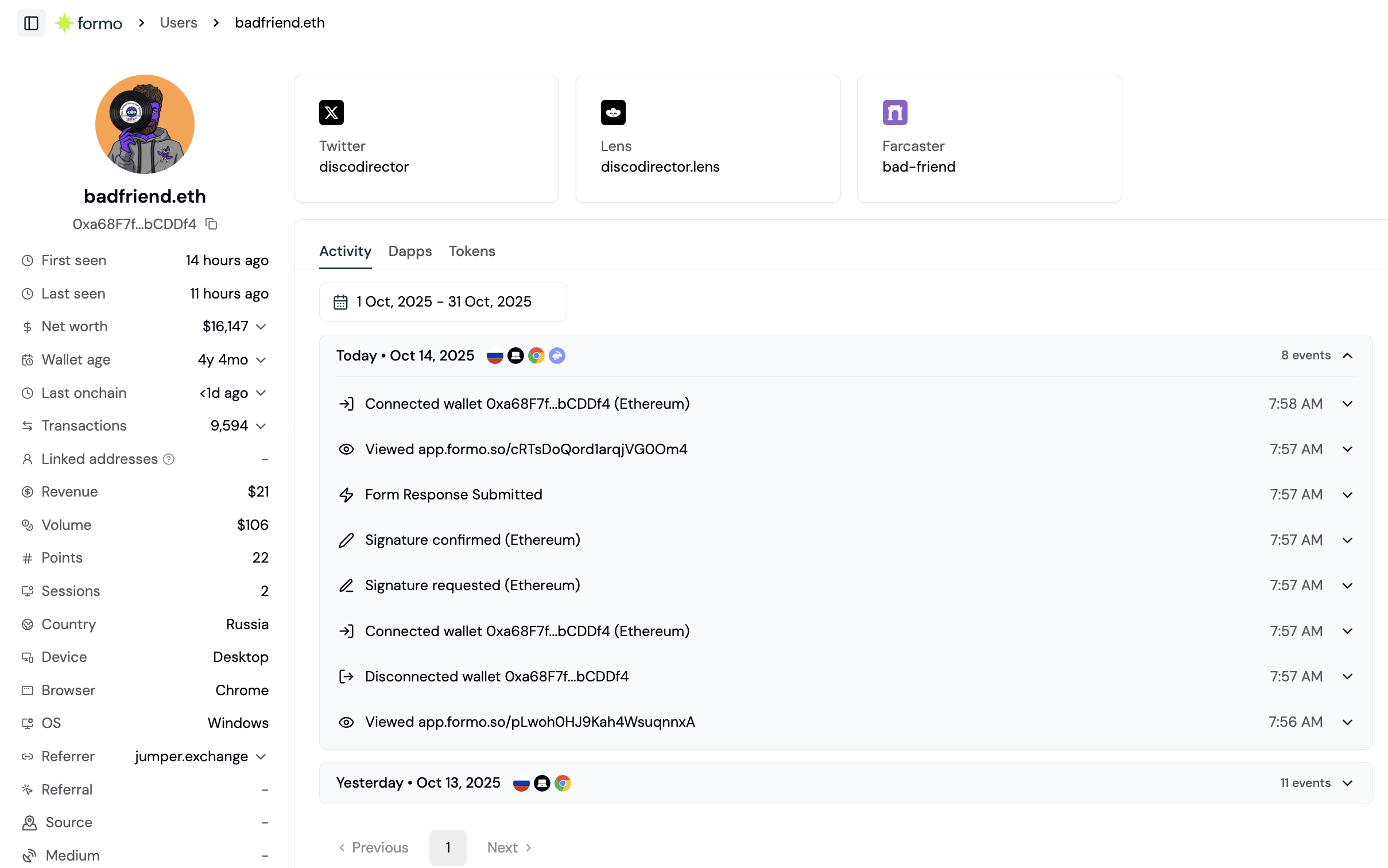 Formo's **Wallet Profiles** unifies data from offchain and onchain data sources to give you a 360° view of your users.
Turn anonymous wallets into actionable, onchain personas. Capture the full user journey to understand how users use your app.
Gain a complete view of each user's behaviour across chains and platforms:
* Wallet address, ENS profile, net worth, and transaction frequency
* Real-time feed of what each user is doing on your crypto app, with full attribution through referrers and UTM sources
* DeFi positions and token balances of the user across multiple chains
* Linked wallet addresses
* Social profiles
* Onchain attestations
* [Wallet labels](/features/wallet-intelligence/wallet-labels)
* Volume, ARPU, and LTV on your app
## User Lifecycle
Each user's lifecycle stage is computed relative to a **reference date** (the end of the queried date range, which defaults to today). The default thresholds are shown below; projects can override them in **Settings → Lifecycle**.
| Lifecycle | Definition |
| :-------------- | :---------------------------------------------------------------------------------------------------------------------------------------------------------------------------------------------------------------------------------------------------------------------------------------------------------------- |
| **New** | First seen within the last 30 days and still active. |
| **Power User** | First seen more than 30 days ago, still active, and active on at least 5 distinct days in the last 30 days. |
| **Resurrected** | First seen more than 30 days ago and re-engaged within the last 30 days after a 30+ day inactivity gap. |
| **At Risk** | Established and still active, but going quiet: last seen at least 14 days ago, fewer than 5 active days in the last 30 days, and no 30+ day gap. To qualify they must have had at least 1 active day in the prior window (days 30 to 60 ago), so they were genuinely engaged before fading (not a one-off visit). |
| **Returning** | Established active users who don't fit another stage: active recently but not New, Power, Resurrected, or At Risk. |
| **Churned** | Last seen more than 30 days ago. |
Stages are mutually exclusive and evaluated in precedence order: Churned, New, Power User, Resurrected, At Risk, Returning. **At Risk** carves out fading users that would otherwise sit in Returning, surfacing established wallets to re-engage before they churn.
Filter users by lifecycle to create [segments](/features/wallet-intelligence/segments) and audiences. For example, "Show me whales who use app X who are power users" or "Show me high net worth wallets who are at risk."
## Wallet Metadata
Each wallet profile includes key metadata aggregated across all chains:
| Field | Description |
| :------------------------------- | :------------------------------------------------------------------------------------------------------------------------------------ |
| **Net Worth** | Total USD value of all token holdings and DeFi positions across all chains, with a per-chain breakdown showing percentage allocation. |
| **Wallet Age** | Time since the wallet's first onchain transaction. |
| **Last Onchain** | When the wallet last had onchain activity. |
| **Total Transactions** | Lifetime transaction count across all chains, with a per-chain breakdown. |
| **Linked Addresses** | Other wallet addresses linked to the same user session. |
| **Sessions** | Total number of sessions on your app. |
| **First Seen / Last Seen** | When the user first and last interacted with your app. |
| **Country, Device, Browser, OS** | Geographic and device information from the user's sessions. |
## User Socials
View social accounts linked to a wallet address. Formo resolves onchain identities and social profiles from multiple sources including ENS, Web3Bio, and more.
Supported platforms:
| Platform | Description |
| :-------------- | :-------------------------- |
| **Twitter / X** | X (formerly Twitter) handle |
| **Farcaster** | Farcaster profile |
| **Lens** | Lens Protocol handle |
| **GitHub** | GitHub username |
| **LinkedIn** | LinkedIn profile |
| **Discord** | Discord username |
| **Telegram** | Telegram handle |
| **Reddit** | Reddit username |
| **Instagram** | Instagram handle |
| **Facebook** | Facebook profile |
| **TikTok** | TikTok handle |
| **YouTube** | YouTube channel |
| **Email** | Email address |
| **Basenames** | Base chain name |
| **Website** | Personal or project website |
Social cards are displayed in a grid on the wallet profile page. Click any card to copy the handle or open the external profile.
## User Apps
The **Apps** tab shows a user's complete DeFi positions and portfolio across all major chains. See which protocols a user is active in and the USD value of their positions.
| Column | Description |
| :-------------- | :------------------------------------------------- |
| **App** | Protocol name and logo (e.g., Aave, Uniswap, Lido) |
| **Chain** | The blockchain network |
| **Balance** | USD value of the position |
| **Portfolio %** | Percentage of the user's total DeFi portfolio |
Filter by individual chain or view all positions at once. Apps are sorted by USD value from highest to lowest.
## User Tokens
The **Tokens** tab shows token balances held by the wallet across all major chains.
| Column | Description |
| :-------------- | :----------------------------------------------- |
| **Token** | Token name, symbol, and logo |
| **Chain** | The blockchain network |
| **App** | Protocol where the token is held (if applicable) |
| **Amount** | Token quantity |
| **Value** | USD value of the balance |
| **Portfolio %** | Percentage of the user's total token holdings |
Filter by individual chain or view all tokens at once. Tokens are sorted by USD value from highest to lowest.
## User Attribution
Track how each user discovered and arrived at your app. Formo captures both first-touch and last-touch attribution for every user.
| Field | Description |
| :--------------- | :-------------------------------------------------------------------------------------------- |
| **Referrer** | The website or page that sent the user to your app. Both first and last referrer are tracked. |
| **Referral** | The referral parameter (`ref`) used when the user arrived. |
| **UTM Source** | The traffic source (e.g., `twitter`, `google`). |
| **UTM Medium** | The marketing medium (e.g., `cpc`, `email`, `social`). |
| **UTM Campaign** | The campaign name. |
| **UTM Term** | The paid search keyword. |
| **UTM Content** | Differentiates ad variations or links within the same campaign. |
All UTM parameters track both first-touch and last-touch values, so you can see how a user originally found your app and what brought them back most recently.
## User Activity
View users' active days at a glance with the activity chart. Activity charts are available on wallet profile and anonymous profile pages, showing engagement patterns over time.
> Let us know what you'd like to know about your onchain users. Message us via [email](mailto:yos@formo.so).
***
## How to research individual users
Wallet profiles let you drill into specific users to understand their behavior, investigate issues, or identify opportunities. This guide shows you how.
### Step 1: Find a user
There are several ways to access wallet profiles:
**From the Users list:**
1. Go to **Users** in the left navigation
2. Click any wallet address to open their profile
**From the Activity feed:**
1. Go to **Activity**
2. Click on any event
3. Click the wallet address to open their profile
**Direct search:**
1. Use the search bar at the top of the dashboard
2. Enter a wallet address or ENS name
3. Click to open the profile
### Step 2: Understand the profile overview
The profile header shows key information at a glance:
| Field | What it shows |
| ---------------- | ------------------------------------------------------------ |
| **Address** | Wallet address with copy button |
| **ENS/Identity** | ENS name, Farcaster, Lens, or other identity |
| **Net Worth** | Total value across all chains |
| **Lifecycle** | New, Returning, Power User, Resurrected, At Risk, or Churned |
| **First Seen** | When they first visited your app |
| **Last Seen** | Most recent activity |
### Step 3: Review the activity timeline
The **Activity** tab shows everything this user has done on your app:
* Page views with URLs
* Wallet connects/disconnects
* Transactions with status
* Custom events you've tracked
Each event shows:
* Timestamp
* Event type and details
* Referrer/UTM attribution (how they arrived)
* Device and location
Use the activity timeline to debug user issues. If a user reports a problem, find their profile and review their recent activity to understand what happened.
### Step 4: Explore onchain data
The **Apps** and **Tokens** tabs show the user's onchain footprint:
**Apps tab (DeFi positions):**
* Active positions in protocols (Aave, Uniswap, etc.) across supported chains
* USD value and portfolio percentage for each position
* Useful for understanding which crypto apps the wallet interacts with
**Tokens tab (token balances):**
* All tokens held across supported chains
* Token amounts, USD values, and portfolio percentages
### Step 5: Check labels and attributes
The **Labels** section shows auto-generated tags:
| Label Type | Examples |
| ---------------- | --------------------------------------------------------------------------------------------------------- |
| **Lifecycle** | New, Returning, Power User |
| **Attestations** | Sanctioned User, Human Passport score, Coinbase Verified Account, Coinbase Verified Country, Coinbase One |
| **Campaigns** | Merkl Campaigns |
| **Agents** | ERC-8004 AI Agent |
See the [full list of labels](/features/wallet-intelligence/wallet-labels) for details. Use labels to understand user personas without manual research.
### Common use cases
**Customer support:**
1. User reports an issue
2. Find their profile by wallet address
3. Review activity timeline to see what happened
4. Check transaction status and error details
**Sales/BD outreach:**
1. Identify high-value users (filter by net worth)
2. Review their onchain activity
3. Find social profiles for outreach
4. Understand their other app usage
**Product research:**
1. Find power users in your segments
2. Study their activity patterns
3. Identify features they use most
4. Discover unmet needs from their other app usage
**Fraud investigation:**
1. Flag suspicious activity in alerts
2. Open the user's profile
3. Check wallet age, transaction patterns
4. Review linked wallets and labels
### Next Steps
Group users by shared characteristics
Aggregate view of your user base
Understand auto-generated labels
Query profiles programmatically
Formo's **Wallet Profiles** unifies data from offchain and onchain data sources to give you a 360° view of your users.
Turn anonymous wallets into actionable, onchain personas. Capture the full user journey to understand how users use your app.
Gain a complete view of each user's behaviour across chains and platforms:
* Wallet address, ENS profile, net worth, and transaction frequency
* Real-time feed of what each user is doing on your crypto app, with full attribution through referrers and UTM sources
* DeFi positions and token balances of the user across multiple chains
* Linked wallet addresses
* Social profiles
* Onchain attestations
* [Wallet labels](/features/wallet-intelligence/wallet-labels)
* Volume, ARPU, and LTV on your app
## User Lifecycle
Each user's lifecycle stage is computed relative to a **reference date** (the end of the queried date range, which defaults to today). The default thresholds are shown below; projects can override them in **Settings → Lifecycle**.
| Lifecycle | Definition |
| :-------------- | :---------------------------------------------------------------------------------------------------------------------------------------------------------------------------------------------------------------------------------------------------------------------------------------------------------------- |
| **New** | First seen within the last 30 days and still active. |
| **Power User** | First seen more than 30 days ago, still active, and active on at least 5 distinct days in the last 30 days. |
| **Resurrected** | First seen more than 30 days ago and re-engaged within the last 30 days after a 30+ day inactivity gap. |
| **At Risk** | Established and still active, but going quiet: last seen at least 14 days ago, fewer than 5 active days in the last 30 days, and no 30+ day gap. To qualify they must have had at least 1 active day in the prior window (days 30 to 60 ago), so they were genuinely engaged before fading (not a one-off visit). |
| **Returning** | Established active users who don't fit another stage: active recently but not New, Power, Resurrected, or At Risk. |
| **Churned** | Last seen more than 30 days ago. |
Stages are mutually exclusive and evaluated in precedence order: Churned, New, Power User, Resurrected, At Risk, Returning. **At Risk** carves out fading users that would otherwise sit in Returning, surfacing established wallets to re-engage before they churn.
Filter users by lifecycle to create [segments](/features/wallet-intelligence/segments) and audiences. For example, "Show me whales who use app X who are power users" or "Show me high net worth wallets who are at risk."
## Wallet Metadata
Each wallet profile includes key metadata aggregated across all chains:
| Field | Description |
| :------------------------------- | :------------------------------------------------------------------------------------------------------------------------------------ |
| **Net Worth** | Total USD value of all token holdings and DeFi positions across all chains, with a per-chain breakdown showing percentage allocation. |
| **Wallet Age** | Time since the wallet's first onchain transaction. |
| **Last Onchain** | When the wallet last had onchain activity. |
| **Total Transactions** | Lifetime transaction count across all chains, with a per-chain breakdown. |
| **Linked Addresses** | Other wallet addresses linked to the same user session. |
| **Sessions** | Total number of sessions on your app. |
| **First Seen / Last Seen** | When the user first and last interacted with your app. |
| **Country, Device, Browser, OS** | Geographic and device information from the user's sessions. |
## User Socials
View social accounts linked to a wallet address. Formo resolves onchain identities and social profiles from multiple sources including ENS, Web3Bio, and more.
Supported platforms:
| Platform | Description |
| :-------------- | :-------------------------- |
| **Twitter / X** | X (formerly Twitter) handle |
| **Farcaster** | Farcaster profile |
| **Lens** | Lens Protocol handle |
| **GitHub** | GitHub username |
| **LinkedIn** | LinkedIn profile |
| **Discord** | Discord username |
| **Telegram** | Telegram handle |
| **Reddit** | Reddit username |
| **Instagram** | Instagram handle |
| **Facebook** | Facebook profile |
| **TikTok** | TikTok handle |
| **YouTube** | YouTube channel |
| **Email** | Email address |
| **Basenames** | Base chain name |
| **Website** | Personal or project website |
Social cards are displayed in a grid on the wallet profile page. Click any card to copy the handle or open the external profile.
## User Apps
The **Apps** tab shows a user's complete DeFi positions and portfolio across all major chains. See which protocols a user is active in and the USD value of their positions.
| Column | Description |
| :-------------- | :------------------------------------------------- |
| **App** | Protocol name and logo (e.g., Aave, Uniswap, Lido) |
| **Chain** | The blockchain network |
| **Balance** | USD value of the position |
| **Portfolio %** | Percentage of the user's total DeFi portfolio |
Filter by individual chain or view all positions at once. Apps are sorted by USD value from highest to lowest.
## User Tokens
The **Tokens** tab shows token balances held by the wallet across all major chains.
| Column | Description |
| :-------------- | :----------------------------------------------- |
| **Token** | Token name, symbol, and logo |
| **Chain** | The blockchain network |
| **App** | Protocol where the token is held (if applicable) |
| **Amount** | Token quantity |
| **Value** | USD value of the balance |
| **Portfolio %** | Percentage of the user's total token holdings |
Filter by individual chain or view all tokens at once. Tokens are sorted by USD value from highest to lowest.
## User Attribution
Track how each user discovered and arrived at your app. Formo captures both first-touch and last-touch attribution for every user.
| Field | Description |
| :--------------- | :-------------------------------------------------------------------------------------------- |
| **Referrer** | The website or page that sent the user to your app. Both first and last referrer are tracked. |
| **Referral** | The referral parameter (`ref`) used when the user arrived. |
| **UTM Source** | The traffic source (e.g., `twitter`, `google`). |
| **UTM Medium** | The marketing medium (e.g., `cpc`, `email`, `social`). |
| **UTM Campaign** | The campaign name. |
| **UTM Term** | The paid search keyword. |
| **UTM Content** | Differentiates ad variations or links within the same campaign. |
All UTM parameters track both first-touch and last-touch values, so you can see how a user originally found your app and what brought them back most recently.
## User Activity
View users' active days at a glance with the activity chart. Activity charts are available on wallet profile and anonymous profile pages, showing engagement patterns over time.
> Let us know what you'd like to know about your onchain users. Message us via [email](mailto:yos@formo.so).
***
## How to research individual users
Wallet profiles let you drill into specific users to understand their behavior, investigate issues, or identify opportunities. This guide shows you how.
### Step 1: Find a user
There are several ways to access wallet profiles:
**From the Users list:**
1. Go to **Users** in the left navigation
2. Click any wallet address to open their profile
**From the Activity feed:**
1. Go to **Activity**
2. Click on any event
3. Click the wallet address to open their profile
**Direct search:**
1. Use the search bar at the top of the dashboard
2. Enter a wallet address or ENS name
3. Click to open the profile
### Step 2: Understand the profile overview
The profile header shows key information at a glance:
| Field | What it shows |
| ---------------- | ------------------------------------------------------------ |
| **Address** | Wallet address with copy button |
| **ENS/Identity** | ENS name, Farcaster, Lens, or other identity |
| **Net Worth** | Total value across all chains |
| **Lifecycle** | New, Returning, Power User, Resurrected, At Risk, or Churned |
| **First Seen** | When they first visited your app |
| **Last Seen** | Most recent activity |
### Step 3: Review the activity timeline
The **Activity** tab shows everything this user has done on your app:
* Page views with URLs
* Wallet connects/disconnects
* Transactions with status
* Custom events you've tracked
Each event shows:
* Timestamp
* Event type and details
* Referrer/UTM attribution (how they arrived)
* Device and location
Use the activity timeline to debug user issues. If a user reports a problem, find their profile and review their recent activity to understand what happened.
### Step 4: Explore onchain data
The **Apps** and **Tokens** tabs show the user's onchain footprint:
**Apps tab (DeFi positions):**
* Active positions in protocols (Aave, Uniswap, etc.) across supported chains
* USD value and portfolio percentage for each position
* Useful for understanding which crypto apps the wallet interacts with
**Tokens tab (token balances):**
* All tokens held across supported chains
* Token amounts, USD values, and portfolio percentages
### Step 5: Check labels and attributes
The **Labels** section shows auto-generated tags:
| Label Type | Examples |
| ---------------- | --------------------------------------------------------------------------------------------------------- |
| **Lifecycle** | New, Returning, Power User |
| **Attestations** | Sanctioned User, Human Passport score, Coinbase Verified Account, Coinbase Verified Country, Coinbase One |
| **Campaigns** | Merkl Campaigns |
| **Agents** | ERC-8004 AI Agent |
See the [full list of labels](/features/wallet-intelligence/wallet-labels) for details. Use labels to understand user personas without manual research.
### Common use cases
**Customer support:**
1. User reports an issue
2. Find their profile by wallet address
3. Review activity timeline to see what happened
4. Check transaction status and error details
**Sales/BD outreach:**
1. Identify high-value users (filter by net worth)
2. Review their onchain activity
3. Find social profiles for outreach
4. Understand their other app usage
**Product research:**
1. Find power users in your segments
2. Study their activity patterns
3. Identify features they use most
4. Discover unmet needs from their other app usage
**Fraud investigation:**
1. Flag suspicious activity in alerts
2. Open the user's profile
3. Check wallet age, transaction patterns
4. Review linked wallets and labels
### Next Steps
Group users by shared characteristics
Aggregate view of your user base
Understand auto-generated labels
Query profiles programmatically