> ## Documentation Index
> Fetch the complete documentation index at: https://docs.formo.so/llms.txt
> Use this file to discover all available pages before exploring further.
# Wallet labels
> Understand user interests and behavior with automatically generated wallet labels based on onchain activity, reputation, and user properties.
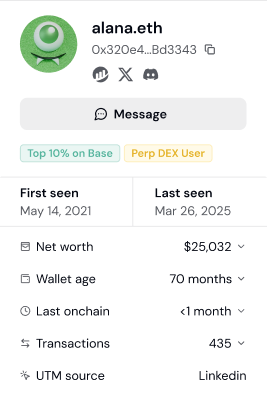 **Wallet Labels** provide valuable context and clarity to blockchain addresses, enhancing the readability and understanding of onchain data.
Labels help you understand your users so you can create granular [segments](/features/wallet-intelligence/segments) to target qualified users in your Ideal Customer Profile (ICP).
## List of Labels
Each tracked user on Formo is assigned labels based on their onchain activity and other data.
### User lifecycle labels
| Label | Description |
| ------------------ | -------------------------------- |
| **New User** | Number of sessions = 1 |
| **Returning User** | Number of sessions > 1 and \< 10 |
| **Power User** | Number of sessions > 10 |
### Attestations
| Label | Description |
| ---------------------------------------- | ------------------------------------------------------------------------------------------------------------------------------------------------------------------- |
| **Sanctioned User** | OFAC-sanction status and designations |
| **Human Passport Unique Humanity Score** | [Human Passport score (0-100)](https://docs.passport.xyz/) |
| **Human Passport Aggregate Model Score** | [Aggregate unique humanity score for EVM wallets (0-100)](https://docs.passport.xyz/building-with-passport/models/available-models#aggregate-unique-humanity-model) |
| **Coinbase Verified Account** | [Coinbase verified account attestations](https://www.coinbase.com/developer-platform/products/verifications) |
| **Coinbase Verified Country** | Coinbase verified country attestations with country code extraction |
| **Coinbase One** | Coinbase One subscription attestations |
| **Binance Verified** | Holds a [Binance Account Bound Token (BABT)](https://www.binance.com/en/babt), attesting the wallet completed Binance KYC |
### Others
| Label | Description |
| --------------------- | ---------------------------------------------------------------------------------------------------------------------------------------------------------------------------------------------------------------------------------------------------------------------------------------------------- |
| **Merkl Campaigns** | Tracks participation in [Merkl](https://merkl.xyz) incentive campaigns. Formo automatically detects campaign IDs from the Merkl API and stores them as a label on the wallet profile. You can filter users by campaign ID to measure the quality of users acquired through specific Merkl campaigns. |
| **ERC-8004 AI Agent** | Automatically detects wallets registered as AI agents via the [ERC-8004](https://erc8004.org) standard. Formo queries onchain registries across 11+ chains to identify agent wallets and surfaces the agent name, ID, and reputation score on the wallet profile. |
***
## How to use labels for targeting
Wallet labels turn anonymous addresses into actionable user profiles. This guide shows you how to use labels to identify and target specific user types.
### How labels work
Formo automatically analyzes each wallet's onchain activity and assigns relevant labels. Labels update as users' behavior changes.
**Label sources:**
* **Onchain activity** - Protocols used, tokens held, transaction patterns
* **Attestations** - Verified credentials from Coinbase, Gitcoin Passport, etc.
* **App behavior** - Session count, engagement patterns on your app
### Step 1: View labels on a user profile
1. Go to **Users** and click any wallet address
2. Scroll to the **Labels** section
3. See all labels assigned to this user
Labels appear as tags you can click to filter by.
### Step 2: Filter users by label
Use labels to find specific user types:
1. Go to **Users** or **Audience Insights**
2. Click **Add Filter**
3. Select **Label** as the filter type
4. Choose the label(s) you want
**Example filters:**
| Goal | Label Filter |
| -------------------------- | ---------------------------------------------- |
| Find DeFi power users | Label = "DeFi Active" AND Label = "Power User" |
| Find verified humans | Human Passport Score > 50 |
| Exclude sanctioned wallets | Label != "Sanctioned User" |
| Find Coinbase users | Label = "Coinbase Verified Account" |
### Step 3: Combine labels with other filters
Labels become powerful when combined with other criteria:
**High-value DeFi users:**
| Filter | Value |
| --------- | ----------- |
| Label | DeFi Active |
| Net Worth | > \$50,000 |
| Lifecycle | Power User |
**Verified users from campaigns:**
| Filter | Value |
| ---------- | ------------------------- |
| Label | Coinbase Verified Account |
| UTM Source | twitter |
| First Seen | Last 30 days |
**At-risk whales:**
| Filter | Value |
| --------- | ----------- |
| Label | ETH Staker |
| Net Worth | > \$100,000 |
| Lifecycle | Churned |
### Step 4: Save as a segment
Turn useful label combinations into reusable segments:
1. Apply your label + other filters
2. Click **Save as Segment**
3. Name it descriptively (e.g., "Verified DeFi Whales")
4. Use the segment for analysis, exports, or alerts
### Common targeting strategies
**Identify your ICP (Ideal Customer Profile):**
1. Look at your best users (highest volume, most active)
2. Check which labels they share
3. Create a segment with those labels
4. Use it to find similar users
**Compliance filtering:**
1. Filter by Label != "Sanctioned User"
2. Add Human Passport Score > 20 for sybil resistance
3. Export clean lists for marketing or rewards
**Quality scoring:**
1. Combine multiple positive labels (DeFi Active + Power User + Coinbase Verified)
2. Users matching more labels = higher quality
3. Prioritize multi-label users for outreach
**Competitive targeting:**
1. Use Apps filter to find users of competitor protocols
2. Combine with labels showing high engagement
3. Target these users with differentiated messaging
### Label-based alerting
Set up alerts based on labels:
1. Go to **Settings** > **Alerts**
2. Create an alert for `connect` events
3. Add condition: Label = "DeFi Active" AND Net Worth > \$100,000
4. Get notified when high-value DeFi users connect
### Next Steps
Save label filters as segments
Aggregate label distribution
Complete targeting workflow
Alert on labeled users
**Wallet Labels** provide valuable context and clarity to blockchain addresses, enhancing the readability and understanding of onchain data.
Labels help you understand your users so you can create granular [segments](/features/wallet-intelligence/segments) to target qualified users in your Ideal Customer Profile (ICP).
## List of Labels
Each tracked user on Formo is assigned labels based on their onchain activity and other data.
### User lifecycle labels
| Label | Description |
| ------------------ | -------------------------------- |
| **New User** | Number of sessions = 1 |
| **Returning User** | Number of sessions > 1 and \< 10 |
| **Power User** | Number of sessions > 10 |
### Attestations
| Label | Description |
| ---------------------------------------- | ------------------------------------------------------------------------------------------------------------------------------------------------------------------- |
| **Sanctioned User** | OFAC-sanction status and designations |
| **Human Passport Unique Humanity Score** | [Human Passport score (0-100)](https://docs.passport.xyz/) |
| **Human Passport Aggregate Model Score** | [Aggregate unique humanity score for EVM wallets (0-100)](https://docs.passport.xyz/building-with-passport/models/available-models#aggregate-unique-humanity-model) |
| **Coinbase Verified Account** | [Coinbase verified account attestations](https://www.coinbase.com/developer-platform/products/verifications) |
| **Coinbase Verified Country** | Coinbase verified country attestations with country code extraction |
| **Coinbase One** | Coinbase One subscription attestations |
| **Binance Verified** | Holds a [Binance Account Bound Token (BABT)](https://www.binance.com/en/babt), attesting the wallet completed Binance KYC |
### Others
| Label | Description |
| --------------------- | ---------------------------------------------------------------------------------------------------------------------------------------------------------------------------------------------------------------------------------------------------------------------------------------------------- |
| **Merkl Campaigns** | Tracks participation in [Merkl](https://merkl.xyz) incentive campaigns. Formo automatically detects campaign IDs from the Merkl API and stores them as a label on the wallet profile. You can filter users by campaign ID to measure the quality of users acquired through specific Merkl campaigns. |
| **ERC-8004 AI Agent** | Automatically detects wallets registered as AI agents via the [ERC-8004](https://erc8004.org) standard. Formo queries onchain registries across 11+ chains to identify agent wallets and surfaces the agent name, ID, and reputation score on the wallet profile. |
***
## How to use labels for targeting
Wallet labels turn anonymous addresses into actionable user profiles. This guide shows you how to use labels to identify and target specific user types.
### How labels work
Formo automatically analyzes each wallet's onchain activity and assigns relevant labels. Labels update as users' behavior changes.
**Label sources:**
* **Onchain activity** - Protocols used, tokens held, transaction patterns
* **Attestations** - Verified credentials from Coinbase, Gitcoin Passport, etc.
* **App behavior** - Session count, engagement patterns on your app
### Step 1: View labels on a user profile
1. Go to **Users** and click any wallet address
2. Scroll to the **Labels** section
3. See all labels assigned to this user
Labels appear as tags you can click to filter by.
### Step 2: Filter users by label
Use labels to find specific user types:
1. Go to **Users** or **Audience Insights**
2. Click **Add Filter**
3. Select **Label** as the filter type
4. Choose the label(s) you want
**Example filters:**
| Goal | Label Filter |
| -------------------------- | ---------------------------------------------- |
| Find DeFi power users | Label = "DeFi Active" AND Label = "Power User" |
| Find verified humans | Human Passport Score > 50 |
| Exclude sanctioned wallets | Label != "Sanctioned User" |
| Find Coinbase users | Label = "Coinbase Verified Account" |
### Step 3: Combine labels with other filters
Labels become powerful when combined with other criteria:
**High-value DeFi users:**
| Filter | Value |
| --------- | ----------- |
| Label | DeFi Active |
| Net Worth | > \$50,000 |
| Lifecycle | Power User |
**Verified users from campaigns:**
| Filter | Value |
| ---------- | ------------------------- |
| Label | Coinbase Verified Account |
| UTM Source | twitter |
| First Seen | Last 30 days |
**At-risk whales:**
| Filter | Value |
| --------- | ----------- |
| Label | ETH Staker |
| Net Worth | > \$100,000 |
| Lifecycle | Churned |
### Step 4: Save as a segment
Turn useful label combinations into reusable segments:
1. Apply your label + other filters
2. Click **Save as Segment**
3. Name it descriptively (e.g., "Verified DeFi Whales")
4. Use the segment for analysis, exports, or alerts
### Common targeting strategies
**Identify your ICP (Ideal Customer Profile):**
1. Look at your best users (highest volume, most active)
2. Check which labels they share
3. Create a segment with those labels
4. Use it to find similar users
**Compliance filtering:**
1. Filter by Label != "Sanctioned User"
2. Add Human Passport Score > 20 for sybil resistance
3. Export clean lists for marketing or rewards
**Quality scoring:**
1. Combine multiple positive labels (DeFi Active + Power User + Coinbase Verified)
2. Users matching more labels = higher quality
3. Prioritize multi-label users for outreach
**Competitive targeting:**
1. Use Apps filter to find users of competitor protocols
2. Combine with labels showing high engagement
3. Target these users with differentiated messaging
### Label-based alerting
Set up alerts based on labels:
1. Go to **Settings** > **Alerts**
2. Create an alert for `connect` events
3. Add condition: Label = "DeFi Active" AND Net Worth > \$100,000
4. Get notified when high-value DeFi users connect
### Next Steps
Save label filters as segments
Aggregate label distribution
Complete targeting workflow
Alert on labeled users