> ## Documentation Index
> Fetch the complete documentation index at: https://docs.formo.so/llms.txt
> Use this file to discover all available pages before exploring further.
# Key metrics
> Track key growth metrics like visitors, wallets, transactions, and user acquisition channels to understand your product performance.
## Visitors, wallets, transactions
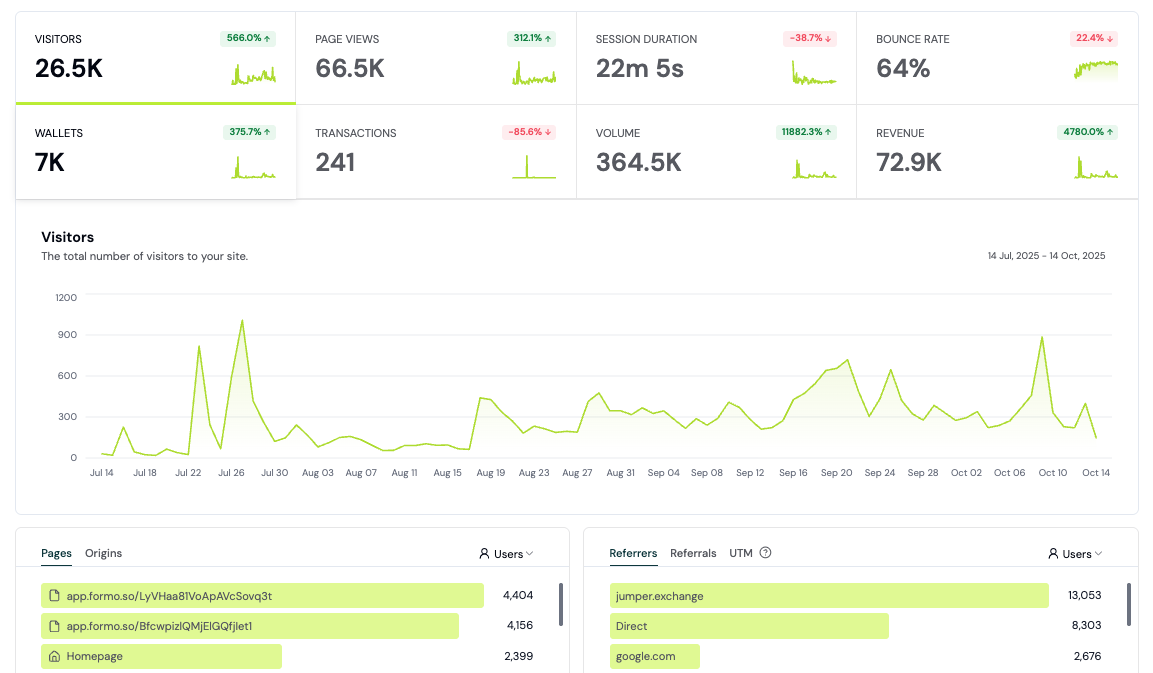
Measure the number of visitors, wallets, and transactions to discover which tactics drive product adoption and growth.
 ### Breakdown by referrer
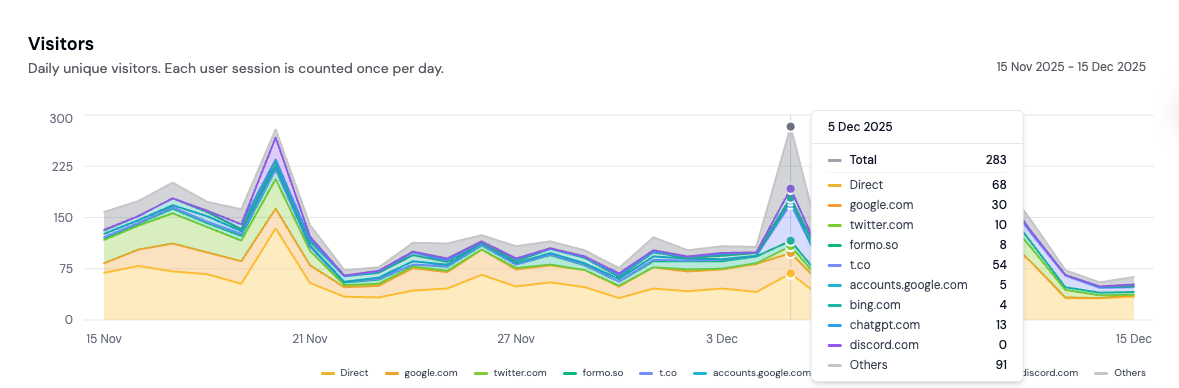 See what's moving the needle with a breakdown of your metrics by referrers. Easily understand where your onchain users come from and how they find you.
## Session duration
See the average session duration of visitors and users on your app. Understand how long users spend engaging with your product.
## Bounce rate
Track your bounce rate to understand how many visitors leave after viewing only one page. A high bounce rate may indicate issues with your landing page or user experience.
## Pages
See the top pages that your users are visiting. See which pages are driving the most traffic and conversions.
See what's moving the needle with a breakdown of your metrics by referrers. Easily understand where your onchain users come from and how they find you.
## Session duration
See the average session duration of visitors and users on your app. Understand how long users spend engaging with your product.
## Bounce rate
Track your bounce rate to understand how many visitors leave after viewing only one page. A high bounce rate may indicate issues with your landing page or user experience.
## Pages
See the top pages that your users are visiting. See which pages are driving the most traffic and conversions.
 ### Entry and exit pages
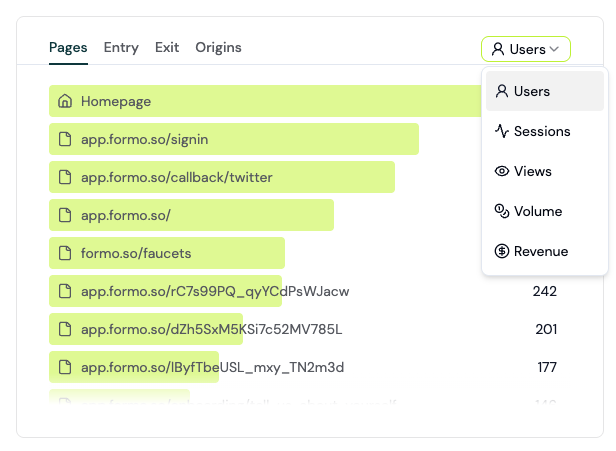
View Entry and Exit page analytics for your site and app.
* **Entry pages** are the first pages visitors land on when they come to your website. Think of them as digital front doors where your user's journey begins.
* **Exit pages** are the last pages users view before leaving your site. They represent the end of a visitor's session, whether it's after completing a goal or bouncing before engaging further.
Understanding both gives you a clear window into how people interact with your site and where you might be losing them.
## Channels, Referrers, UTM, referrals
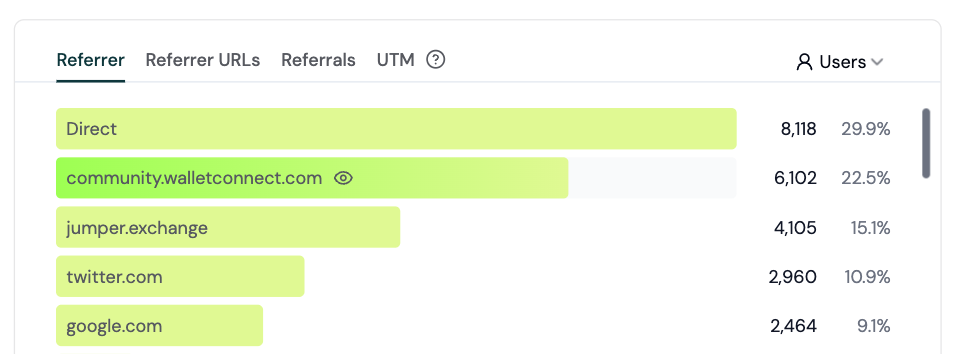
See where your users are coming from by acquisition channel, referrer, UTM parameters, and referrals.
### Channels
Formo automatically classifies every session into one of 12 acquisition channels using a priority-ordered ladder over the referrer domain, `utm_medium`, and 8 ad-platform click IDs (`gclid`, `gad_source`, `fbclid`, `msclkid`, `ttclid`, `twclid`, `li_fat_id`, `rdt_cid`). Classification happens at query time, so rule changes apply retroactively without backfills.
The 12 channels (first match wins):
1. **Paid Search** - paid traffic from Google, Bing, DuckDuckGo, Yahoo, Yandex, Baidu, Brave, Kagi, Naver, etc.
2. **Paid Video** - paid traffic from YouTube, Vimeo, Twitch, Dailymotion, Loom, Wistia.
3. **Paid Social** - paid traffic from Meta, X/Twitter, LinkedIn, Reddit, TikTok, Pinterest, Snapchat, Threads, Discord, Telegram, Farcaster, etc.
4. **Email** - `utm_medium` of `email`, `e-mail`, `e_mail`, or `newsletter`.
5. **Affiliates** - `utm_medium=affiliate` or any non-empty `ref` query parameter.
6. **Display** - `utm_medium` of `display`, `banner`, `expandable`, or `interstitial`.
7. **AI** - traffic from ChatGPT, Claude, Gemini, Copilot, Perplexity, DeepSeek, Phind, Poe, Mistral Chat, Meta AI, You.com, Pi. (No other analytics tool surfaces this yet.)
8. **Organic Search** - unpaid traffic from search engines (`utm_medium=organic` or referrer matches a search domain with no paid signal).
9. **Organic Social** - unpaid traffic from social platforms.
10. **Organic Video** - unpaid traffic from video platforms.
11. **Referrers** - any other non-empty referrer not matched above.
12. **Direct** - no referrer, no UTM, no click ID (typed URL, bookmark, or stripped referrer).
Paid is detected from any of: paid pricing mediums (`cpc`, `cpm`, `cpv`, `cpa`, `ppc`, `paidsearch`, `paidsocial`, `sem`, `retargeting`), any `utm_medium` starting with `paid`, or any of the 8 click IDs above. Sub-classification (Search vs Social vs Video) uses the referrer domain.
### Entry and exit pages
View Entry and Exit page analytics for your site and app.
* **Entry pages** are the first pages visitors land on when they come to your website. Think of them as digital front doors where your user's journey begins.
* **Exit pages** are the last pages users view before leaving your site. They represent the end of a visitor's session, whether it's after completing a goal or bouncing before engaging further.
Understanding both gives you a clear window into how people interact with your site and where you might be losing them.
## Channels, Referrers, UTM, referrals
See where your users are coming from by acquisition channel, referrer, UTM parameters, and referrals.
### Channels
Formo automatically classifies every session into one of 12 acquisition channels using a priority-ordered ladder over the referrer domain, `utm_medium`, and 8 ad-platform click IDs (`gclid`, `gad_source`, `fbclid`, `msclkid`, `ttclid`, `twclid`, `li_fat_id`, `rdt_cid`). Classification happens at query time, so rule changes apply retroactively without backfills.
The 12 channels (first match wins):
1. **Paid Search** - paid traffic from Google, Bing, DuckDuckGo, Yahoo, Yandex, Baidu, Brave, Kagi, Naver, etc.
2. **Paid Video** - paid traffic from YouTube, Vimeo, Twitch, Dailymotion, Loom, Wistia.
3. **Paid Social** - paid traffic from Meta, X/Twitter, LinkedIn, Reddit, TikTok, Pinterest, Snapchat, Threads, Discord, Telegram, Farcaster, etc.
4. **Email** - `utm_medium` of `email`, `e-mail`, `e_mail`, or `newsletter`.
5. **Affiliates** - `utm_medium=affiliate` or any non-empty `ref` query parameter.
6. **Display** - `utm_medium` of `display`, `banner`, `expandable`, or `interstitial`.
7. **AI** - traffic from ChatGPT, Claude, Gemini, Copilot, Perplexity, DeepSeek, Phind, Poe, Mistral Chat, Meta AI, You.com, Pi. (No other analytics tool surfaces this yet.)
8. **Organic Search** - unpaid traffic from search engines (`utm_medium=organic` or referrer matches a search domain with no paid signal).
9. **Organic Social** - unpaid traffic from social platforms.
10. **Organic Video** - unpaid traffic from video platforms.
11. **Referrers** - any other non-empty referrer not matched above.
12. **Direct** - no referrer, no UTM, no click ID (typed URL, bookmark, or stripped referrer).
Paid is detected from any of: paid pricing mediums (`cpc`, `cpm`, `cpv`, `cpa`, `ppc`, `paidsearch`, `paidsocial`, `sem`, `retargeting`), any `utm_medium` starting with `paid`, or any of the 8 click IDs above. Sub-classification (Search vs Social vs Video) uses the referrer domain.
 The Formo SDK automatically adds the following UTM parameters present on the page to events fired from that page load:
* utm\_source
* utm\_campaign
* utm\_medium
* utm\_term
* utm\_content
* ref
### Referrer URL tracking
Referrer URL tracking lets you understand the specific URL where your users are coming from – as long as the site has the correct `Referer-Policy` header set.
We recommend setting the `no-referrer-when-downgrade` policy, which will only send the domain, path, and query parameters to the destination URL as long as the protocol security level stays the same (i.e. `HTTP` → `HTTP`, or `HTTPS` → `HTTPS`).
If the protocol security level is downgraded (i.e. `HTTPS` → `HTTP`), the referrer will not be sent. This is a good compromise to make sure your users' privacy is respected while still getting a good amount of data.
Here's how to configure this:
If you are using Next.js, you can use the headers property in your `next.config.js` file to configure the referrer policy:
```javascript theme={null}
module.exports = {
async headers() {
return [
{
source: "/:path*",
headers: [
{
key: "Referrer-Policy",
value: "no-referrer-when-downgrade",
},
],
},
];
},
};
```
You can set the referrer policy using a meta tag in the `` section of your HTML:
```html theme={null}
```
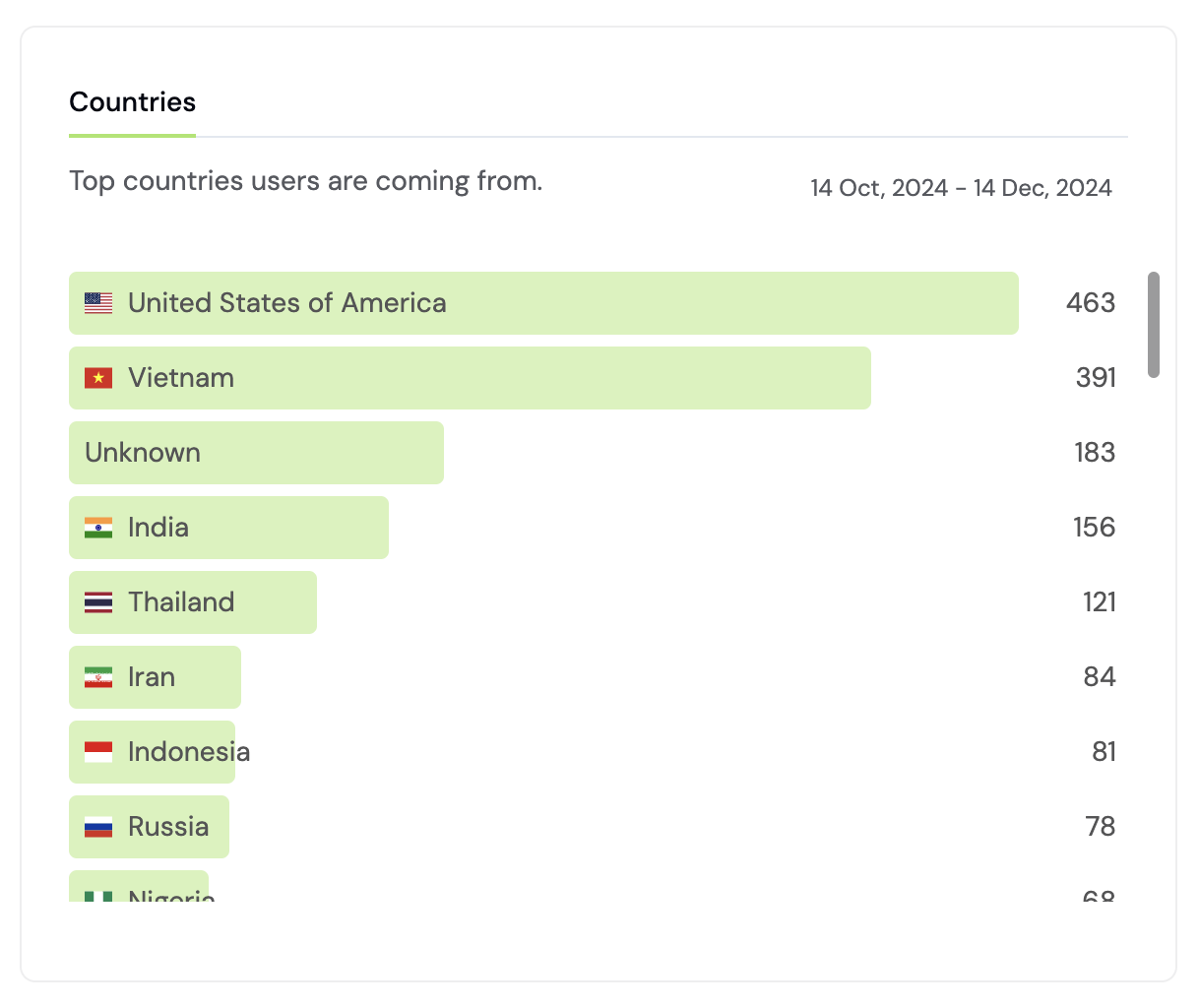
## Countries
See where your users are coming from by country.
The Formo SDK automatically adds the following UTM parameters present on the page to events fired from that page load:
* utm\_source
* utm\_campaign
* utm\_medium
* utm\_term
* utm\_content
* ref
### Referrer URL tracking
Referrer URL tracking lets you understand the specific URL where your users are coming from – as long as the site has the correct `Referer-Policy` header set.
We recommend setting the `no-referrer-when-downgrade` policy, which will only send the domain, path, and query parameters to the destination URL as long as the protocol security level stays the same (i.e. `HTTP` → `HTTP`, or `HTTPS` → `HTTPS`).
If the protocol security level is downgraded (i.e. `HTTPS` → `HTTP`), the referrer will not be sent. This is a good compromise to make sure your users' privacy is respected while still getting a good amount of data.
Here's how to configure this:
If you are using Next.js, you can use the headers property in your `next.config.js` file to configure the referrer policy:
```javascript theme={null}
module.exports = {
async headers() {
return [
{
source: "/:path*",
headers: [
{
key: "Referrer-Policy",
value: "no-referrer-when-downgrade",
},
],
},
];
},
};
```
You can set the referrer policy using a meta tag in the `` section of your HTML:
```html theme={null}
```
## Countries
See where your users are coming from by country.
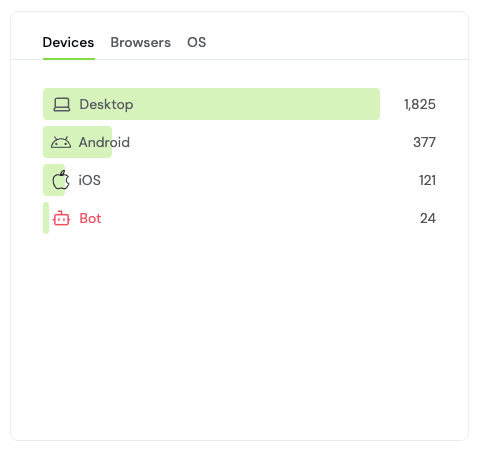
 ## Devices, browsers, OS
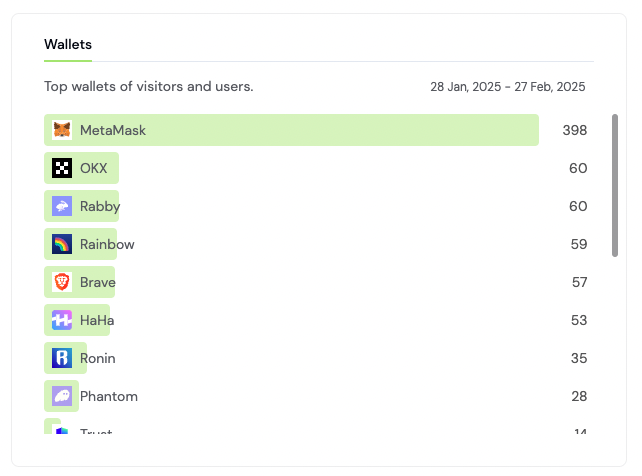
 ## Wallets
See the top wallets of your visitors and users.
## Wallets
See the top wallets of your visitors and users.
 ***
## How to analyze traffic sources
Understand where your users come from and which channels drive the most value. This guide walks you through analyzing traffic sources and optimizing user acquisition.
### Step 1: Open Formo
1. Go to the [Formo Dashboard](https://app.formo.so)
2. Select your project
3. Click **Overview** in the left navigation
You'll see the overview with visitors, wallets, and transactions over time.
### Step 2: Review the referrer breakdown
View your core metrics by referrer to see where traffic originates:
| Data | What it shows |
| ---------------- | ---------------------------------------------------------------------------------------------------------- |
| **Referrer** | The source domain (twitter.com, google.com, direct) |
| **Sessions** | Session visits from this source (the session count, not the overview's unique-visitor **Visitors** metric) |
| **Wallets** | Wallet connects from this source |
| **Transactions** | Completed transactions from this source |
| **Volume** | Total transaction volume (USD) |
You get full attribution for users, volume, and revenue by referrer, referral, and UTM parameters in the Referrers chart.
You can click on any item to drill down into the data, showing you the list of [users](/features/wallet-intelligence/overview) that came from that source.
### Step 3: Measure conversion rates by source
The overview page shows your **conversion rates by source**:
```
Conversion Rate = Transactions / Visitors × 100
```
**Example analysis:**
| Referrer | Visitors | Transactions | Conversion |
| ------------- | -------- | ------------ | ---------- |
| twitter.com | 1,000 | 50 | 5% |
| discord.com | 500 | 75 | 15% |
| defillama.com | 200 | 60 | 30% |
In this example, DefiLlama drives 6x better conversion than Twitter despite lower volume.
### Step 4: Analyze UTM campaigns
If you use UTM parameters in your marketing links, you can drill deeper:
1. See your breakdown by UTM campaign, source, medium
2. Identify which specific campaigns perform best on user acquisition and volume
**UTM parameter guide:**
| Parameter | Purpose | Example |
| -------------- | ------------------- | ---------------------------- |
| `utm_source` | Platform | twitter, discord, newsletter |
| `utm_medium` | Channel type | social, email, paid |
| `utm_campaign` | Campaign name | launch\_promo, airdrop\_2024 |
| `utm_content` | Ad variation | banner\_a, banner\_b |
| `utm_term` | Keywords (for paid) | defi, swap |
You can use Formo's [UTM Generator](https://formo.so/utm-generator) to generate your marketing links.
**Example URL:**
```
https://yourapp.xyz/?utm_source=twitter&utm_medium=social&utm_campaign=launch_promo
```
Once Formo is installed, any incoming clicks with UTM parameters leading to wallet connects or transactions in your app will be attributed automatically.
### Step 5: Analyze by device and geography
Check the **Devices** and **Countries** sections:
**Device insights:**
* High mobile traffic but low mobile conversion? Mobile UX issue.
* Desktop dominates? Your users are power users.
**Geographic insights:**
* Unexpected traffic from certain countries? Potential new markets.
* Low conversion from specific regions? Localization opportunities.
### Optimizing based on data
**Double down on high-converting sources:**
* Identify your top 3 converting referrers
* Allocate more budget/effort to these channels
* Create content tailored to these audiences
**Investigate low-converting sources:**
* High traffic but low conversion = landing page issue
* Check if these visitors bounce or explore but don't convert
* Consider if this traffic is actually relevant
**UTM best practices:**
* Use consistent naming conventions
* Track all paid campaigns with unique UTMs
* Add UTMs to social media links, emails, and partner links
### Attribution models
Formo supports multiple attribution models. Learn more in the [Attribution guide](/data/attribution).
| Model | Best for |
| --------------- | ------------------------------------------------------------------------------------------- |
| **First Touch** | Understanding discovery channels |
| **Last Touch** | Understanding conversion drivers |
| **Custom** | Use the [Explorer](/features/product-analytics/explore) to build your own attribution model |
### Next Steps
View real-time events and Live View
Run custom SQL queries
Track conversion by source through funnels
Complete attribution workflow
***
## How to analyze traffic sources
Understand where your users come from and which channels drive the most value. This guide walks you through analyzing traffic sources and optimizing user acquisition.
### Step 1: Open Formo
1. Go to the [Formo Dashboard](https://app.formo.so)
2. Select your project
3. Click **Overview** in the left navigation
You'll see the overview with visitors, wallets, and transactions over time.
### Step 2: Review the referrer breakdown
View your core metrics by referrer to see where traffic originates:
| Data | What it shows |
| ---------------- | ---------------------------------------------------------------------------------------------------------- |
| **Referrer** | The source domain (twitter.com, google.com, direct) |
| **Sessions** | Session visits from this source (the session count, not the overview's unique-visitor **Visitors** metric) |
| **Wallets** | Wallet connects from this source |
| **Transactions** | Completed transactions from this source |
| **Volume** | Total transaction volume (USD) |
You get full attribution for users, volume, and revenue by referrer, referral, and UTM parameters in the Referrers chart.
You can click on any item to drill down into the data, showing you the list of [users](/features/wallet-intelligence/overview) that came from that source.
### Step 3: Measure conversion rates by source
The overview page shows your **conversion rates by source**:
```
Conversion Rate = Transactions / Visitors × 100
```
**Example analysis:**
| Referrer | Visitors | Transactions | Conversion |
| ------------- | -------- | ------------ | ---------- |
| twitter.com | 1,000 | 50 | 5% |
| discord.com | 500 | 75 | 15% |
| defillama.com | 200 | 60 | 30% |
In this example, DefiLlama drives 6x better conversion than Twitter despite lower volume.
### Step 4: Analyze UTM campaigns
If you use UTM parameters in your marketing links, you can drill deeper:
1. See your breakdown by UTM campaign, source, medium
2. Identify which specific campaigns perform best on user acquisition and volume
**UTM parameter guide:**
| Parameter | Purpose | Example |
| -------------- | ------------------- | ---------------------------- |
| `utm_source` | Platform | twitter, discord, newsletter |
| `utm_medium` | Channel type | social, email, paid |
| `utm_campaign` | Campaign name | launch\_promo, airdrop\_2024 |
| `utm_content` | Ad variation | banner\_a, banner\_b |
| `utm_term` | Keywords (for paid) | defi, swap |
You can use Formo's [UTM Generator](https://formo.so/utm-generator) to generate your marketing links.
**Example URL:**
```
https://yourapp.xyz/?utm_source=twitter&utm_medium=social&utm_campaign=launch_promo
```
Once Formo is installed, any incoming clicks with UTM parameters leading to wallet connects or transactions in your app will be attributed automatically.
### Step 5: Analyze by device and geography
Check the **Devices** and **Countries** sections:
**Device insights:**
* High mobile traffic but low mobile conversion? Mobile UX issue.
* Desktop dominates? Your users are power users.
**Geographic insights:**
* Unexpected traffic from certain countries? Potential new markets.
* Low conversion from specific regions? Localization opportunities.
### Optimizing based on data
**Double down on high-converting sources:**
* Identify your top 3 converting referrers
* Allocate more budget/effort to these channels
* Create content tailored to these audiences
**Investigate low-converting sources:**
* High traffic but low conversion = landing page issue
* Check if these visitors bounce or explore but don't convert
* Consider if this traffic is actually relevant
**UTM best practices:**
* Use consistent naming conventions
* Track all paid campaigns with unique UTMs
* Add UTMs to social media links, emails, and partner links
### Attribution models
Formo supports multiple attribution models. Learn more in the [Attribution guide](/data/attribution).
| Model | Best for |
| --------------- | ------------------------------------------------------------------------------------------- |
| **First Touch** | Understanding discovery channels |
| **Last Touch** | Understanding conversion drivers |
| **Custom** | Use the [Explorer](/features/product-analytics/explore) to build your own attribution model |
### Next Steps
View real-time events and Live View
Run custom SQL queries
Track conversion by source through funnels
Complete attribution workflow