> ## Documentation Index
> Fetch the complete documentation index at: https://docs.formo.so/llms.txt
> Use this file to discover all available pages before exploring further.
# Insights
> Receive AI-powered weekly insights that surface acquisition quality, activation moments, revenue trends, and churn signals from your analytics data.
Track how user behavior evolves over time across different dimensions with AI-powered cohort analysis. Insights automatically analyzes your data each week and surfaces actionable findings across acquisition, activation, revenue, and churn.
 ## Cohort Analysis
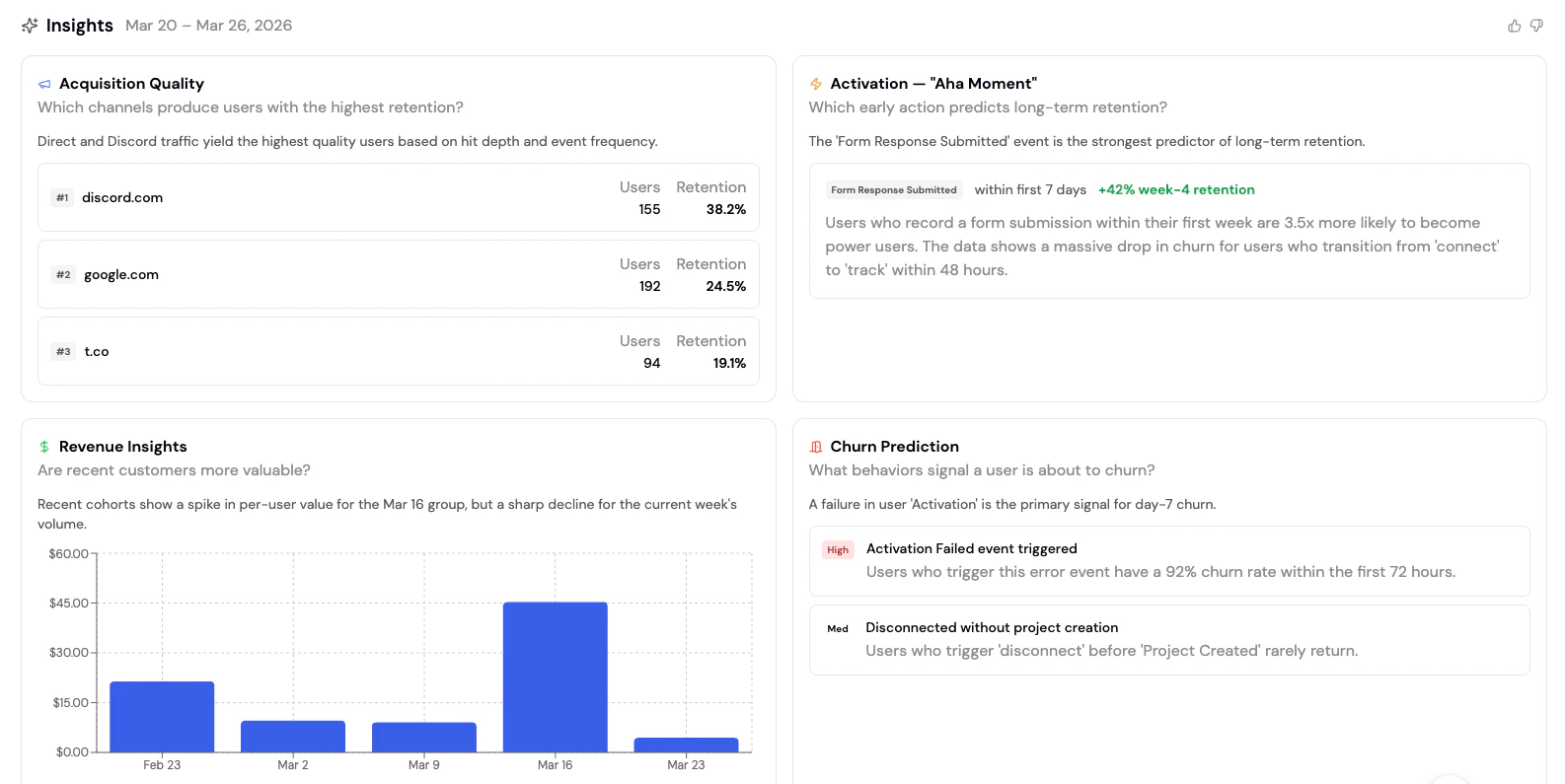
Insights runs a weekly cohort analysis that answers four key questions about your users:
### Acquisition Quality
**Which channels produce users with the highest retention?**
Acquisition Quality ranks your traffic sources by the retention rate of the users they bring in. Instead of optimizing for volume alone, you can identify which channels produce users that actually stick around.
Each channel shows:
| Column | Description |
| ------------- | -------------------------------------------------------- |
| **Channel** | The traffic source (e.g., discord.com, google.com, t.co) |
| **Users** | Number of users acquired from this channel |
| **Retention** | Week-4 retention rate for users from this channel |
Use this to shift acquisition spend toward channels that produce higher-quality users, not just more users.
### Activation - "Aha Moment"
**Which early action predicts long-term retention?**
Activation identifies the single event within a user's first few days that most strongly predicts long-term retention. This is the "aha moment" - the action that separates users who stay from those who churn.
The insight shows:
* **The event** that predicts retention (e.g., "Form Response Submitted")
* **Time window** for the action (e.g., "within first 7 days")
* **Retention lift** compared to users who don't perform this action (e.g., "+42% week-4 retention")
Once you identify your aha moment, design your onboarding to guide every new user toward that action as quickly as possible.
### Revenue Insights
**Are recent customers more valuable?**
Revenue Insights compares per-user value across weekly cohorts so you can spot whether your product changes are attracting higher-value users or if value is declining.
The chart displays:
* **Weekly cohorts** on the x-axis
* **Average value per user** on the y-axis
* **Trend analysis** highlighting spikes and declines
### Churn Prediction
**What behaviors signal a user is about to churn?**
Churn Prediction surfaces early warning signals - specific user behaviors that precede churn. Each signal includes a risk level and a description of what the data shows.
| Column | Description |
| --------------- | ----------------------------------------- |
| **Behavior** | The action or pattern that precedes churn |
| **Risk Level** | High, Medium, or Low severity |
| **Description** | What the data shows about this signal |
For example:
* **High risk**: "Users who trigger an error event have a 92% churn rate within the first 72 hours"
* **Medium risk**: "Users who disconnect before completing onboarding rarely return"
## Weekly Summary
In addition to cohort analysis, the Insights page provides a weekly summary organized into four sections:
* 🏆 **Wins** - Metrics that improved this week, with deltas and baselines
* ⚠️ **Issues** - Performance drops or problems that need attention
* 📈 **Opportunities** - Untapped segments or behaviors with estimated upside
* ✅ **Actions** - Concrete action items with priority levels (High/Med/Low) and success metrics
## How to use Insights
1. Navigate to the [Formo Dashboard](https://app.formo.so)
2. Select your project
3. Click **Insights** in the left navigation (✨ sparkle icon)
4. Insights are generated automatically each week - review the latest analysis and take action
Insights are generated using AI analysis of your actual analytics data. Results are cached daily and refresh automatically each week.
## Combining Insights with other features
| Insight | Follow-up action |
| ------------------------------------------------- | ------------------------------------------------------------------------------------------------------------------------ |
| **Low-quality acquisition channel** | Create a [segment](/features/wallet-intelligence/segments) of users from that channel to investigate |
| **Aha moment identified** | Build a [funnel](/features/product-analytics/funnels) to measure how many users reach that event |
| **Revenue decline in recent cohorts** | Use [retention analysis](/features/product-analytics/retention) to understand drop-off patterns |
| **High churn signal detected** | Set up an [alert](/features/product-analytics/alerts) to notify you when users exhibit that behavior |
| **Behavioral gap between power and casual users** | Explore the gap using [Ask Formo](/features/product-analytics/ai) or the [Explorer](/features/product-analytics/explore) |
## Next Steps
Dive deeper into cohort retention patterns
Measure conversion toward your aha moment
Create segments based on insight findings
Get notified when churn signals are detected
## Cohort Analysis
Insights runs a weekly cohort analysis that answers four key questions about your users:
### Acquisition Quality
**Which channels produce users with the highest retention?**
Acquisition Quality ranks your traffic sources by the retention rate of the users they bring in. Instead of optimizing for volume alone, you can identify which channels produce users that actually stick around.
Each channel shows:
| Column | Description |
| ------------- | -------------------------------------------------------- |
| **Channel** | The traffic source (e.g., discord.com, google.com, t.co) |
| **Users** | Number of users acquired from this channel |
| **Retention** | Week-4 retention rate for users from this channel |
Use this to shift acquisition spend toward channels that produce higher-quality users, not just more users.
### Activation - "Aha Moment"
**Which early action predicts long-term retention?**
Activation identifies the single event within a user's first few days that most strongly predicts long-term retention. This is the "aha moment" - the action that separates users who stay from those who churn.
The insight shows:
* **The event** that predicts retention (e.g., "Form Response Submitted")
* **Time window** for the action (e.g., "within first 7 days")
* **Retention lift** compared to users who don't perform this action (e.g., "+42% week-4 retention")
Once you identify your aha moment, design your onboarding to guide every new user toward that action as quickly as possible.
### Revenue Insights
**Are recent customers more valuable?**
Revenue Insights compares per-user value across weekly cohorts so you can spot whether your product changes are attracting higher-value users or if value is declining.
The chart displays:
* **Weekly cohorts** on the x-axis
* **Average value per user** on the y-axis
* **Trend analysis** highlighting spikes and declines
### Churn Prediction
**What behaviors signal a user is about to churn?**
Churn Prediction surfaces early warning signals - specific user behaviors that precede churn. Each signal includes a risk level and a description of what the data shows.
| Column | Description |
| --------------- | ----------------------------------------- |
| **Behavior** | The action or pattern that precedes churn |
| **Risk Level** | High, Medium, or Low severity |
| **Description** | What the data shows about this signal |
For example:
* **High risk**: "Users who trigger an error event have a 92% churn rate within the first 72 hours"
* **Medium risk**: "Users who disconnect before completing onboarding rarely return"
## Weekly Summary
In addition to cohort analysis, the Insights page provides a weekly summary organized into four sections:
* 🏆 **Wins** - Metrics that improved this week, with deltas and baselines
* ⚠️ **Issues** - Performance drops or problems that need attention
* 📈 **Opportunities** - Untapped segments or behaviors with estimated upside
* ✅ **Actions** - Concrete action items with priority levels (High/Med/Low) and success metrics
## How to use Insights
1. Navigate to the [Formo Dashboard](https://app.formo.so)
2. Select your project
3. Click **Insights** in the left navigation (✨ sparkle icon)
4. Insights are generated automatically each week - review the latest analysis and take action
Insights are generated using AI analysis of your actual analytics data. Results are cached daily and refresh automatically each week.
## Combining Insights with other features
| Insight | Follow-up action |
| ------------------------------------------------- | ------------------------------------------------------------------------------------------------------------------------ |
| **Low-quality acquisition channel** | Create a [segment](/features/wallet-intelligence/segments) of users from that channel to investigate |
| **Aha moment identified** | Build a [funnel](/features/product-analytics/funnels) to measure how many users reach that event |
| **Revenue decline in recent cohorts** | Use [retention analysis](/features/product-analytics/retention) to understand drop-off patterns |
| **High churn signal detected** | Set up an [alert](/features/product-analytics/alerts) to notify you when users exhibit that behavior |
| **Behavioral gap between power and casual users** | Explore the gap using [Ask Formo](/features/product-analytics/ai) or the [Explorer](/features/product-analytics/explore) |
## Next Steps
Dive deeper into cohort retention patterns
Measure conversion toward your aha moment
Create segments based on insight findings
Get notified when churn signals are detected