> ## Documentation Index
> Fetch the complete documentation index at: https://docs.formo.so/llms.txt
> Use this file to discover all available pages before exploring further.
# Contract events
> Add smart contract addresses to ingest and decode onchain events like swaps, transfers, and mints in real time across supported EVM chains.
Add your contract address to start ingesting contract events.
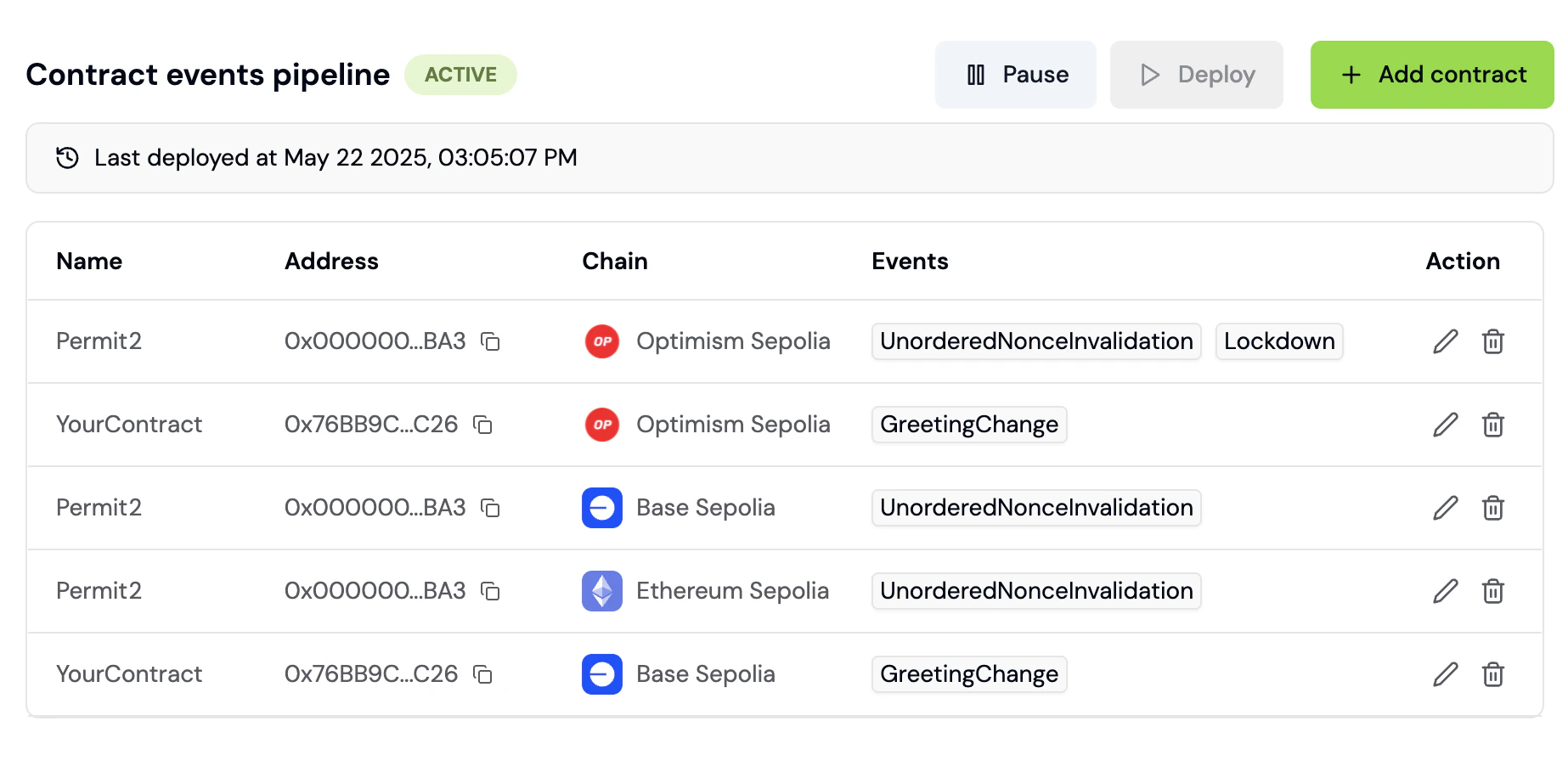 You will see your selected events on the [Activity Feed](/features/product-analytics/activity) and [Wallet Profile](/features/wallet-intelligence/wallet-profiles) in real-time.
Contract events can also be used when creating [Funnels](/features/product-analytics/funnels).
## Chains
See the list of supported chains [here](/chains/overview).
***
## How to track smart contract events
Monitor your smart contract activity in real-time. This guide walks you through adding contracts, selecting events, and using contract data in analytics.
### Step 1: Navigate to Contract Events
1. Go to the [Formo Dashboard](https://app.formo.so)
2. Select your project
3. Click **Settings** in the left navigation
4. Select the **Contracts** tab
### Step 2: Add a contract
1. Click **Add Contract**
2. Fill in the contract details:
| Field | Description | Example |
| -------------------- | ----------------------------------------------------------------------------- | ------------------------ |
| **Chain** | The blockchain network | Ethereum, Base, Arbitrum |
| **Contract Address** | Your contract's address | `0x1234...abcd` |
| **Name** (optional) | Friendly name for reference | "Swap Router" |
| **ABI** (optional) | Formo automatically fetches the contract ABI from Etherscan to decode events. | |
3. Click **Save**
You will see your selected events on the [Activity Feed](/features/product-analytics/activity) and [Wallet Profile](/features/wallet-intelligence/wallet-profiles) in real-time.
Contract events can also be used when creating [Funnels](/features/product-analytics/funnels).
## Chains
See the list of supported chains [here](/chains/overview).
***
## How to track smart contract events
Monitor your smart contract activity in real-time. This guide walks you through adding contracts, selecting events, and using contract data in analytics.
### Step 1: Navigate to Contract Events
1. Go to the [Formo Dashboard](https://app.formo.so)
2. Select your project
3. Click **Settings** in the left navigation
4. Select the **Contracts** tab
### Step 2: Add a contract
1. Click **Add Contract**
2. Fill in the contract details:
| Field | Description | Example |
| -------------------- | ----------------------------------------------------------------------------- | ------------------------ |
| **Chain** | The blockchain network | Ethereum, Base, Arbitrum |
| **Contract Address** | Your contract's address | `0x1234...abcd` |
| **Name** (optional) | Friendly name for reference | "Swap Router" |
| **ABI** (optional) | Formo automatically fetches the contract ABI from Etherscan to decode events. | |
3. Click **Save**
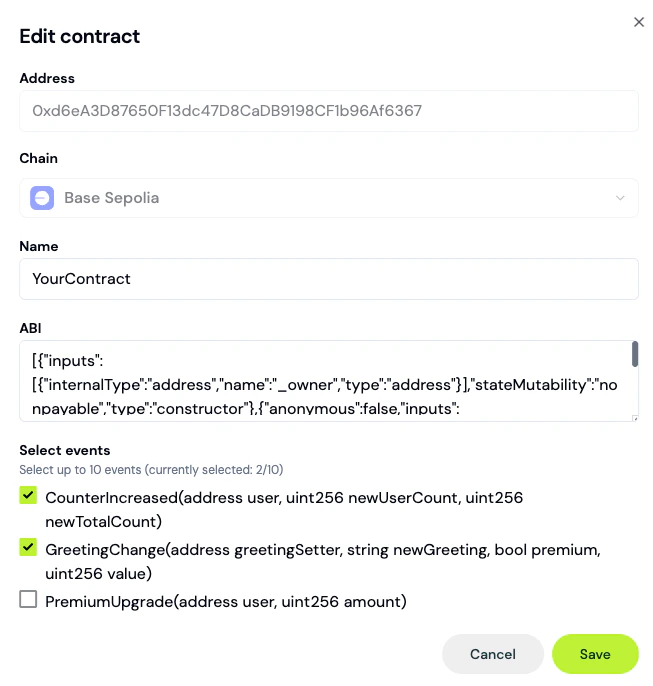 For verified contracts, Formo auto-detects the ABI. For unverified contracts, you can paste the ABI manually.
### Step 3: Select smart contract events to track
After adding a contract, select one or more events to ingest into Formo:
1. Click on your contract in the list
2. You'll see all available events from the ABI
3. Toggle on the events you want to track from the list
### Step 4: View events in Activity Feed
Once configured, contract events appear in your Activity Feed:
1. Go to **Activity** in the left navigation
2. Filter by the **Contract Event** event type to see contract events
3. Click any event to see decoded parameters including transaction hash, block number, function name and function parameters
### Step 5: Use contract events in funnels
Build funnels that include onchain actions:
1. Go to **Funnels** and click **Create Funnel**
2. Add steps mixing offchain and onchain events:
* Step 1: `page` view (visit homepage)
* Step 2: `connect` (connect wallet)
* Step 3: `transaction` (successful tx)
* Step 4: `SwapCompleted` (contract event)
This gives you true end-to-end conversion tracking from first visit offchain to conversions onchain.
### Example: DEX swap tracking
Track user journey from landing page to completed swap:
| Step | Event Type | Description |
| ---- | -------------------- | -------------------- |
| 1 | `page` | User lands on /swap |
| 2 | `connect` | User connects wallet |
| 3 | Contract: `Approval` | User approves token |
| 4 | Contract: `Swap` | Swap executed |
### Supported chains
Contract events is available on [40+ chains](/chains/overview) including all major EVM chains.
### Next Steps
Create conversion funnels with contract events
View real-time contract activity
Full list of supported networks
Track additional offchain events
For verified contracts, Formo auto-detects the ABI. For unverified contracts, you can paste the ABI manually.
### Step 3: Select smart contract events to track
After adding a contract, select one or more events to ingest into Formo:
1. Click on your contract in the list
2. You'll see all available events from the ABI
3. Toggle on the events you want to track from the list
### Step 4: View events in Activity Feed
Once configured, contract events appear in your Activity Feed:
1. Go to **Activity** in the left navigation
2. Filter by the **Contract Event** event type to see contract events
3. Click any event to see decoded parameters including transaction hash, block number, function name and function parameters
### Step 5: Use contract events in funnels
Build funnels that include onchain actions:
1. Go to **Funnels** and click **Create Funnel**
2. Add steps mixing offchain and onchain events:
* Step 1: `page` view (visit homepage)
* Step 2: `connect` (connect wallet)
* Step 3: `transaction` (successful tx)
* Step 4: `SwapCompleted` (contract event)
This gives you true end-to-end conversion tracking from first visit offchain to conversions onchain.
### Example: DEX swap tracking
Track user journey from landing page to completed swap:
| Step | Event Type | Description |
| ---- | -------------------- | -------------------- |
| 1 | `page` | User lands on /swap |
| 2 | `connect` | User connects wallet |
| 3 | Contract: `Approval` | User approves token |
| 4 | Contract: `Swap` | Swap executed |
### Supported chains
Contract events is available on [40+ chains](/chains/overview) including all major EVM chains.
### Next Steps
Create conversion funnels with contract events
View real-time contract activity
Full list of supported networks
Track additional offchain events