> ## Documentation Index
> Fetch the complete documentation index at: https://docs.formo.so/llms.txt
> Use this file to discover all available pages before exploring further.
# Ask Formo
> Ask questions about your analytics data in natural language and get AI-generated SQL queries, charts, and growth insights without writing code.
Agentic analytics for onchain apps is now available on Formo! You can ask **Ask Formo** (the AI assistant) to help you explore your data and surface hidden insights.
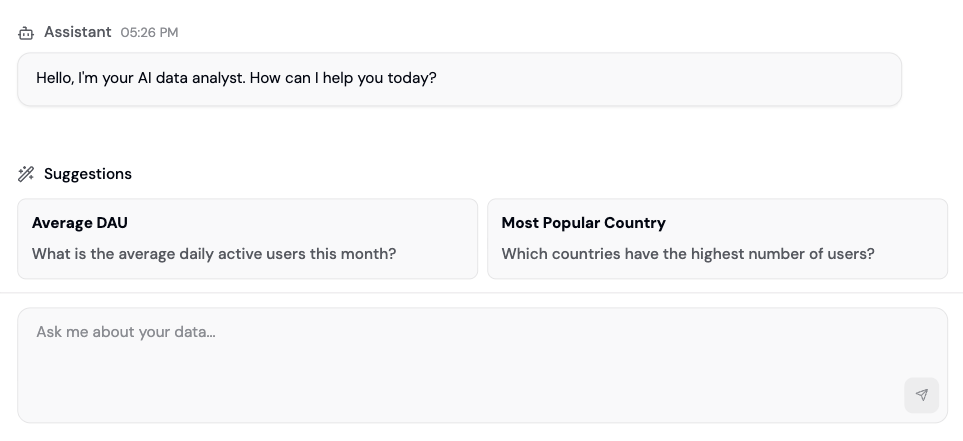 Agentic analytics help lower the barrier of entry to understanding data. AI agents can act as autonomous teammates. They will generate queries, explore patterns, surface anomalies, and recommend actions, all grounded in context about your app and driven by real data.
Ask Formo can help you explore your data without needing to know SQL or complex analytics queries. Simply describe what you want to understand, and the AI will generate the appropriate analysis.
## How it works
The Ask Formo feature provides an intelligent analytics assistant that can:
* **Generate queries**: Ask questions in natural language and get SQL queries automatically generated
* **Explore patterns**: Discover trends and patterns in your data that might not be immediately obvious
* **Surface anomalies**: Identify unusual behavior or outliers in your metrics
* **Recommend actions**: Get actionable insights and recommendations based on your data
* **Build charts**: Create [custom charts](/features/product-analytics/charts) and save them to your dashboard
* **Text to SQL**: Write and fix SQL code based on your instructions
## Access Ask Formo
Use Ask Formo from anywhere on the dashboard. Ask it any question about your data, or ask it to draw custom charts for your dashboard.
## Getting started
1. Click **Ask Formo** from anywhere in the dashboard
2. Type your question in natural language, such as:
* "What are my top performing acquisition channels this month?"
* "Show me users who dropped off in the signup funnel"
* "Which wallets have the highest transaction volume?"
* "Are there any unusual patterns in my recent activity?"
3. Review the generated query and results
4. Save useful charts to your dashboard
## Use cases
### Data exploration
Ask Formo can help you explore your data without needing to know SQL or complex analytics queries. Simply describe what you want to understand, and the AI will generate the appropriate analysis.
### Pattern recognition
The AI can identify trends, seasonality, and patterns in your user behavior, transaction data, and conversion metrics that might be difficult to spot manually.
### Anomaly detection
Get alerts about unusual spikes, drops, or changes in your key metrics, along with potential explanations for what might be causing them.
### Actionable insights
Beyond just showing you data, Ask Formo provides context and recommendations for what actions you might take based on the insights discovered.
## Best practices
* **Be specific**: The more specific your questions, the better the AI can help you
* **Provide context**: Mention time periods, [user segments](/features/wallet-intelligence/segments), or specific metrics you're interested in
* **Follow up**: Ask follow-up questions to dive deeper into interesting findings
* **Validate insights**: Always review the AI's findings and validate important insights with your domain knowledge
* **Specify time ranges**: Use "in the last 7 days" instead of "recently"
* **Name metrics clearly**: Use "daily active wallets" instead of "users"
* **Include thresholds**: Use "net worth > \$10,000" instead of "wealthy users"
* **Ask for comparisons**: Use "Compare X to Y" instead of "Show me X"
## Sample questions
For a full list of example questions and prompts, see the [How to use Ask Formo](/guides/ask-ai#example-questions) guide.
## Next Steps
Example questions and prompts
Build custom dashboards
Understand available data
Deep-dive on conversion
Analyze specific user groups
Agentic analytics help lower the barrier of entry to understanding data. AI agents can act as autonomous teammates. They will generate queries, explore patterns, surface anomalies, and recommend actions, all grounded in context about your app and driven by real data.
Ask Formo can help you explore your data without needing to know SQL or complex analytics queries. Simply describe what you want to understand, and the AI will generate the appropriate analysis.
## How it works
The Ask Formo feature provides an intelligent analytics assistant that can:
* **Generate queries**: Ask questions in natural language and get SQL queries automatically generated
* **Explore patterns**: Discover trends and patterns in your data that might not be immediately obvious
* **Surface anomalies**: Identify unusual behavior or outliers in your metrics
* **Recommend actions**: Get actionable insights and recommendations based on your data
* **Build charts**: Create [custom charts](/features/product-analytics/charts) and save them to your dashboard
* **Text to SQL**: Write and fix SQL code based on your instructions
## Access Ask Formo
Use Ask Formo from anywhere on the dashboard. Ask it any question about your data, or ask it to draw custom charts for your dashboard.
## Getting started
1. Click **Ask Formo** from anywhere in the dashboard
2. Type your question in natural language, such as:
* "What are my top performing acquisition channels this month?"
* "Show me users who dropped off in the signup funnel"
* "Which wallets have the highest transaction volume?"
* "Are there any unusual patterns in my recent activity?"
3. Review the generated query and results
4. Save useful charts to your dashboard
## Use cases
### Data exploration
Ask Formo can help you explore your data without needing to know SQL or complex analytics queries. Simply describe what you want to understand, and the AI will generate the appropriate analysis.
### Pattern recognition
The AI can identify trends, seasonality, and patterns in your user behavior, transaction data, and conversion metrics that might be difficult to spot manually.
### Anomaly detection
Get alerts about unusual spikes, drops, or changes in your key metrics, along with potential explanations for what might be causing them.
### Actionable insights
Beyond just showing you data, Ask Formo provides context and recommendations for what actions you might take based on the insights discovered.
## Best practices
* **Be specific**: The more specific your questions, the better the AI can help you
* **Provide context**: Mention time periods, [user segments](/features/wallet-intelligence/segments), or specific metrics you're interested in
* **Follow up**: Ask follow-up questions to dive deeper into interesting findings
* **Validate insights**: Always review the AI's findings and validate important insights with your domain knowledge
* **Specify time ranges**: Use "in the last 7 days" instead of "recently"
* **Name metrics clearly**: Use "daily active wallets" instead of "users"
* **Include thresholds**: Use "net worth > \$10,000" instead of "wealthy users"
* **Ask for comparisons**: Use "Compare X to Y" instead of "Show me X"
## Sample questions
For a full list of example questions and prompts, see the [How to use Ask Formo](/guides/ask-ai#example-questions) guide.
## Next Steps
Example questions and prompts
Build custom dashboards
Understand available data
Deep-dive on conversion
Analyze specific user groups