> ## Documentation Index
> Fetch the complete documentation index at: https://docs.formo.so/llms.txt
> Use this file to discover all available pages before exploring further.
# Key metrics
> Track key growth metrics like visitors, wallets, transactions, sessions, page views, volume, and revenue to understand your product performance.
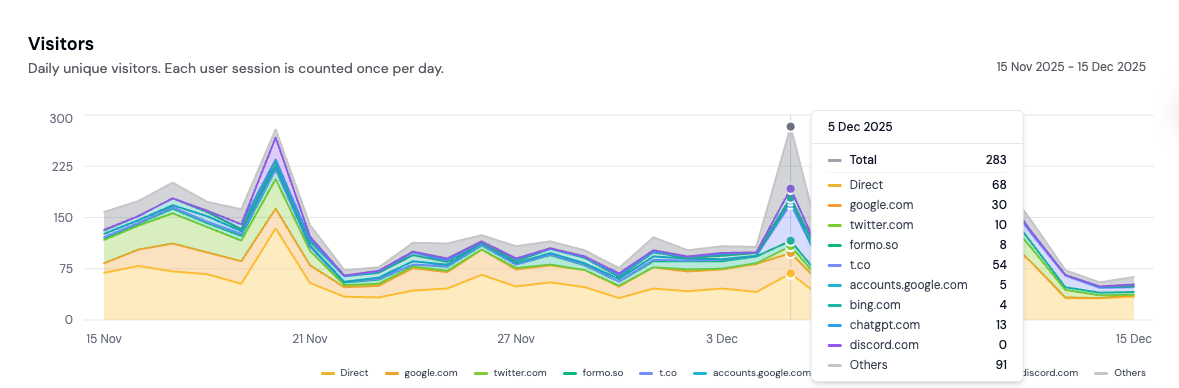
These are the core metrics on your project's Overview page in the Formo dashboard: how many people show up, how many connect a wallet, and how much they transact, spend, and earn you.
## Visitors
Unique visitors interacting with your site or app over the selected period. See [Visitors](/data/metrics#visitors) for exactly how this is counted.
## Page views
How many times a page has been viewed across your site or app. See [Pages](#pages) below for a breakdown by URL.
## Wallets
Unique wallet addresses that connected during the selected period. See [Wallets](/data/metrics#wallets) for details.
## Transactions
How many onchain transactions were made across your site or app.
## Sessions
A session groups the actions a visitor takes in one visit. See [Sessions](/data/metrics#sessions) for how Formo counts them.
## Session duration
See the average session duration of visitors and users on your app. Understand how long users spend engaging with your product.
## Bounce rate
Track your bounce rate to understand how many visitors leave after viewing only one page. A high bounce rate may indicate issues with your landing page or user experience.
## Volume
Total transaction volume (USD) tracked through your [custom events](/features/product-analytics/custom-events#step-3-track-with-volume-revenue-or-points), like the dollar value of a swap.
## Revenue
Total revenue (USD) tracked through your [custom events](/features/product-analytics/custom-events#step-3-track-with-volume-revenue-or-points), like a protocol fee.
 ## Breakdowns
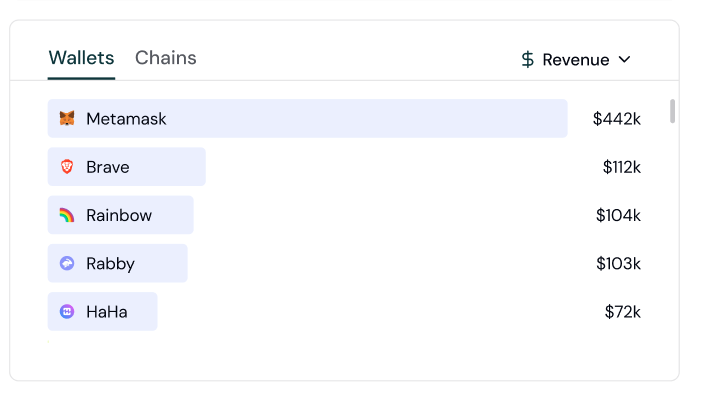
Break down visitors, page views, wallets, transactions, sessions, volume, or revenue by acquisition channel, referrer, referral, ad network, UTM parameter, device, browser, OS, or country, plus onchain builder codes for wallets, transactions, volume, and revenue. Session duration and bounce rate are not breakdown-eligible. Click any item in a breakdown to drill down into the [users](/features/wallet-intelligence/overview) behind it.
## Breakdowns
Break down visitors, page views, wallets, transactions, sessions, volume, or revenue by acquisition channel, referrer, referral, ad network, UTM parameter, device, browser, OS, or country, plus onchain builder codes for wallets, transactions, volume, and revenue. Session duration and bounce rate are not breakdown-eligible. Click any item in a breakdown to drill down into the [users](/features/wallet-intelligence/overview) behind it.
 ## Pages
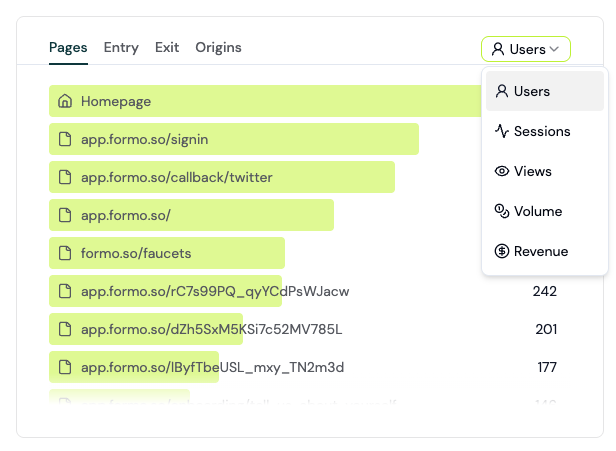
See the top pages, entry pages, exit pages, and origins that your users are visiting. See which pages are driving the most traffic and conversions.
## Pages
See the top pages, entry pages, exit pages, and origins that your users are visiting. See which pages are driving the most traffic and conversions.
 ### Entry, exit, and origin pages
* **Entry pages** are the first pages visitors land on when they come to your website. Think of them as digital front doors where your user's journey begins.
* **Exit pages** are the last pages users view before leaving your site. They represent the end of a visitor's session, whether it's after completing a goal or bouncing before engaging further.
* **Origins** groups traffic by the full page origin (protocol and domain), useful if your app spans multiple subdomains or environments.
Understanding these gives you a clear window into how people interact with your site and where you might be losing them.
## Channels
Formo automatically classifies every session into one of 13 acquisition channels using a priority-ordered ladder over the referrer domain, `utm_medium`, and 8 ad-platform click IDs (`gclid`, `gad_source`, `fbclid`, `msclkid`, `ttclid`, `twclid`, `li_fat_id`, `rdt_cid`). Classification happens at ingestion time.
See [Channels](/data/metrics#channels) for the full priority list and detection rules.
### Entry, exit, and origin pages
* **Entry pages** are the first pages visitors land on when they come to your website. Think of them as digital front doors where your user's journey begins.
* **Exit pages** are the last pages users view before leaving your site. They represent the end of a visitor's session, whether it's after completing a goal or bouncing before engaging further.
* **Origins** groups traffic by the full page origin (protocol and domain), useful if your app spans multiple subdomains or environments.
Understanding these gives you a clear window into how people interact with your site and where you might be losing them.
## Channels
Formo automatically classifies every session into one of 13 acquisition channels using a priority-ordered ladder over the referrer domain, `utm_medium`, and 8 ad-platform click IDs (`gclid`, `gad_source`, `fbclid`, `msclkid`, `ttclid`, `twclid`, `li_fat_id`, `rdt_cid`). Classification happens at ingestion time.
See [Channels](/data/metrics#channels) for the full priority list and detection rules.
 ## Referrers
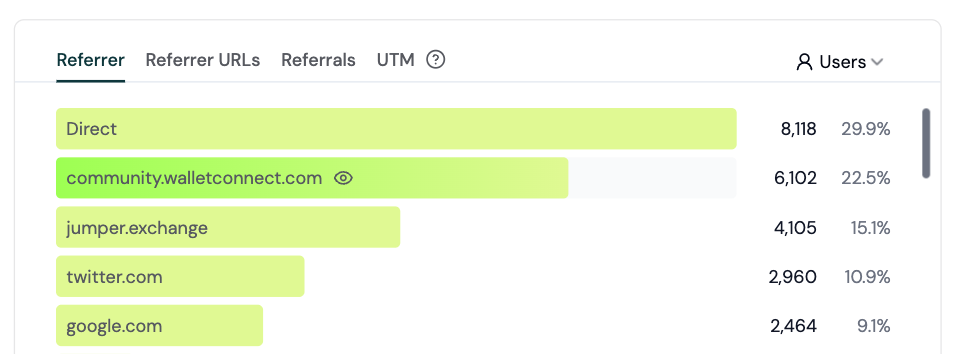
See what's moving the needle with a breakdown of your metrics by referrer. Easily understand where your onchain users come from and how they find you. See [Referrers](/data/metrics#referrers) for details.
Getting the specific referrer URL (not just the domain) requires the right `Referrer-Policy` header on your site. See [Referrer URL tracking](/sdks/web#referrer-url-tracking) for how to configure it.
## Ad attribution
Formo captures ad-platform click IDs automatically and attributes paid sessions, users, conversions, volume, and revenue to the acquiring network. See [Ad attribution](/features/attribution/ads) for supported platforms, attribution behavior, dashboard surfaces, and API access.
## Builder codes
For wallets, transactions, volume, and revenue, Formo defaults to breaking down by [builder codes](/data/events/transaction#builder-codes), an onchain attribution standard (ERC-8021) that lets apps identify themselves directly in transaction calldata.
## UTM
The Formo SDK automatically adds the following UTM parameters present on the page to events fired from that page load:
* utm\_source
* utm\_campaign
* utm\_medium
* utm\_term
* utm\_content
Break down any metric by UTM source, medium, campaign, content, or term. See [UTM parameters](/data/metrics#utm-parameters) for details, and use Formo's [UTM Generator](https://formo.so/utm-generator) to generate your marketing links.
## Referrals
See how many users arrive through a referral link, tracked via the `ref` query parameter (or `utm_medium=affiliate`/`referral`). See [Referrals](/data/metrics#referrals) for details.
The Web SDK autodetects `ref`, `referral`, `refcode`, `af`, and `referrer`. You can also configure custom query parameter names or extract a code from a URL path such as `/referral/alice`; see [Web SDK referrals](/sdks/web#referrals).
## Mobile attribution
The React Native SDK captures UTM parameters and referral codes from deep and universal links. On Android, it can also read the Google Play Install Referrer on first launch to connect a website or campaign to an app install. Deep-link attribution works on iOS, but Apple does not expose an install-referrer API. See [Deep link attribution](/sdks/mobile#deep-link-attribution) and [Web-to-mobile attribution](/sdks/mobile#web-to-mobile-attribution).
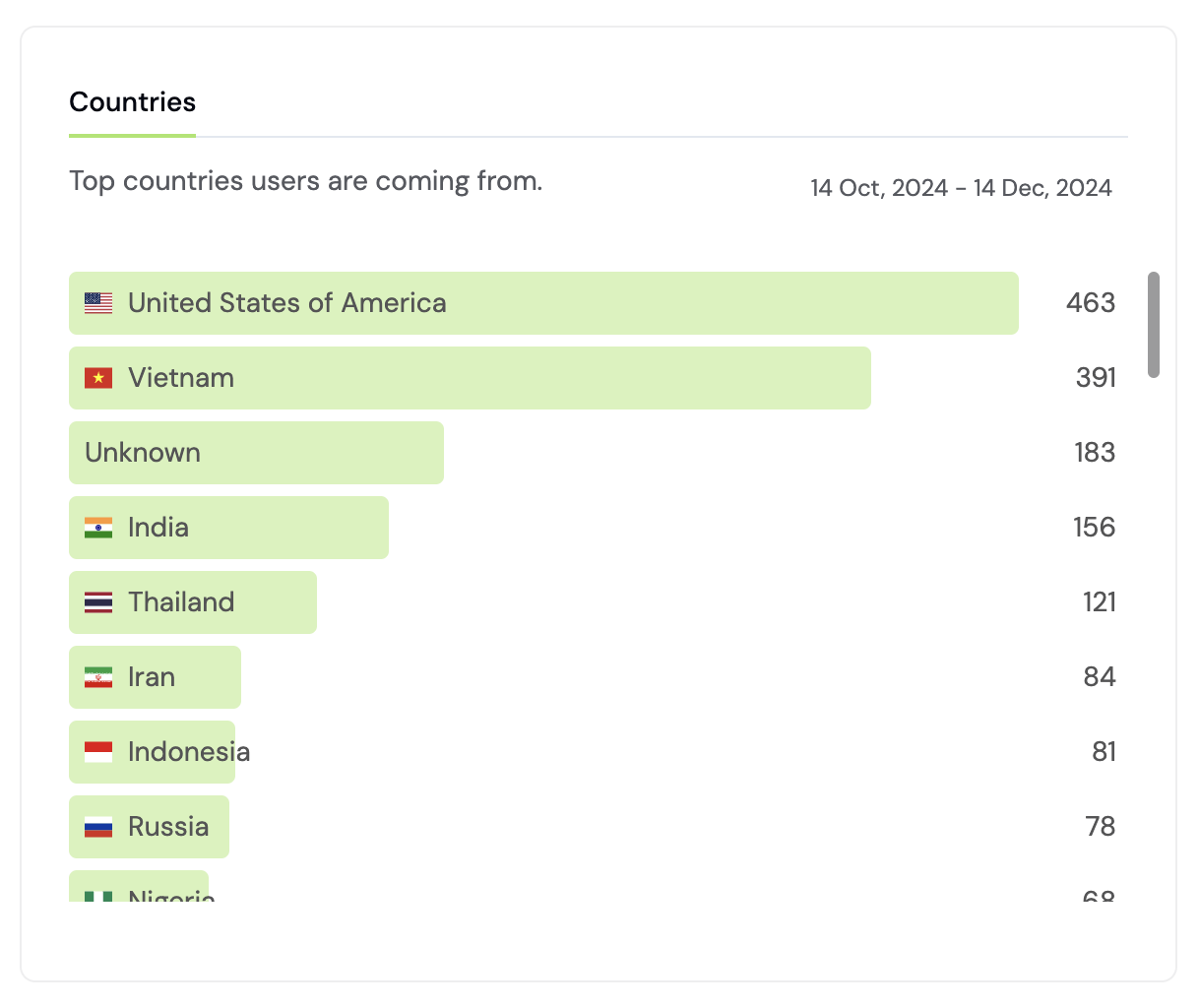
## Countries
See where your users are coming from by country.
## Referrers
See what's moving the needle with a breakdown of your metrics by referrer. Easily understand where your onchain users come from and how they find you. See [Referrers](/data/metrics#referrers) for details.
Getting the specific referrer URL (not just the domain) requires the right `Referrer-Policy` header on your site. See [Referrer URL tracking](/sdks/web#referrer-url-tracking) for how to configure it.
## Ad attribution
Formo captures ad-platform click IDs automatically and attributes paid sessions, users, conversions, volume, and revenue to the acquiring network. See [Ad attribution](/features/attribution/ads) for supported platforms, attribution behavior, dashboard surfaces, and API access.
## Builder codes
For wallets, transactions, volume, and revenue, Formo defaults to breaking down by [builder codes](/data/events/transaction#builder-codes), an onchain attribution standard (ERC-8021) that lets apps identify themselves directly in transaction calldata.
## UTM
The Formo SDK automatically adds the following UTM parameters present on the page to events fired from that page load:
* utm\_source
* utm\_campaign
* utm\_medium
* utm\_term
* utm\_content
Break down any metric by UTM source, medium, campaign, content, or term. See [UTM parameters](/data/metrics#utm-parameters) for details, and use Formo's [UTM Generator](https://formo.so/utm-generator) to generate your marketing links.
## Referrals
See how many users arrive through a referral link, tracked via the `ref` query parameter (or `utm_medium=affiliate`/`referral`). See [Referrals](/data/metrics#referrals) for details.
The Web SDK autodetects `ref`, `referral`, `refcode`, `af`, and `referrer`. You can also configure custom query parameter names or extract a code from a URL path such as `/referral/alice`; see [Web SDK referrals](/sdks/web#referrals).
## Mobile attribution
The React Native SDK captures UTM parameters and referral codes from deep and universal links. On Android, it can also read the Google Play Install Referrer on first launch to connect a website or campaign to an app install. Deep-link attribution works on iOS, but Apple does not expose an install-referrer API. See [Deep link attribution](/sdks/mobile#deep-link-attribution) and [Web-to-mobile attribution](/sdks/mobile#web-to-mobile-attribution).
## Countries
See where your users are coming from by country.
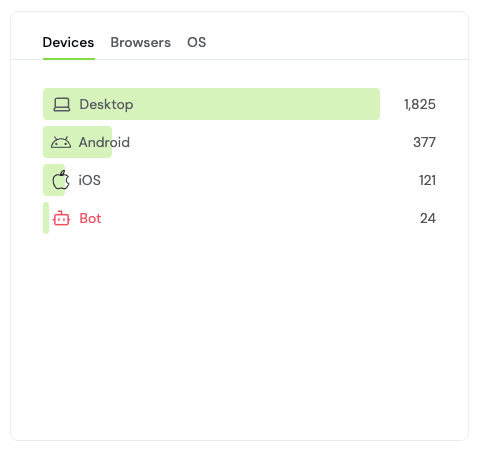
 ## Devices
 ## Browsers
See the breakdown of browsers your users are on, in the same view as [Devices](#devices), just switch tabs.
## OS
See the breakdown of operating systems your users are on, in the same view as [Devices](#devices), just switch tabs.
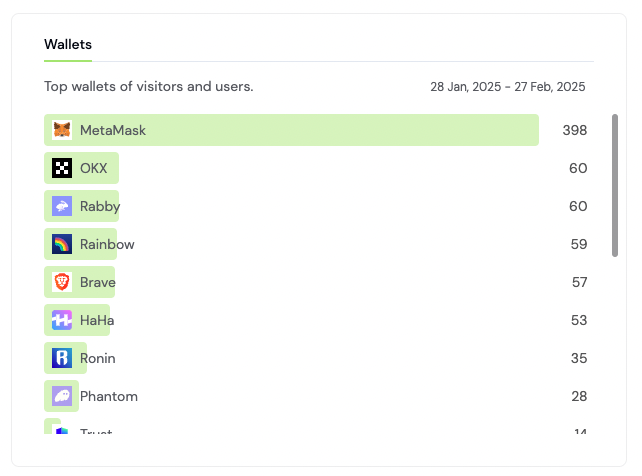
## Wallet
See the top wallet providers (MetaMask, Coinbase Wallet, Phantom, etc.) your users connect with. See [Wallet Type](/data/metrics#wallet-type) for details.
## Browsers
See the breakdown of browsers your users are on, in the same view as [Devices](#devices), just switch tabs.
## OS
See the breakdown of operating systems your users are on, in the same view as [Devices](#devices), just switch tabs.
## Wallet
See the top wallet providers (MetaMask, Coinbase Wallet, Phantom, etc.) your users connect with. See [Wallet Type](/data/metrics#wallet-type) for details.
 ## Chains
See the top chains your wallets and transactions are active on. Formo supports Ethereum and all major EVM chains, plus Solana. See [Chains](/chains/overview) for the full list and feature availability per chain.
***
For a complete walkthrough of analyzing referrers, referral codes, ads, UTM campaigns, mobile links, and builder codes, comparing attribution models, and optimizing acquisition spend, see [How to Set Up Attribution](/guides/onchain-attribution).
## Chains
See the top chains your wallets and transactions are active on. Formo supports Ethereum and all major EVM chains, plus Solana. See [Chains](/chains/overview) for the full list and feature availability per chain.
***
For a complete walkthrough of analyzing referrers, referral codes, ads, UTM campaigns, mobile links, and builder codes, comparing attribution models, and optimizing acquisition spend, see [How to Set Up Attribution](/guides/onchain-attribution).